Content Generation Settings
Region, search area, Knowledge Base, key takeaways, YouTube videos, image style and blocked domains.
Writing 1 min readUpdated 2026-10-20
Content Generation Settings control how every article is researched and written. Open them with the settings icon next to the language selector in the writing box on Home. Changes are saved right away and apply to your next articles.
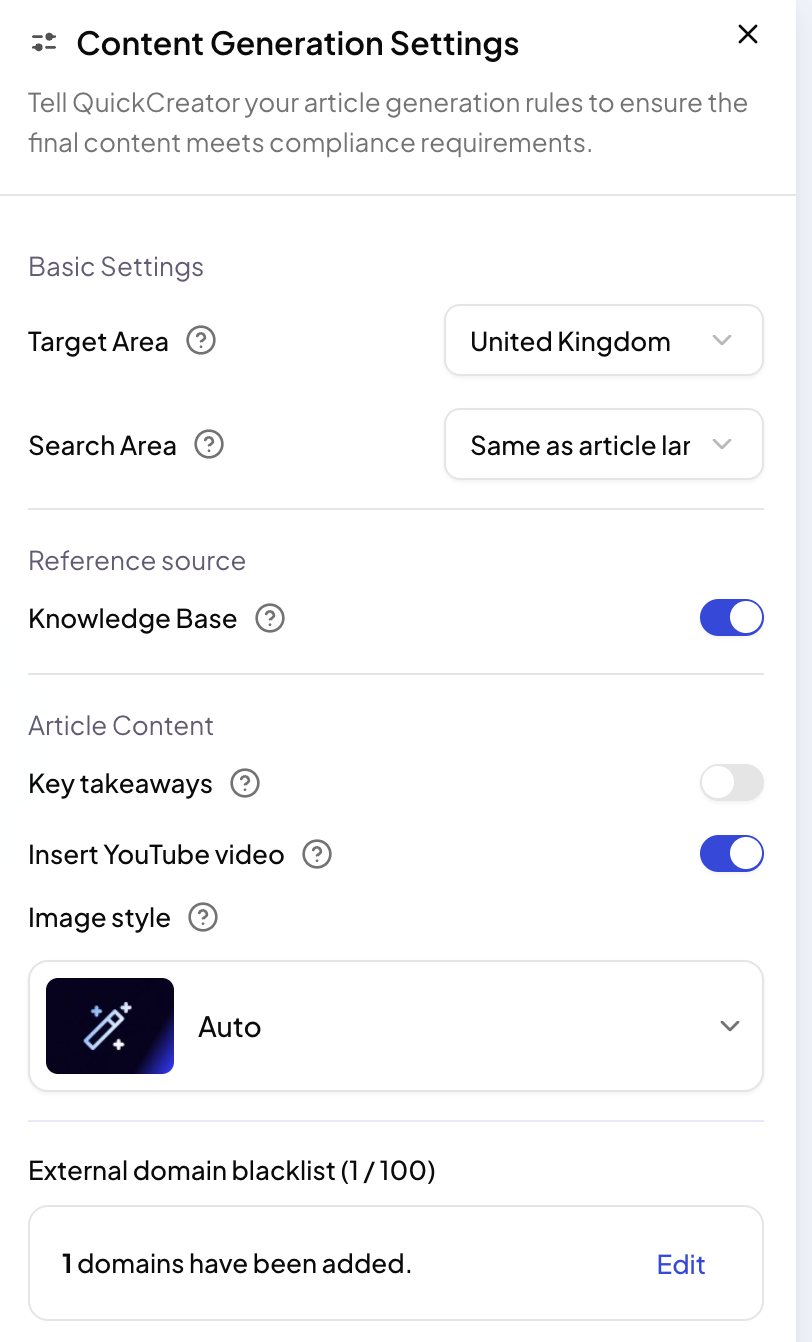
Basic settings
- Target Area: the market the article is written for, so details and examples fit that region.
- Search Area: where research looks for sources. Same as article language searches in the article's language; Global search looks more widely.
Reference source
- Knowledge Base: when on, the research agent also uses your Knowledge Base for product facts.
Article content
- Key takeaways: adds a short summary of the main points.
- Insert YouTube video: adds a relevant YouTube video to the article.
- Image style: the style of generated images. Auto lets QuickCreator choose.
External domain blacklist
Add domains you never want linked from your articles, such as competitors. Enter the domain only; paths and protocols are ignored.
Related articles
- Write a blog postGive QuickCreator a topic, check a few settings, and get a researched, SEO-ready draft.
- What happens while an article is writtenThe steps QuickCreator's agents take, and how to read the cards you see during a run.
- Write in other languagesChoose from 36 article languages, and match the region and research sources to your market.