Connect WordPress
Install the Quickcreator Agent plugin and publish articles to your WordPress site in one click.
Publishing 1 min readUpdated 2026-10-20
Before you start
- Admin access to your WordPress site, to install a plugin
- WordPress 6.0 or later and PHP 7.4 or later
Install the plugin
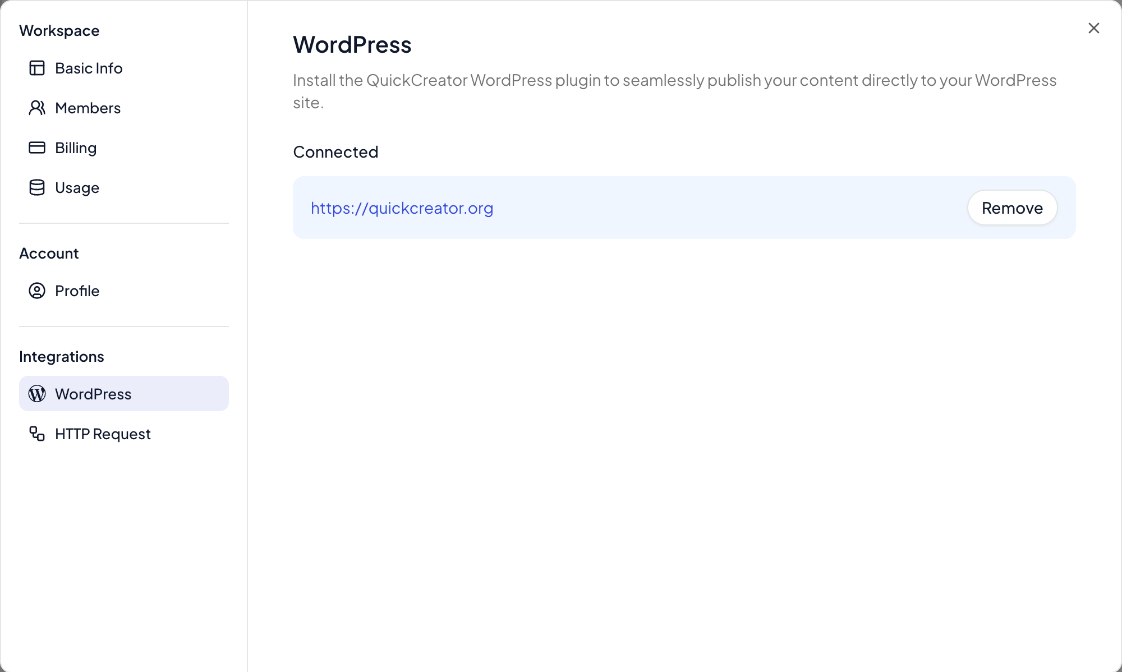
- In QuickCreator, click your name at the bottom of the sidebar, then Settings → WordPress. If no site is connected yet, click Install QuickCreator Plugin; it opens the Quickcreator Agent plugin on WordPress.org.
- In your WordPress admin, install and activate Quickcreator Agent. It needs WordPress 6.0 or later and PHP 7.4 or later.
- Open the plugin's settings page in WordPress and follow the steps to connect your QuickCreator account. When asked, allow QuickCreator to access the plugin on your site.
Your site then appears under Connected on the WordPress page in QuickCreator. To disconnect it, click Remove.
Publish to WordPress
- In the editor, open Publish Settings and click Change next to Publish to.
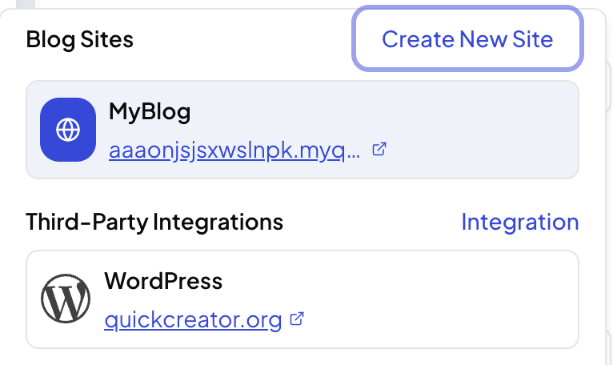
- Under Third-Party Integrations, choose your WordPress site.
- Fill in the WordPress options, such as author, categories, tags, post type and publish status, and click Publish.
If it can't load your WordPress site
If you see An error occurred while retrieving WordPress information. Please check whether the authorization is valid., the connection has expired or the plugin is inactive. Check that the plugin is active, then connect it again from the plugin's settings page.
Related articles
- Create a hosted blog siteLaunch a blog that QuickCreator hosts, pick a theme, and manage its settings.
- Connect your own domainPut your hosted blog on a subdomain like blog.yourcompany.com, or in a folder like yourcompany.com/blog.
- Blog SEO settings and categoriesSet your blog's homepage title, description, structured data and canonical URL, and group posts into categories.
- Publish to your own system with an HTTP requestSend finished articles to any CMS or app through an HTTPS endpoint you control.