Read your Quality Analysis
What the rating, the E-E-A-T radar and the notes mean, and when to reanalyze.
Every article QuickCreator writes gets a page-quality rating, modeled on Google's Search Quality Rater Guidelines. Open Quality Analysis on the right side of the editor to see it.
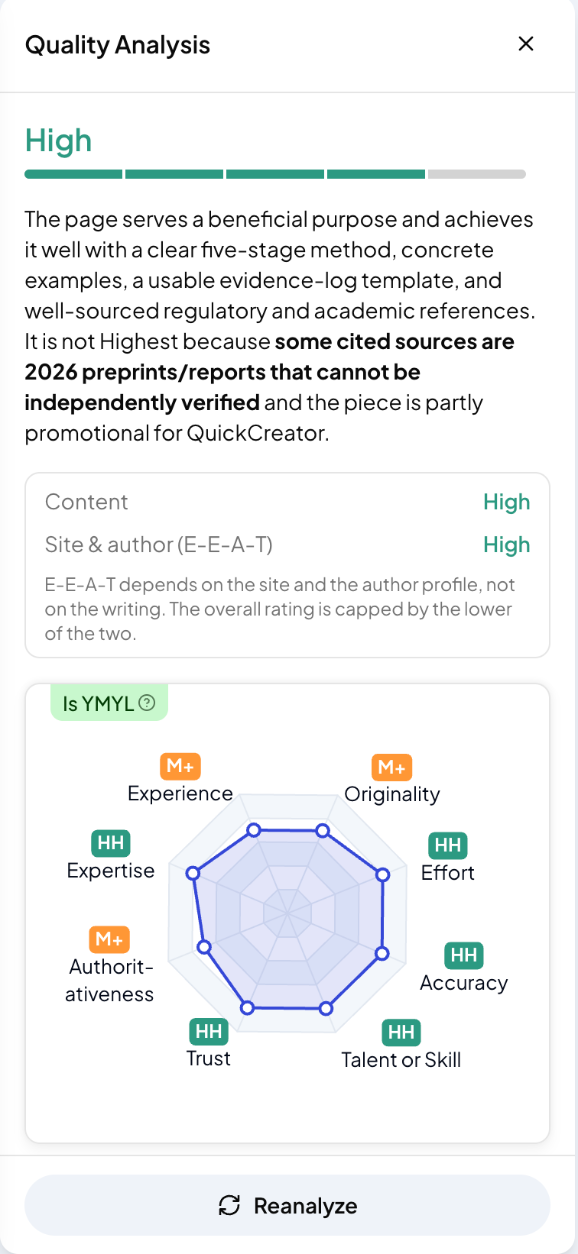
The rating
The top line is the overall rating, from Lowest to Highest, with a short note on why. It is the lower of two ratings:
- Content: the article itself
- Site & author (E-E-A-T): who publishes it. This depends on your site and author profile, not on the writing.
The radar
Eight dimensions, each rated:
- Experience, Expertise, Authoritativeness, Trust (E-E-A-T)
- Originality, Effort, Accuracy, Talent or Skill (main content quality)
Is YMYL shows whether the topic is "Your Money or Your Life", such as health, finance or legal topics, where the bar is higher.
The notes
Scroll down for a note on each dimension. The bold parts point to what holds the rating back, for example a source that can't be verified or a section that reads as promotional.
Improve and reanalyze
- Fix what the notes point to, by hand or with the Assistant.
- Click Reanalyze to rate the new version.
Ratings vary a little between runs of the same text, so compare overall levels rather than single steps.
Related articles
- Edit an articleFind your articles, edit them in the editor, insert blocks, preview and export.
- Use the AI assistant and Quick EditAsk the assistant to change your article, or pick a ready-made edit from Quick Edit.
- Review links in Page AssetsSee every link in an article, edit where it points, or remove it.
- Import an article or start a blank postBring in an article you already have, or write one yourself in the editor.