If you’re on a small marketing team, you’ve felt the squeeze: more channels, more content, more reporting—same headcount.
AI agents promise relief, but the term is already overloaded. This guide gives you a clean mental model for what AI agents are, why multi-agent systems are different from “one big AI,” and what a reliable agent workflow looks like in a real marketing operation.
What you’ll be able to do after reading
By the end, you’ll be able to:
Explain what an AI agent is (without confusing it with a chatbot or automation)
Describe single-agent vs multi-agent workflows in plain language
Sketch a basic multi-agent content workflow (with clear handoffs)
Spot the failure modes (and the guardrails that prevent them)
What is an AI agent (and what it isn’t)
An AI agent is a goal-driven system that can decide what to do next and take actions (usually through tools like APIs) to complete a task.
That sounds abstract—so here’s the practical way to separate three things that often get lumped together:
Automation workflows: deterministic “if this happens, do that.” Great for repeatable processes.
Chatbots / copilots: conversational assistants that suggest or answer; you stay in the driver’s seat.
AI agents: can own a goal and execute multi-step work (with guardrails).
Tray.ai’s breakdown of agents vs copilots vs chatbots is a useful framing because it anchors on autonomy and capability, not buzzwords (Tray.ai, “Agent vs copilot vs chatbot,” 2025).
AI agents for marketing: single-agent vs multi-agent systems
A single-agent setup is one “do-it-all” agent that plans, researches, drafts, and optimizes.
A multi-agent system (MAS) is a team of specialized agents that coordinate toward the same outcome.
IBM defines a multi-agent system as multiple AI agents working collectively to perform tasks and produce global outcomes (IBM, “What is a multi-agent system?”). Zapier’s practical guide adds an important implementation detail: MAS works best when agents share context and handoffs are explicit (Zapier, “Multi-agent systems: a complete guide,” 2026).
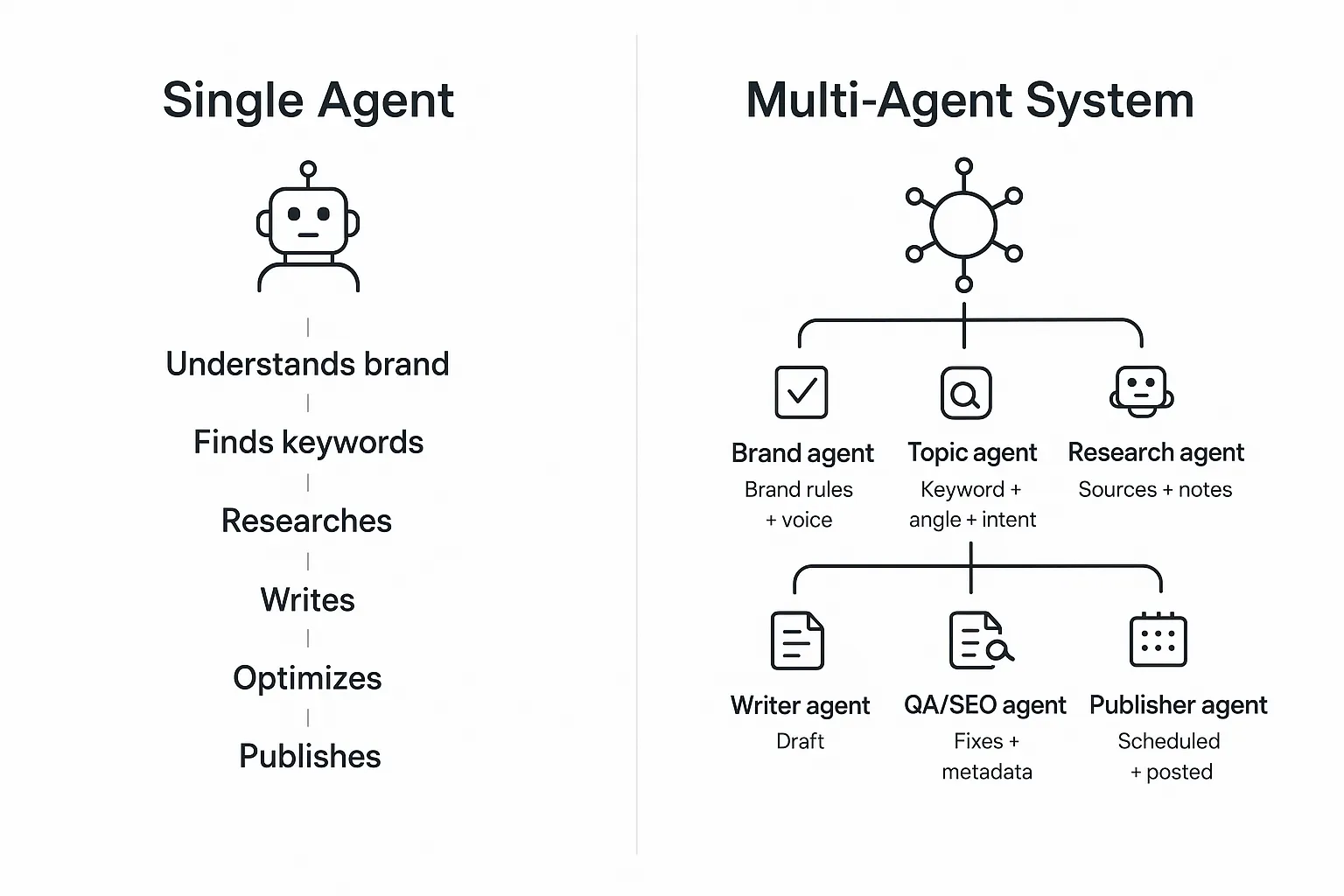
Two diagrams: same goal, different architecture
Single agent:
Goal: Publish a blog post

[ One agent ]
   |-- understands brand
   |-- finds keywords
   |-- researches
   |-- writes
   |-- optimizes
   |-- publishes
Multi-agent system:
Goal: Publish a blog post

[Orchestrator]
   |
   +--> [Brand agent] -------> brand rules + voice
   +--> [Topic agent] -------> keyword + angle + intent
   +--> [Research agent] ----> sources + notes
   +--> [Writer agent] ------> draft
   +--> [QA/SEO agent] ------> fixes + metadata
   +--> [Publisher agent] ---> scheduled + posted
When a single agent is enough
Use a single agent when:
The task is narrow and repeatable (e.g., “Summarize these notes,” “Draft a LinkedIn post from this outline”)
You need speed-to-launch and lower cost
You want simpler debugging (one prompt chain, one output)
Microsoft’s architecture guidance is blunt: start with a single-agent prototype unless boundaries (like security/compliance), organizational separation, or growth demands multiple agents (see Microsoft Azure Cloud Adoption Framework, “Single agent vs multiple agents,” 2025).
When multi-agent systems start to win
Multi-agent setups become worth it when you need:
Specialization (brand governance is different work than research)
Parallelism (research and outline can run while brand rules are being compiled)
Clear checkpoints (e.g., brand review before draft, QA before publish)
Modularity (swap one agent without rewriting everything)
For scaling SMB teams, the biggest value is often not raw speed—it’s consistency under pressure.
How multi-agent systems work: the moving parts
Most marketing-oriented multi-agent systems (and broader agentic workflows) boil down to five “moving parts.” If you understand these, you can evaluate any platform or internal build.
1) Roles (what each agent owns)
Agents need narrow job descriptions.
Good roles are defined by outputs, not vibes:
Brand agent → “Brand voice rules + do/don’t list + example phrases”
Research agent → “Source list + claims supported + citations”
Writer agent → “Draft in Markdown + section structure”
2) Shared context (what everyone reads)
Without a shared source of truth, agents disagree quietly.
The minimum shared context for a marketing content workflow is:
Brand voice rules
Product facts (or a knowledge base)
The approved topic angle + target keyword
The “definition of done” (length, format, audience)
3) Handoffs (what gets passed between agents)
Handoffs are where most systems break.
A good handoff is a compact artifact:
Draft handoff package
- Title + target keyword
- Outline (H2/H3)
- Source-to-claim map (what each citation supports)
- Brand constraints (banned phrases, required terms)
- CTA rule (TOFU: low commitment)
4) Tools (how agents act, not just write)
If an “agent” only generates text, you have a smart template.
Real agents tend to:
Pull data from analytics / CRM
Read docs and knowledge bases
Create drafts and push them into a CMS
Create tasks and route them for review
5) Checkpoints (where humans or QA gate the workflow)
For marketing, human-in-the-loop isn’t optional. It’s your brand safety net.
The right checkpoints depend on risk:
Low risk: publish social drafts after quick review
Medium risk: brand + factual QA before publishing
High risk (regulated, legal, medical): strict approvals + citation requirements
Example: a coordinated content pipeline (with realistic outputs)
Here’s a simple end-to-end workflow that mirrors how many teams actually want content to ship.
(1) Brand rules
    Input: brand docs, previous posts
    Output: voice + messaging guardrails

(2) Topic selection
    Input: ICP + search intent
    Output: angle + outline + keywords

(3) Research
    Input: outline + questions
    Output: sources + claim map + notes

(4) Drafting
    Input: brand rules + sources
    Output: draft + suggested visuals

(5) Optimization
    Input: draft + SERP intent
    Output: headline options + on-page SEO + metadata

(6) Distribution
    Input: final draft
    Output: scheduled publish + repurposed snippets
If you want a concrete, marketing-focused reference point, QuickCreator describes its product as a coordinated AI agent pipeline for the content lifecycle—where “agents propose, you decide,” and humans approve, edit, or redirect at each stage.
The trade-offs: where multi-agent systems fail in the real world
Multi-agent systems don’t fail because the models are “dumb.” They fail because coordination is hard.
Common failure modes you’ll see in marketing workflows:
Context drift: one agent updates assumptions; others keep working from old context.
Error propagation: a bad assumption in research becomes “truth” in the draft.
Over-automation: the system ships content faster than you can review it.
Debugging pain: when something is wrong, you can’t tell which agent introduced the problem.
⚠️ Warning: The more handoffs you add, the more you need explicit artifacts (briefs, claim maps, approvals). Otherwise mistakes look “polished” and slip through.
Guardrails that make multi-agent workflows reliable
If you take nothing else from this guide, take these four guardrails.
Guardrail 1: Narrow scopes + clear outputs
Each agent should have one job and a clear output format.
If your “research agent” also rewrites the outline and drafts copy, you’ve blurred accountability.
Guardrail 2: Grounding (sources or knowledge base)
Require the research agent to attach sources to claims.
If you’re using product info, ground it in a private knowledge base—not whatever the model “remembers.”
Guardrail 3: Human checkpoints
Put human review where brand risk is highest:
Brand guardrails before drafting
Factual QA before publishing
Guardrail 4: Keep a shared source of truth
Even a simple shared document works:
one brief
one approved outline
one claim map
Without it, a multi-agent system becomes “multiple opinions,” not coordinated execution.
Next steps (if you want to try this without over-engineering)
Start with a single workflow and add agents only where you keep dropping the ball:
Add a brand guardrails step (even if it’s just a checklist)
Add a research + claim map step before drafting
Add a QA step before you hit publish
If you want to see what a coordinated pipeline can look like, you can explore QuickCreator as one example of a system designed around specialized agents and human-in-the-loop control.