Free Robots.txt Generator
Generate a standards-compliant robots.txt in seconds — one-click templates for WordPress, Shopify, Blogger and Wix, plus full control over 23 search and AI crawlers.
How to Generate a robots.txt File in 3 Steps
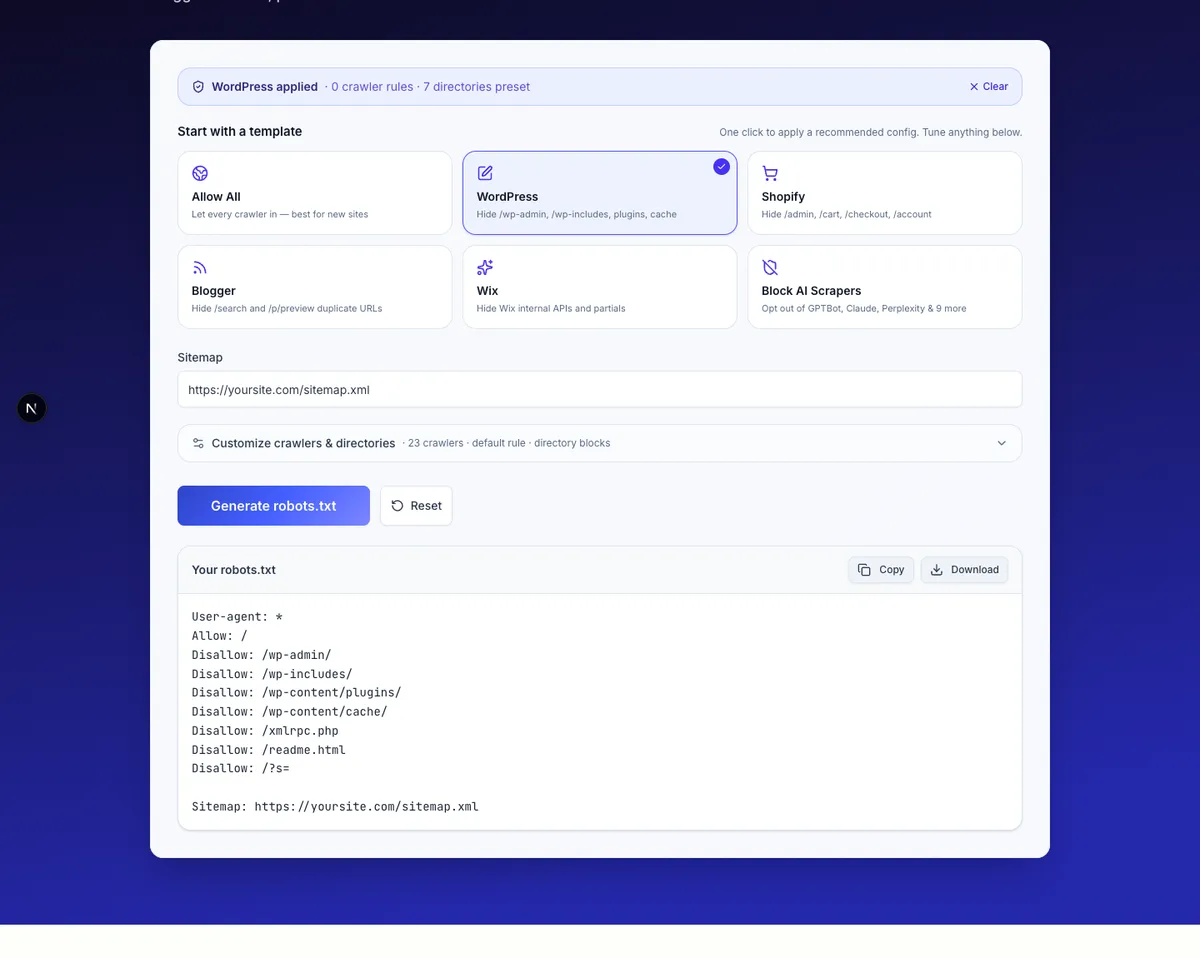
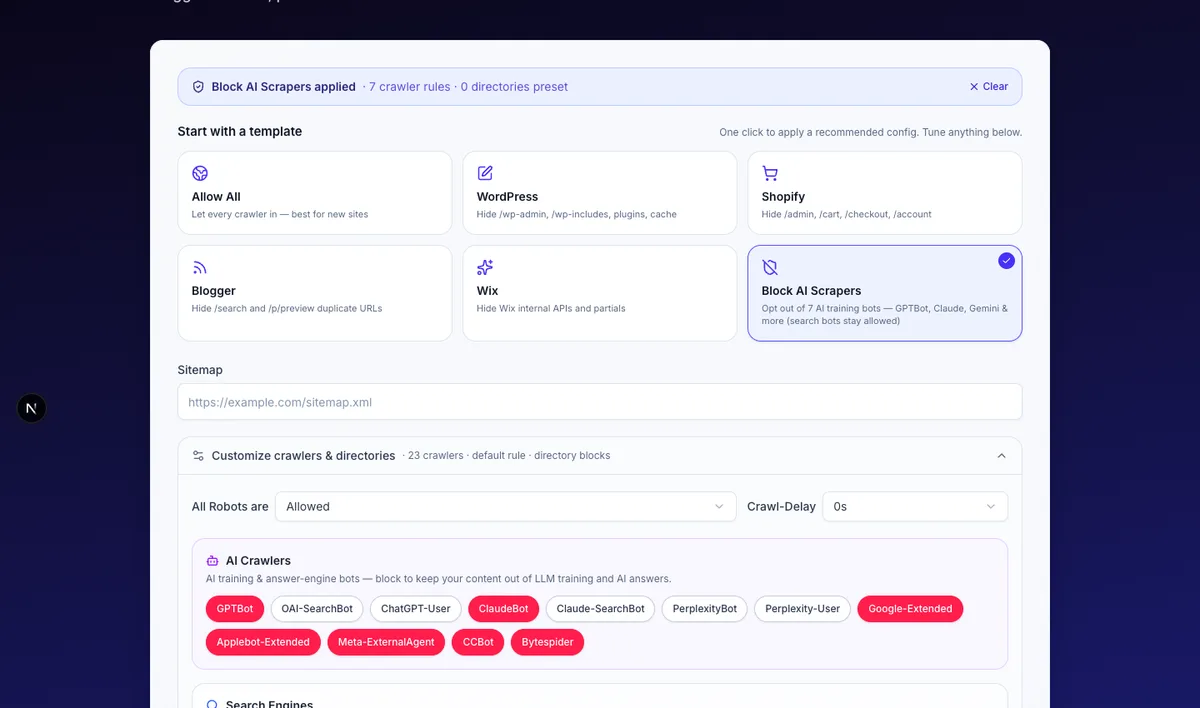
- Pick a template (optional but recommended). Click WordPress, Shopify, Blogger, Wix, Allow All, or Block AI Scrapers to load a battle-tested config. You can still fine-tune anything afterwards.
- Adjust crawlers and directories. Open Customize to allow or block specific bots across three groups — Search Engines, AI Crawlers, Regional Engines — and add any directory paths you want kept out of search results (e.g.
/admin,/private). - Click Generate robots.txt. Copy the output or download it as
robots.txt, then upload it to your site root (https://yoursite.com/robots.txt).
No signup, no credit card, no daily limit.
What Is robots.txt and Why Every Site Needs One in 2026
robots.txt is a plain-text file at the root of your domain that tells automated crawlers which parts of your site they're allowed to fetch. It uses a tiny set of directives — User-agent, Allow, Disallow, Crawl-delay, Sitemap — and every well-behaved crawler reads it before doing anything else.
A correctly configured robots.txt does three jobs at once:
- Tells search engines what to crawl — Googlebot, Bingbot, DuckDuckBot, YandexBot and the rest read it on every visit. A missing or broken file can quietly cost you rankings.
- Points crawlers to your Sitemap — adding a single
Sitemap:line at the end is the cheapest discoverability win for new pages. - Gives you control over AI crawlers, on whichever side you want. OpenAI's
GPTBot, Anthropic'sClaudeBot, Google'sGoogle-Extended, Apple'sApplebot-Extended, Meta'sMeta-ExternalAgentand others all honorrobots.txt. Block them to keep your content out of LLM training, or leave them on to let your content surface in ChatGPT, Claude and Perplexity answers — most publishers do a mix of both, and the AI Crawlers group in the tool above lets you set each one explicitly.
Two more things worth knowing:
robots.txtis a request, not a wall. Reputable crawlers honor it. Malicious scrapers ignore it entirely. For private data, use authentication, notrobots.txt.- Blocking in
robots.txtis not the same as blocking from search results. ADisallowrule stops Google from crawling a page — but if the URL is linked from elsewhere, it can still appear in search with no snippet. Use thenoindexmeta tag (or HTTP header) when you want a page fully out of the index.
The Complete 2026 Crawler List (Search Engines + AI Bots)
The generator above covers 23 crawlers grouped into three categories. Here's what each does and when you'd block it.
Search Engines
- Googlebot — Google's main web crawler. Block only on staging or dev sites.
- Googlebot-Image — Indexes images for Google Images. Block if you don't want your images discoverable.
- Googlebot-Mobile — Legacy mobile crawler; Google has consolidated mobile crawling into Googlebot, but the token is still respected.
- bingbot — Microsoft Bing's crawler, also powers Yahoo and DuckDuckGo for many queries.
- DuckDuckBot — DuckDuckGo's own crawler.
- Slurp — Yahoo's residual crawler.
- YandexBot — Russia's largest search engine; relevant if you serve RU/CIS traffic.
AI Crawlers — train vs cite, your choice
- GPTBot — OpenAI's training crawler. Block if you don't want your content used to train future GPT models.
- OAI-SearchBot — Powers ChatGPT Search results. Blocking it removes you from ChatGPT's web answers.
- ChatGPT-User — Fetches pages on demand when a ChatGPT user clicks a citation. Block to be hidden from those previews.
- ClaudeBot — Anthropic's training crawler.
- Claude-SearchBot — Anthropic's search-time fetcher for Claude's web tool.
- PerplexityBot — Indexes content for Perplexity's AI answers.
- Perplexity-User — Fetches pages when a Perplexity user follows a citation.
- Google-Extended — Google's opt-out token for Gemini training and Vertex AI grounding. Independent of Googlebot — blocking it does not affect Google Search ranking.
- Applebot-Extended — Apple's opt-out for Apple Intelligence training. Independent of Applebot.
- Meta-ExternalAgent — Meta's AI crawler for training Llama models.
- CCBot — Common Crawl, the open dataset that nearly every major LLM has been trained on at some point.
- Bytespider — ByteDance's crawler, used for Doubao and other AI products.
Most publishers block AI training bots (GPTBot, ClaudeBot, Google-Extended, Applebot-Extended, Meta-ExternalAgent, CCBot, Bytespider) but allow search-time bots (OAI-SearchBot, Claude-SearchBot, PerplexityBot) — that way your content stays out of training data but can still be cited in AI answers, which drives referral traffic.
Regional Engines
- Baiduspider — Block only if you actively don't want Chinese search traffic.
- Yeti — Naver, the dominant search engine in South Korea.
- Sogou web spider — Secondary Chinese search engine.
- SeznamBot — Seznam, the largest non-Google search engine in Czech Republic.
Common robots.txt Mistakes That Hurt SEO
We see the same five mistakes again and again in audits:
- Disallowing your entire site by accident. A single
Disallow: /underUser-agent: *on production will deindex you within weeks. Always test on staging first. - Blocking CSS or JavaScript directories. Google needs to render your pages the way users see them. Blocking
/wp-content/,/_next/static/, or any directory that contains stylesheets and scripts can break how Google understands your layout and hurt rankings. - Trying to use
robots.txtfor noindex. Google deprecated theNoindex:directive inrobots.txtin 2019. Use thenoindexmeta tag instead. - Forgetting the Sitemap line. Adding
Sitemap: https://yoursite.com/sitemap.xmlat the end of the file is the cheapest discoverability win you'll ever get. - Mixing up
robots.txtblocking with security. If a URL is sensitive, require authentication.robots.txtis publicly readable — listing your/admin/path inDisallowactually advertises where it is.
Use Cases
- Set up a clean robots.txt for a new WordPress, Shopify, Blogger or Wix site. Each CMS template ships with the directories that platform's tooling actually generates — no more copy-paste-from-blog-post guesswork.
- Tell search engines where your Sitemap is. Drop your
https://yoursite.com/sitemap.xmlURL in the Sitemap field — it appends aSitemap:line every reputable crawler reads. - Stop AI scrapers from training on your content — but stay citable in AI answers. Apply the Block AI Scrapers template — it disallows the seven AI training bots (
GPTBot,ClaudeBot,Google-Extended,Applebot-Extended,Meta-ExternalAgent,CCBot,Bytespider) and leaves search-time bots (OAI-SearchBot,Claude-SearchBot,PerplexityBot,ChatGPT-User,Perplexity-User) allowed, so your pages can still be cited in ChatGPT, Claude and Perplexity answers — the industry-standard "out of training data, in AI answers" setup. Want full opt-out? Open Customize and refuse the search-time bots too. - Slow down aggressive crawlers on a small server. Use
Crawl-delay(5s or 10s) for bots that hammer your origin. Note that Googlebot ignoresCrawl-delay— use Google Search Console's crawl rate setting for Google. - Keep staging or dev environments out of the index. On staging subdomains (e.g.
staging.yoursite.com/robots.txt), open Customize and set the default rule to Refused to block every crawler in one line and prevent accidental indexing of pre-production content.
Free Robots.txt Generator vs Other SEO Tools You'll Need
robots.txt is one signal in a stack. Pair this generator with these companion tools on QuickCreator:
- LLMs.txt Generator — Build an
llms.txtfile alongside your robots.txt. The emerging standard for telling AI systems what to read on your site (vs.robots.txtwhich tells them what not to read). - Page SEO Checker — Audit any page for on-page SEO basics — title, meta, headings, canonical, and indexability signals.
- Backlink Checker — See referring domains, anchor text, and link authority — the other half of how Google decides who ranks.
- Dead Link Checker — Find broken links anywhere on a site before crawlers (and users) hit them.
- Domain Age Checker — Vet a domain's age and registration history before chasing it as a link prospect.
- Keyword Density Checker — Make sure your on-page keyword usage stays within natural bounds.
Next: Generate your llms.txt file with the LLMs.txt Generator — it covers the AI side of crawl control that robots.txt alone can't.
FAQs
Where do I put the robots.txt file?
Upload it to the root of your domain so it resolves at https://yoursite.com/robots.txt. It must be at the root — not in a subdirectory. Each subdomain (blog.yoursite.com, shop.yoursite.com) needs its own separate robots.txt.
How do I block ChatGPT, Claude, and Perplexity from training on my content?
Apply the Block AI Scrapers template. By default it blocks the seven AI training bots — GPTBot (OpenAI), ClaudeBot (Anthropic), Google-Extended (Gemini), Applebot-Extended (Apple Intelligence), Meta-ExternalAgent (Llama), CCBot (Common Crawl), and Bytespider (ByteDance) — and leaves the five search-time bots (OAI-SearchBot, ChatGPT-User, Claude-SearchBot, PerplexityBot, Perplexity-User) allowed. That keeps your content out of LLM training data while still letting your pages be cited in ChatGPT Search, Claude's web tool and Perplexity answers — those AI answers are an increasingly real referral channel.
Want a hard opt-out (no training, no AI answers either)? Open Customize after applying the preset and click the five search-time bots until they turn red.
Does Google still honor crawl-delay in 2026?
No. Googlebot has never honored Crawl-delay — Google has its own crawl rate adjustment inside Google Search Console (Settings → Crawl rate). Bing, Yandex, and most other crawlers do honor the directive. So Crawl-delay is still useful, just not for Google.
Is robots.txt legally binding?
No. robots.txt is a voluntary protocol (originally proposed in 1994 and standardized by IETF as RFC 9309 in 2022). Major search engines and reputable AI companies honor it as a matter of policy, but it's not enforced by law. Malicious scrapers ignore it. For pages that must stay private, use authentication or noindex.
What's the difference between robots.txt and the meta robots tag?
robots.txt controls crawling (whether a bot can fetch the page at all). The <meta name="robots"> tag controls indexing (whether the page can appear in search results once crawled). They solve different problems — to truly keep a page out of Google's index, you need noindex, not Disallow. If you Disallow a page in robots.txt, Google can't fetch it to see the noindex tag, which is a common own-goal.
How do I create a robots.txt file for WordPress?
Click the WordPress template above. It pre-fills the directories WordPress core generates — /wp-admin/, /wp-includes/, /wp-content/plugins/, /wp-content/cache/, /xmlrpc.php, /readme.html, and the internal search endpoint (/?s=). After generating, you can either upload robots.txt to your server's web root or use a plugin like Yoast SEO or Rank Math, which both let you edit robots.txt from the WP admin without FTP.
How do I create a custom robots.txt for Blogger?
Click the Blogger template — it pre-fills Disallow: /search (Blogger's site-search endpoint, which duplicates your archive URLs and is the single biggest robots.txt mistake on Blogger) and Disallow: /p/preview/. Then in Blogger's admin go to Settings → Crawlers and indexing → Custom robots.txt, paste the generated file, and switch Enable custom robots.txt to ON. The change takes effect on the next crawl — usually within 24 hours.
What happens if my robots.txt has errors?
Google parses what it can and ignores broken lines silently — which is dangerous, because a malformed rule can mean "no rule" instead of what you intended. Validate your file using Google Search Console's robots.txt report (under Settings → robots.txt) after publishing. If you see status Couldn't fetch or syntax errors, fix and re-test.
Should every website have a robots.txt file?
Yes — even an empty or Allow: / file is better than a missing one. When a crawler requests /robots.txt and gets a 404, some treat that as "everything allowed" but others interpret server-side errors (500-range) as "block everything," which can deindex you. Always serve a deliberate, valid robots.txt.
Looking for a powerful tool to improve your content?
Try QuickCreator to Create professional, unique, and personalized content without hiring, outsourcing, or managing complex workflows.
Other SEO Tools tools you may find helpful
Other free tools






Real SEO & GEO Growth for Small Teams.
Create professional, unique, and personalized content without hiring, outsourcing, or managing complex workflows.