
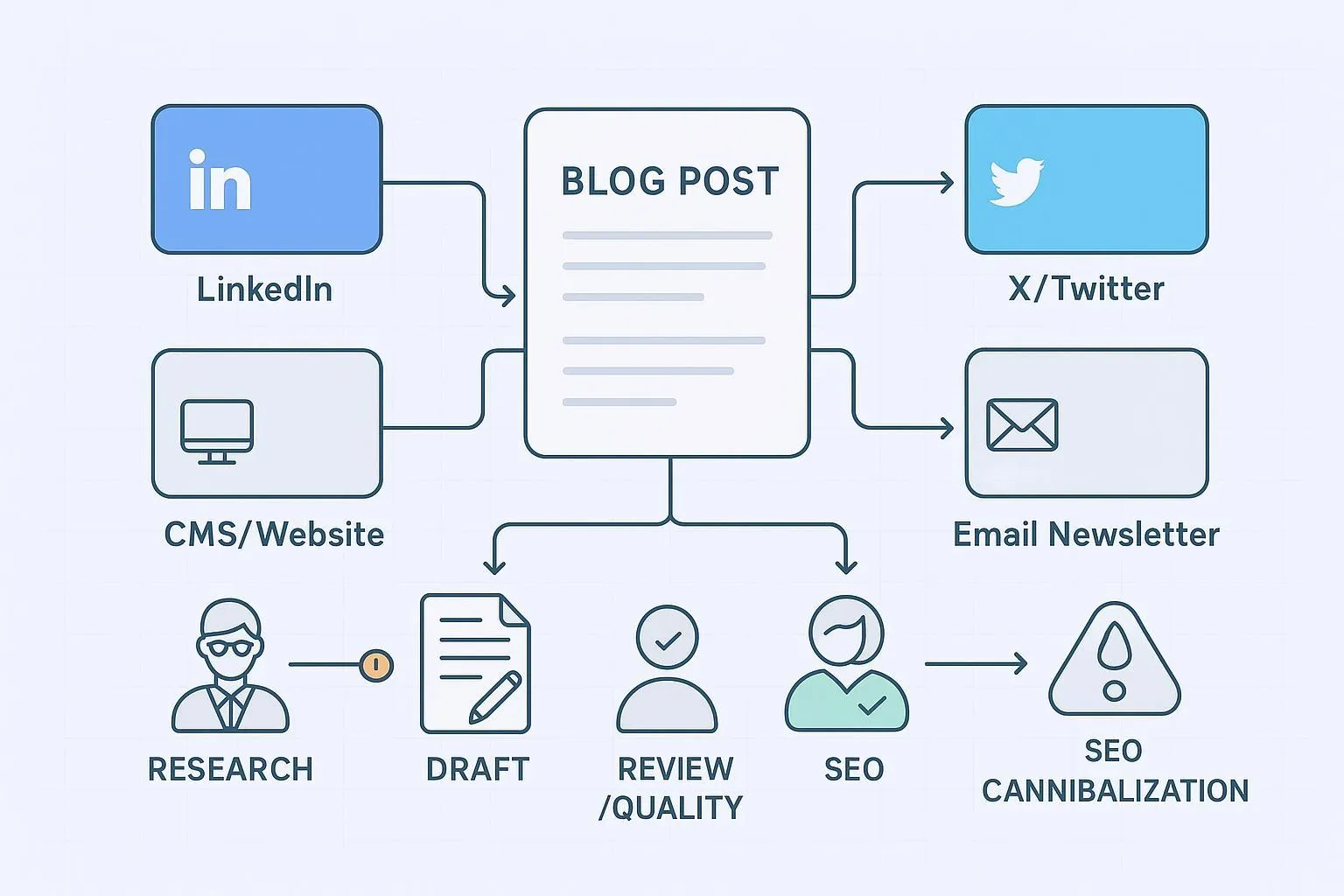
Publishing one great blog post each week is hard. Turning that post into LinkedIn updates, an X thread, a newsletter teaser, and a clean CMS publish—consistently—can feel impossible with a lean team. Here’s the deal: agentic workflows stitch the steps together so work flows, not stalls. In this guide, we’ll show how AI agents for multi-channel marketing automate an end-to-end blog-to-social flywheel, how to prevent and fix SEO cannibalization, and how to measure time-to-publish so you actually see the gains.
Below is the system at a glance—triggers, roles, artifacts, and handoffs you can replicate.

Set up the weekly flywheel with AI agents for multi-channel marketing
What’s the anchor scenario? A weekly SEO blog that becomes multi-channel outputs with a feedback loop. The primary success metric is time-to-publish (cycle time). Below, each stage lists Inputs, Actions, Outputs, and a Validation Gate you can automate or run with quick checks.
- Topic research and brief
Inputs: target_intent, primary_keyword, audience notes, sources/kb_refs, tone_profile_id, due date.
Actions: Research Agent compiles SERP landscape, questions, and outline; flags competing internal URLs.
Outputs: Approved brief with outline, source pack, and success criteria (rank, CTR, or conversion proxy).
Validation gate: Brief approved timestamp captured (start of cycle time).
- Drafting (long-form blog)
Inputs: brief; brand voice guidelines; examples.
Actions: Drafting Agent writes a 1,500–2,000 word post grounded in sources, inserts descriptive links for citations, and prepares alt text for any images.
Outputs: Draft v1 with references, suggested H1/H2s, and snippet candidates for social.
Validation gate: Plagiarism and hallucination screens; reading-level check.
- Brand and quality review
Inputs: draft v1; tone_profile_id; banned terms list.
Actions: Quality Agent compares style and terminology to brand rules; highlights off-brand lines for human edits.
Outputs: Draft v2 with tracked edits and an approval note.
Validation gate: Human-in-the-loop approval with SLA; capture review_in/out timestamps.
- SEO optimization and canonical setup
Inputs: draft v2; keyword focus; internal link map.
Actions: SEO Agent refines titles/meta, ensures one canonical per page, proposes internal links, and prepares schema if applicable.
Outputs: SEO-optimized draft; canonical_url determined; internal link targets.
Validation gate: Confirm canonical target is live, indexable, and not a redirect; self-referencing canonical on the primary URL.
- Derivative assets (social + email)
Inputs: SEO-approved draft; tone and channel constraints.
Actions: Derivative Assets Agent produces 3–5 LinkedIn updates, an X thread outline, and a 70–120 word newsletter teaser; generates or requests images with alt text.
Outputs: Channel-ready copy blocks and visuals.
Validation gate: Character counts, hashtag and mention checks, accessibility review (contrast, alt text).
- Scheduling and publish
Inputs: canonical_url; CMS access; UTM template; asset pack.
Actions: Scheduler/Publisher posts to CMS, queues social updates, and enforces a consistent UTM structure; retries transient failures.
Outputs: Live blog post; scheduled social/email; analytics events queued.
Validation gate: Smoke test links, preview social cards, confirm publish timestamp (end of cycle time if you measure brief_approved → cms_publish).
- Attribution and learning loop
Inputs: analytics data (pageviews, CTR, conversions), rank tracking, social engagement.
Actions: Attribution Agent compares performance to criteria; creates a “next brief” note with wins, gaps, and keyword follow-ups.
Outputs: Learning artifacts and prioritized opportunities for next week.
Validation gate: P90 cycle time and any approval SLA breaches visible on the dashboard.
Practical workflow example — Weekly flywheel (neutral tool reference)
You can map the handoffs in any modern stack. For example, QuickCreator’s pipeline can illustrate how a draft moves through agents without you wiring every piece by hand. See how an AI Writing Agent hands to a Content Quality Agent, then to a Distribution Agent with human approvals in between: QuickCreator.
Minimal payload carried between stages
content_id: UUID
primary_keyword: string
target_intent: enum (informational, commercial, navigational)
tone_profile_id: string (e.g., “B2B crisp”)
kb_refs: [URL]
canonical_url: URL (filled post-SEO stage)
derivative_assets: [object]
schedule_jobs: [object] with channel, slot, asset_id
timestamps: array of stage events
Example timestamp trail
10:32 Brief approved
11:00 Drafting start → 13:30 Drafting complete (attempt_count=1)
13:35 Brand/Quality review in → 14:10 out (approved)
14:15 SEO optimization in → 14:45 out (canonical_url set)
15:00 CMS publish → 15:05 published
15:10 Distribution scheduled (LinkedIn, X, Newsletter)
Before/after content snippets
Source paragraph (blog): “Agentic workflows reduce idle time between drafting, review, and publish by passing structured metadata and SLAs between tools.”
LinkedIn post: “Ship faster without cutting corners. Pass a content_id, canonicals, and SLAs between your AI agents so work never stalls. Here’s the checklist we use.”
Newsletter teaser: “This week’s playbook: connect drafting → quality → SEO → publish with timestamped handoffs and guardrails. Read the 7-step SOP inside.”
Governance: prevent and fix SEO cannibalization
Cannibalization happens when multiple URLs on your site compete for the same intent or keyword. Left unchecked, it splits signals and drags rankings. Your playbook needs prevention and fast recovery.
Decision tree and swimlane

Prevention principles (authoritative consensus)
Use exactly one canonical per page; the target must be indexable, live, and absolute HTTPS. See the guidance in the canonicalization overview by Moz — Canonicalization best practices and the detailed tutorial in Yoast’s rel=canonical guide.
When permanently consolidating duplicates, use 301 redirects; don’t point a rel=canonical at a redirect, and avoid redirect chains. See this deep dive on canonical tags vs. redirects from Finch and the platform how-to in Webflow’s official canonical tags help.
Step-by-step remediation checklist
Detect conflicts
- Crawl and query: site: searches, rank deltas, and analytics landing pages for the same query/intent.
Choose the canonical
- Score contenders by intent fit, backlinks, traffic/conversions, quality/depth, freshness, and internal link centrality.
Consolidate content
- Merge high-signal sections into the canonical; align titles/H1; remove thin/duplicative fragments.
Implement redirects vs canonicals
- Retire pages with 301s to the canonical (no chains/loops). Keep alternates accessible only when necessary; point their rel=canonical to the canonical target.
Update internal links and sitemaps
- Point all internal links to the canonical; update or regenerate the XML sitemap.
Verify and monitor
- Use Search Console’s URL Inspection to confirm Google-selected canonical; monitor rankings/indexation for 2–8 weeks.
Redirect mapping CSV template
from_url,to_url,redirect_type,note,updated_by,updated_at
https://example.com/blog/ai-seo-tools-guide-2024/,https://example.com/blog/ai-seo-tools/,301,Consolidate cannibalized variant,seo_lead,2026-03-14
https://example.com/blog/ai-seo-tools?utm=foo,https://example.com/blog/ai-seo-tools/,301,Param cleanup,seo_lead,2026-03-14
Canonical selection rubric (score each 0–5 unless noted)
- Intent match, backlinks/authority, traffic/conversions, content quality/depth, freshness (0–3), internal link centrality (0–2). Highest total wins.
Authoritative sources for this SOP include the canonicalization overview by Moz, the implementation details in Yoast’s rel=canonical guide, the redirect vs canonical discussion by Finch, and platform specifics in Webflow’s canonical tags help.
Measure time-to-publish (cycle time)
We optimize for one north-star metric: time-to-publish. Define it. Instrument it. Improve it.
Definitions (with sources)
Cycle time is the elapsed time from when work begins until it’s completed and ready for delivery. See the overview in monday.com’s cycle time definition and supporting context from Six Sigma’s cycle time basics.
Distinguish from lead time, which starts at request and ends at delivery; both matter, but cycle time is the operational control lever. For a clear comparison, see Tulip’s guide on cycle vs lead vs takt. For content ops dashboards and KPIs, reference Scalemath’s content operations metrics overview.
How to instrument your pipeline

- Minimal timestamp schema (JSON)
{
  "content_id": "UUID",
  "type": "blog",
  "stage_events": [
    {"stage": "brief_approved", "entered_at": "2026-03-14T10:32:00Z", "actor": "human@domain.com"},
    {"stage": "drafting", "entered_at": "2026-03-14T11:00:00Z", "exited_at": "2026-03-14T13:30:00Z", "actor": "ai_writer", "attempt_count": 1},
    {"stage": "brand_quality_review", "entered_at": "2026-03-14T13:35:00Z", "exited_at": "2026-03-14T14:10:00Z", "actor": "editor1"},
    {"stage": "seo_optimization", "entered_at": "2026-03-14T14:15:00Z", "exited_at": "2026-03-14T14:45:00Z", "actor": "seo_agent"},
    {"stage": "cms_publish", "entered_at": "2026-03-14T15:00:00Z", "exited_at": "2026-03-14T15:05:00Z", "actor": "cms_plugin", "status": "published"},
    {"stage": "distribution_schedule", "entered_at": "2026-03-14T15:10:00Z", "exited_at": "2026-03-14T15:20:00Z", "actor": "distribution_agent"}
  ]
}
- Sample query (SQL-like) for average and p90 time-to-publish
WITH stage_times AS (
  SELECT content_id,
         MIN(CASE WHEN stage = 'brief_approved' THEN entered_at END) AS start_ts,
         MAX(CASE WHEN stage = 'cms_publish' THEN exited_at END) AS end_ts
  FROM content_stage_events
  WHERE type = 'blog' AND DATE(entered_at) BETWEEN '2026-01-01' AND '2026-03-31'
  GROUP BY content_id
)
SELECT COUNT(*) AS items,
       AVG(TIMESTAMPDIFF(MINUTE, start_ts, end_ts)) AS avg_minutes,
       PERCENTILE_CONT(0.90) WITHIN GROUP (ORDER BY TIMESTAMPDIFF(MINUTE, start_ts, end_ts)) AS p90_minutes
FROM stage_times
WHERE end_ts IS NOT NULL;
Operational tips
Define a consistent start and end (we recommend brief_approved → cms_publish for this flywheel).
Capture timestamps automatically at each gate; avoid manual entry.
Track retries and error codes to quantify rework.
Watch p90 cycle time to surface bottlenecks hidden by the average.
Tools and platform notes (brief)
CMS and SEO
WordPress often auto-adds self-referencing canonicals; Yoast lets you override the Canonical URL per post. See the official WordPress references for
wp_get_canonical_urland Yoast’s help if you need custom control.Webflow provides per-page canonical settings and custom code injection for rel=canonical.
Scheduling
- Use a scheduler that supports retries, status sync, and UTM templates across LinkedIn, X, and email.
Monitoring
- Add a rank watcher and a crawler to catch cannibalization early.
Resources
Canonicalization overview by Moz — Canonicalization best practices
Implementation tutorial in Yoast’s rel=canonical guide
Decisioning primer: Finch on canonical tags vs. redirects
Platform how-to: Webflow’s guide to setting canonical tags
Metric definitions: monday.com on cycle time
Operational framing: Tulip on cycle vs lead vs takt
Content ops KPIs: Scalemath’s content operations metrics