If you’re searching for a detailed seo extension alternative, you’re probably past the basics. You already know the value of one-click, in-browser audits.
What you’re really trying to solve is consistency: shipping pages that are technically sound and credible, readable, and fast—without building a fragile process that only one person on the team can run.
This guide is built for the consideration stage: you’re comparing options. We’ll be fair about what Detailed SEO Extension does well—and then explain why QuickCreator Extension is the stronger choice for SMB marketing teams that need a more complete publish-ready checklist.
Why people look for a Detailed SEO Extension alternative
Detailed SEO Extension is popular because it’s fast and lightweight. But teams start looking for alternatives when their workflow evolves from “inspect the page” to “ship a page that performs.” Common triggers:
You’ve fixed titles/headings/schema, but the page still doesn’t convert.
Different writers create different levels of quality, and reviews become subjective.
You need a repeatable pre-publish QA checklist that a new teammate can follow.
You’re responsible for more than blog posts—product pages and landing pages need trust signals too.
In other words: the missing piece is usually quality + workflow, not “one more tag.”
What Detailed SEO Extension does well (and where it stops)
Detailed SEO Extension is excellent at what it’s designed for: fast page-level inspection.
On the official Detailed SEO Extension page, the tool positions itself as a free, no-tracking way to view on-page details without digging through source code. It’s typically used for:
Heading structure checks (H1–H6)
Schema visibility
Indexability hints (e.g., X-Robots HTTP headers)
Link and image exports
Power-user shortcuts (right-clicking into other SEO tools)
Where it stops is also straightforward: it tells you what’s on the page, but it doesn’t help your team judge whether the page is good enough to publish.
If you’re a lean content/SEO team, that “publish-ready” question is where most time gets burned.
A practical checklist for choosing a Detailed SEO Extension alternative
Most tool comparisons list features. For SMB teams, it’s more useful to evaluate extensions by workflow coverage.
1) On-page SEO coverage (the non-negotiables)
Any seo chrome extension for on-page audit should reliably surface the fundamentals:
Title and meta tags
H1/H2 structure
Canonical and indexability hints
Schema presence
Internal links (and attributes)
Image alt text
If an alternative can’t match the “one click and I know what I’m looking at” experience, it won’t stick.
2) E-E-A-T and content quality signals
A page can be technically correct and still lose because it doesn’t look credible.
E-E-A-T (Experience, Expertise, Authoritativeness, Trust) isn’t a magic ranking switch. It’s a useful framework for diagnosing why content feels generic, unsupported, or untrustworthy—especially when your team is publishing at higher velocity.
If you want this capability, look for an e-e-a-t checker extension (or at least a quality analysis workflow) that helps you answer:
Where is the first-hand experience?
Where is the evidence?
What would a skeptical reader question?
3) Readability (publish-ready writing)
Readability is where “SEO work” turns into “marketing results.” A readable page is more likely to:
hold attention long enough to earn engagement signals
convert because the value is clear
survive internal reviews because the structure is sound
A readability layer helps a small team standardize quality without endless subjective edits.
4) Speed and performance signals
If you publish quickly, speed issues often get discovered late—after a template has already been reused.
A practical alternative should give you at least directional feedback so you can triage what needs a deeper performance pass.
5) Team workflow (sharing, consistency, repeatability)
For SMB teams, the goal is not a perfect audit once. It’s a repeatable workflow:
consistent checks across teammates
easy handoffs (what did we find, what do we fix next?)
less tab-hopping
This is the biggest “hidden requirement” when you’re comparing extensions.
Why QuickCreator Extension is the strongest team-focused alternative
If you want a detailed seo extension alternative that replaces the tag/schema inspection workflow and adds what SMB teams actually need to ship, QuickCreator’s Chrome extension is the more complete option.
Its Chrome Web Store listing describes a single sidebar that combines on-page audits with quality analysis and team-oriented workflows. The difference is not just “more checks.” It’s that the checks are organized around the decisions you make before publishing.
It covers the on-page inspection baseline
The listing explicitly calls out on-page auditing that includes titles, headings, meta tags, canonical, indexability, schema, internal links, and image alt text—with fix suggestions.
That covers the core inspection layer most people rely on Detailed for.
It adds an E-E-A-T quality lens for content teams
Most extensions can show what’s present. Few help you decide whether the page is credible.
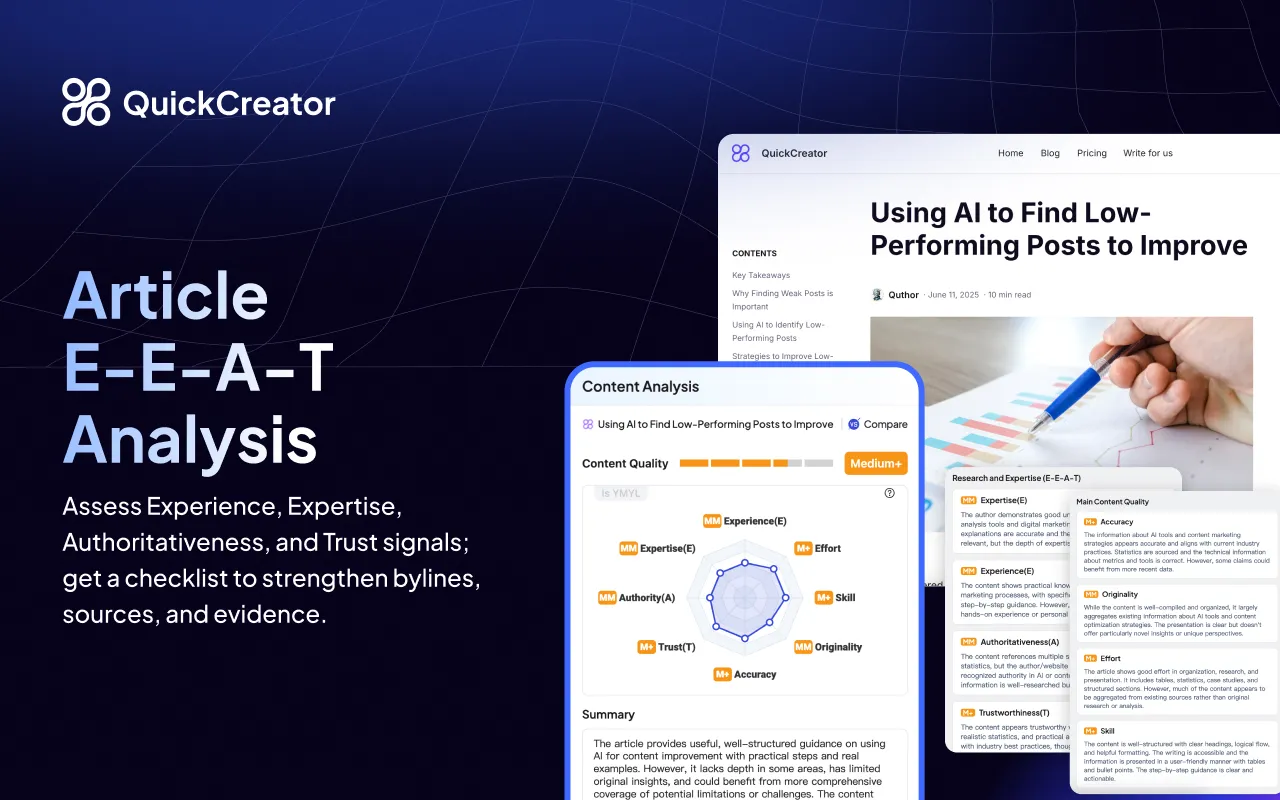
QuickCreator’s documentation explains that its Quality Analysis evaluates E-E-A-T (Experience, Expertise, Authoritativeness, Trust) alongside broader main content quality signals (effort, accuracy, originality) and flags higher standards for YMYL-style content—see QuickCreator’s help doc: “How to review content quality with E-E-A-T analysis”.
That’s why this is a better fit for teams: you get a structured checklist for improving trust and credibility, not just a view into the DOM.
It supports readability and speed checks in the same QA pass
Per the Chrome Web Store description, the extension expands beyond “SEO fields exist” into additional checks (readability and speed) that usually require separate tools—or get skipped.
For SMB teams, this matters because the final 20% (readability + trust + performance) tends to drive the majority of content outcomes.
Key Takeaway: If you’re replacing Detailed because you need more than tag inspection, evaluate alternatives on quality + performance + team workflow—not on whether they can show an H2 list.
It’s built for “do the work, not just inspect the work”
QuickCreator’s own roundup of extensions describes the product as a team-friendly sidebar for faster audits and content workflows, focused on on-page checks plus E-E-A-T insights and practical fixes—see QuickCreator’s “Best AI SEO Chrome Extensions” page.
That framing matters because it matches how SMB teams actually operate: you’re not auditing all day—you’re shipping.
Side-by-side: Detailed SEO Extension vs QuickCreator Extension
Here’s a practical comparison based on what each tool describes in its official materials.

Criteria | Detailed SEO Extension | QuickCreator Extension |
|---|---|---|
Fast on-page inspection | Strong | Strong |
Schema visibility | Yes | Yes |
Indexability hints | Yes | Yes |
Exports/shortcuts for power users | Strong | Not the primary focus |
E-E-A-T / quality analysis | Not a focus | Yes |
Readability checks | Not a focus | Yes (positioned as included) |
Speed checks | Not a focus | Yes (positioned as included) |
Team workflow | Limited | Strong |
What to check on blog posts vs product pages
One reason teams outgrow a pure inspector is that different page types fail in different ways.
Blog posts: the usual failure mode is “generic”
On blog content, you’re often trying to upgrade:
Experience: does the piece show real-world specifics?
Authority: are claims supported with credible sources?
Readability: is the structure clear and skimmable?
Product pages: the usual failure mode is “untrusted”
On product and landing pages, you’re often trying to upgrade:
Proof: reviews, case studies, customer logos, clear outcomes
Clarity: what is this product, who is it for, what happens next?
Trust elements: policies, guarantees, contact/support info
This is why the Chrome listing’s mention of both article and product page E-E-A-T analysis is a meaningful differentiator for SMB teams.
Who should pick which?
Choose Detailed SEO Extension if…
You want a fast, free page inspector.
Your workflow is mostly technical validation and you already have separate processes for writing quality and performance.
Choose QuickCreator Extension if…
You’re responsible for publishing pages that need to persuade (not just rank).
You want a single pre-publish QA workflow that includes E-E-A-T, readability, and speed checks.
You want consistency across teammates without building a complicated SOP.
A 10-minute pre-publish workflow (what to run before you hit publish)
Use this when you’re updating an existing page or shipping a new one.
Step 1: On-page basics (2 minutes)
This is your on-page seo audit chrome extension moment:
Title/meta are present and aligned to intent.
H1/H2 structure is clear and not repetitive.
Canonical/indexability/schema don’t show obvious mistakes.
Step 2: Quality check (E-E-A-T) (4 minutes)
Ask:
Where is the first-hand experience?
Where is the evidence?
What would a skeptical reader question?
Step 3: Readability pass (2 minutes)
Break long paragraphs.
Make headings more specific.
Remove repeated phrasing and vague claims.
Step 4: Speed triage (2 minutes)
If the page is heavy, treat it as a release risk.
Escalate template-level issues before replicating them across dozens of pages.
FAQ
What’s the best detailed seo extension alternative for small marketing teams?
If you only need a fast on-page inspector, Detailed is a great fit. If you need publish-ready QA that adds E-E-A-T, readability, and speed checks to the same workflow, QuickCreator Extension is a better fit for SMB teams.
Is Detailed SEO Extension free?
Yes—Detailed describes it as 100% free on its official extension page.
Does QuickCreator Extension replace the core on-page checks?
QuickCreator’s Chrome Web Store listing states it scans pages for titles, headings, meta tags, canonical, indexability, schema, internal links, and image alt text—covering the core inspection needs most teams use Detailed for.
Is E-E-A-T a ranking factor?
Treat E-E-A-T as a quality lens, not a single ranking factor. It helps teams systematically strengthen credibility signals and reduce “thin content” risk—especially when content is produced quickly.
Next steps
If you want to test-drive a team-oriented alternative, install QuickCreator Extension and run it on two page types:
a blog article (where readability + E-E-A-T matter)
a product or landing page (where trust elements and clarity often drive conversion)
QuickCreator’s privacy and data handling details are published in QuickCreator’s privacy policy.