If you’re searching for an AITDK alternative, odds are you’re not “missing another SEO tool.”
You’re missing a clean way to answer a more practical question:
Is this page actually ready to publish—technically and credibly—without opening five tabs and chasing checklists across tools?
AITDK’s extension is helpful for quick page-level SEO checks. But modern SEO teams (especially small teams shipping content weekly) are being judged on more than titles and meta tags. You’re being judged on whether a page demonstrates credibility, clarity, and confidence—across articles and product pages.

That’s why QuickCreator Extension – All-in-One SEO Assistant for Teams is a strong replacement: it combines baseline on-page checks with article and product-page E‑E‑A‑T analysis, plus readability and workflow features designed for real editorial handoffs.
Why SEO teams look for an AITDK extension alternative
Most SMB SEO teams hit the same wall:
On-page checks are necessary, but not sufficient. A page can be technically fine and still feel thin, untrustworthy, or hard to read.
Quality control lives in handoffs. Writers draft, editors edit, SEOs review, PMs or founders approve. If your checks aren’t consistent, quality drifts.
Tool sprawl kills speed. When audits, credibility checks, and source collection live in different places, the workflow becomes the bottleneck.
If what you need is a SEO Chrome extension for teams, the bar is simple: it should reduce friction, standardize checks, and make fixes obvious.
What AITDK gets right (and what it doesn’t cover)
AITDK’s extension is positioned as an all-in-one browser tool for page analysis—useful when you want a quick snapshot of common SEO signals.
According to the AITDK SEO Extension feature page, it emphasizes capabilities like:
traffic analysis snapshots
Whois lookup
keyword density checks
on-page SEO elements (title, description, canonical)
headings, images, and link breakdowns
metadata extraction and suggestions
For many teams, that’s a solid baseline.
Where it tends to fall short for content teams is the part that’s harder to reduce to tag checks:
Does the page communicate Experience/Expertise/Authority/Trust signals?
Does an article provide evidence and sourcing, not just statements?
Does a product page prove credibility (policies, reviews, specs, proof elements), not just features?
Is the content readable enough for the audience to actually follow it?
What to look for in the best AITDK alternative
Don’t start with a feature list. Start with the workflow.
Here’s a practical rubric for SMB teams:
Baseline on-page coverage
- Titles, headings, meta tags, canonicals, indexability, schema, internal links, image alt
Content credibility checks (E‑E‑A‑T signals)
Articles: bylines, sourcing, evidence, transparency
Product pages: policies, proof elements, clarity of purpose
Readability and “publishability”
- Whether the page is easy to scan, understand, and act on
Team consistency
- Outputs writers, editors, and SEOs can share (checklists, templates, repeatable standards)
Actionability
- Plain-English fixes, not cryptic warnings
If an extension can’t cover (2) and (3), it’s usually a “quick audit tool,” not a team-ready content QA assistant.
QuickCreator Extension: the most complete AITDK alternative for content teams

QuickCreator is best understood as an E‑E‑A‑T checker for content (E-E-A-T checker for content) that still respects the fundamentals—plus a practical readability layer for content QA.
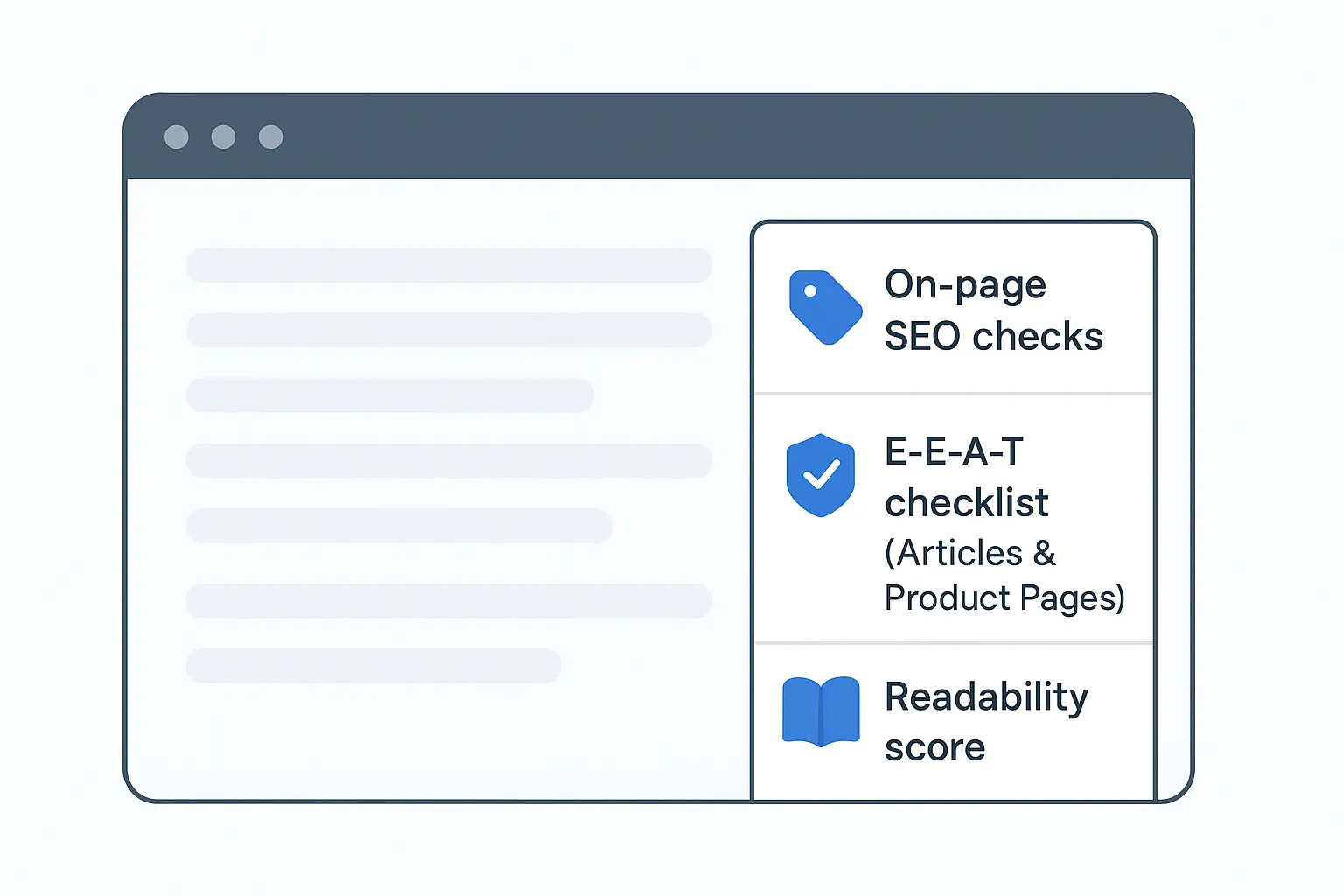
You get one sidebar that covers:
1) On-page SEO checks (the basics, done cleanly)
QuickCreator includes the core checks teams expect from an on-page SEO checker Chrome extension, including:
titles, H1/H2 structure, and meta tags
canonical and indexability signals
schema checks
internal links
image alt coverage
More importantly for a small team: findings are paired with clear fix suggestions, so writers can keep moving without turning every draft into a Slack thread.
2) Article E‑E‑A‑T analysis (built into the workflow)
E‑E‑A‑T isn’t a single metric you “optimize.” It’s a set of credibility signals that affect whether readers trust a page.
QuickCreator’s extension describes Article E‑E‑A‑T analysis with a checklist to strengthen bylines, sources, and evidence (see the QuickCreator Extension Chrome Web Store listing).

This is the difference between:
- “the page has a title tag”
and
- “the page shows who wrote it, why they’re credible, and what evidence supports the claims.”
Pro Tip: Treat E‑E‑A‑T checks as a publishing checklist, not a ranking promise. Your goal is to reduce risk: thin content, unverified claims, missing authorship, and vague assertions.
3) Product page E‑E‑A‑T analysis (the credibility layer that affects conversion)
For many SMBs, organic traffic doesn’t fail on the blog—it fails on the pages that need to convert.
QuickCreator’s extension includes product page E‑E‑A‑T analysis (product page E-E-A-T) focused on credibility signals like specs completeness, proof elements (reviews, case studies), policy visibility, and clarity of purpose.
That matters because the trust questions on a product page are different from a blog post:
“Can I trust this company?”
“Will this work for my scenario?”
“What proof exists?”
“What happens after I buy?”
4) Readability analysis (so teams ship pages people can read)

Readability isn’t a “nice to have.” It’s often the difference between:
a page that gets skimmed and abandoned
and a page that gets understood, trusted, and acted on
A practical way to use readability outputs:
If it’s too dense: tighten paragraphs, reduce nested clauses, add clearer topic sentences.
If it’s too vague: add concrete examples, numbers, screenshots, or step-by-step evidence.
If it’s hard to scan: improve subheadings, use fewer but stronger bullets, and move key definitions earlier.
The point isn’t to chase a perfect score. It’s to make the page understandable for the person who actually has to buy, sign up, or share it.
5) Built for team workflow, not solo audits
One underrated feature is content material collection: saving quotes, stats, links, screenshots, and source notes into organized boards.
That matters because a real bottleneck in content QA is usually evidence gathering:
finding credible sources
capturing them cleanly
reusing them across writers and editors
keeping notes attached to the right page
Honest tradeoffs: when QuickCreator Extension isn’t the right pick
A browser extension is not a full technical SEO crawler.
If your primary need is:
sitewide crawling
JavaScript rendering diagnostics
log file analysis
complex Core Web Vitals troubleshooting
…you’ll still want dedicated technical tools.
QuickCreator Extension is strongest when your daily reality is:
auditing and improving individual pages
shipping SEO-ready content with consistent quality
enforcing credibility and clarity across writers, editors, and SEOs
Migration checklist: moving from AITDK to QuickCreator Extension
If you’re switching from AITDK, don’t migrate “features.” Migrate your workflow.
Pick 3 representative pages: one blog article, one product page, one high-traffic landing page.
Run QuickCreator’s on-page SEO checks and record the top 5 recurring issues.
Run Article E‑E‑A‑T analysis on the blog page.
- Fix the top 2 trust gaps (typically authorship + sourcing/evidence).
Run Product Page E‑E‑A‑T analysis on your PDP.
- Add missing proof elements (reviews/case studies) and surface key policies.
Turn the outputs into a shared checklist your team can reuse.
FAQ
Is QuickCreator Extension really an AITDK alternative?
Yes—if you’re using AITDK primarily for quick page-level audits. AITDK covers baseline SEO analysis; QuickCreator covers those basics and adds content QA layers (E‑E‑A‑T + readability) and team workflow features.
Will E‑E‑A‑T checks guarantee higher rankings?
No. E‑E‑A‑T is best treated as a framework for strengthening credibility and reducing content risk. Use it to improve authorship, evidence, transparency, and user trust—not as a guaranteed ranking lever.
What about privacy and data handling?
If you’re deploying extensions across a team, review the QuickCreator privacy policy alongside your internal security and compliance requirements.
Next step: try it on 3 pages this week
If you want a more complete, team-friendly AITDK alternative, learn more about QuickCreator and install the extension.
A simple way to evaluate it: run it on one article you’re about to publish, one product page that should convert, and one page that already gets traffic.