Welcome Series Best Practices for Ecommerce (United States, 2025)

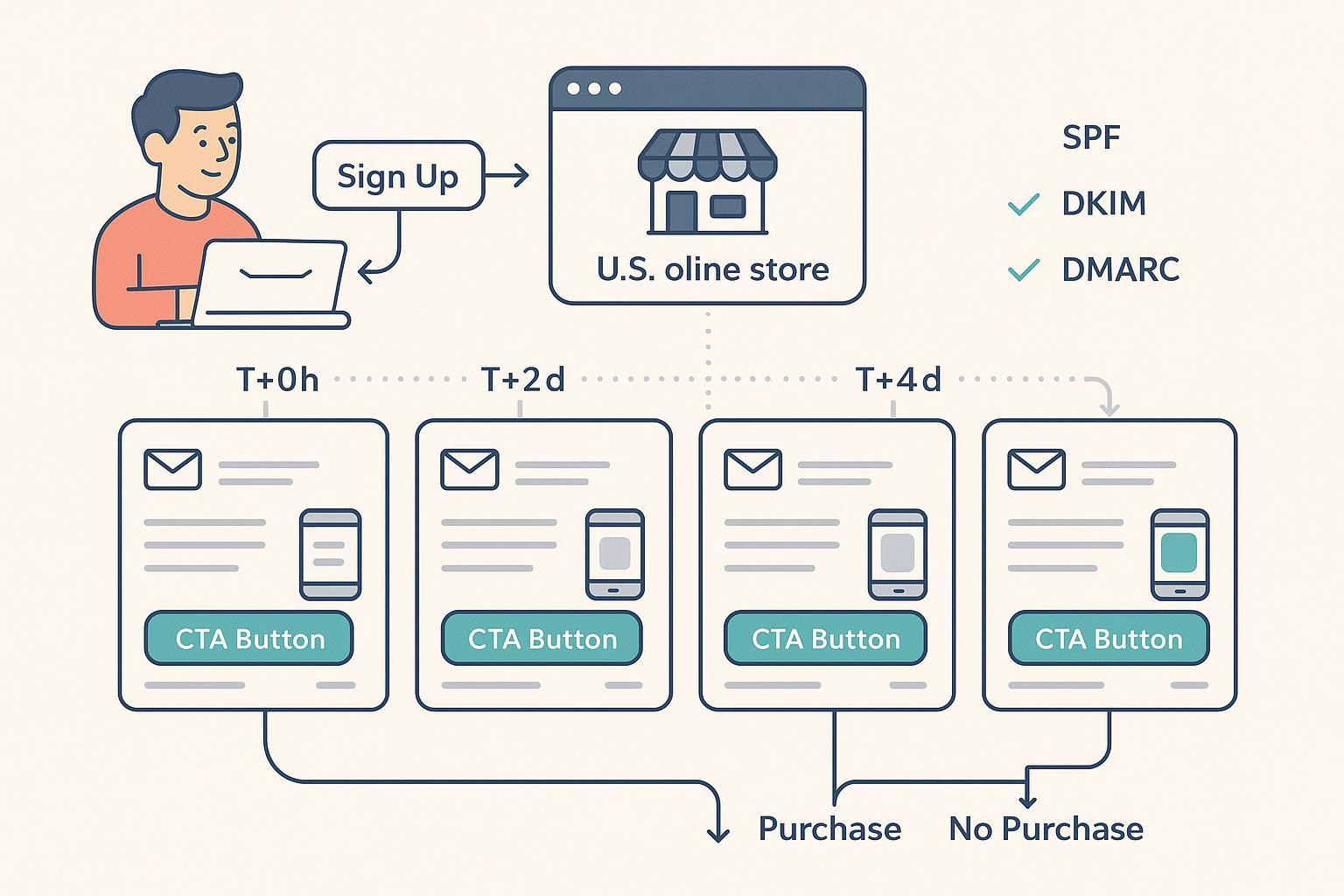
A high-performing welcome series is still the most reliable lever for turning new subscribers into first-time buyers in U.S. ecommerce. In 2025, the fundamentals haven’t changed—speed, clarity, relevance—but the bar has risen on compliance, accessibility, mobile/dark mode rendering, and deliverability. This guide distills hard-won practices you can apply immediately, with guardrails and checklists drawn from primary authorities and current industry benchmarks.
The 4-Email Blueprint You Can Launch in 14 Days
A pragmatic starting pattern is a 3–5 email sequence over 7–14 days. Below is a four-email version that balances momentum with restraint. Adjust cadence by engagement and purchase behavior.
-
Email 1 (T+0h to +1h): Deliver the promise
- Objective: Confirm subscription, deliver any incentive, set expectations for frequency and content types.
- Copy cues: “Welcome to [Brand]. Your 15% is ready.” Clear single CTA. Add trust markers (returns policy, BBB, secure checkout).
- Compliance: Physical mailing address and one-click unsubscribe in the footer; subject line reflects content.
-
Email 2 (T+1–2d): Build trust and context
- Objective: Brand story, value prop, social proof. Introduce top categories; light personalization based on signup source.
- Copy cues: Founder note, 2–3 review snippets, compact category tiles.
-
Email 3 (T+3–5d): Personalize the first shop
- Objective: Dynamic recommendations by category/affinity; sizing/fit guides; secondary CTA to preference center.
- Copy cues: “Picked for you” blocks, utility content (how to choose, care tips).
-
Email 4 (T+7–10d): Incentive reminder and cross-channel invite
- Objective: Nudge to convert; offer reminder if applicable; invite SMS if consented for an extra perk.
- Copy cues: “Last chance to use your welcome offer,” alternative paths (bestsellers, new arrivals, clearance).
Branching rules and suppression
- If purchase occurs at any point: suppress remaining welcome emails and move to post-purchase onboarding.
- If no opens by Email 2: slow cadence; test alternative subject lines and preheaders; consider preference capture.
- If unsub >0.3% or complaints >0.1% on any send: reduce frequency, re-evaluate expectation-setting, and revisit incentive framing.
This cadence aligns with widely observed performance advantages for automated flows, which outpace one-off campaigns on open, click, and conversion, per platform benchmarks such as the Klaviyo 2025 dataset (automated flows averaged around elevated open and click rates versus campaigns in 2024–2025). See the benchmarks section below for how to set realistic goals.
Benchmarks and How to Set Goals in 2025
Treat benchmarks as directional, then calibrate to your brand’s data. Platform-wide analyses in 2024–2025 show automated flows—including welcome series—consistently outperform broadcast campaigns on engagement and conversion. For instance, Klaviyo’s 2025 cross-industry benchmarks report materially higher open, click, and conversion rates for automated flows than campaigns; use these as starting points, not hard targets: see the summary in the concise overview by Klaviyo in “[email marketing benchmarks—open, click and conversion rates]”(https://www.klaviyo.com/uk/blog/email-marketing-benchmarks-open-click-and-conversion-rates) published in 2025.
Similarly, Omnisend’s 2025 ecommerce report analyzes billions of emails from 2024 and highlights the revenue impact of automated journeys, including welcome flows: consult “[Omnisend’s 2025 Ecommerce Marketing Report]”(https://www.omnisend.com/2025-ecommerce-marketing-report/) for industry-level context.
Goal-setting suggestions for a U.S. ecommerce welcome series
- Engagement: Aim for open rates materially above your broadcast baseline; for many programs, 40–50% is attainable for Email 1 when incentive and expectation-setting are clear.
- Click-through: Target 3–5%+ CTR for early emails, driven by single, clear CTAs and relevant product blocks.
- Conversion: Track placed order rate and revenue per recipient (RPR); for new programs, 1–2% placed order rate within the series is a reasonable initial bar. Scale from there.
- Health thresholds: Keep unsub <0.3% and spam complaints <0.1% per send; sustained >0.3% complaints risks filtering or blocks by large ISPs.
Note limitations: Most public datasets are platform-derived; validate against your own segments and attribution model. Avoid repeating outlier claims that lack primary sourcing.
Compliance: CAN-SPAM and CPRA/CCPA Essentials
U.S. ecommerce welcome emails are subject to CAN-SPAM. If you collect personal information from Californians, CPRA/CCPA governs your notices and rights handling.
-
CAN-SPAM requirements
- Truthful header information and non-deceptive subject lines.
- Identify the message as an advertisement when the primary purpose is promotional.
- Include a valid physical postal address (street address, USPS P.O. Box, or CMRA mailbox).
- Provide a clear, working opt-out in every email and honor requests within 10 business days.
- Monitor any third parties sending on your behalf.
- Civil penalties for violations are significant and inflation-adjusted annually.
- Reference: See the Federal Trade Commission’s “[CAN-SPAM Act: A Compliance Guide for Business]”(https://www.ftc.gov/business-guidance/resources/can-spam-act-compliance-guide-business). For penalty updates, review the FTC’s 2025 press release on “[inflation-adjusted civil penalty amounts]”(https://www.ftc.gov/news-events/news/press-releases/2025/02/ftc-publishes-inflation-adjusted-civil-penalty-amounts-2025).
-
CPRA/CCPA implications for email capture
- At the point of collection, disclose categories of personal information (e.g., email) and purposes (e.g., marketing) with a link to your privacy policy.
- If you sell or share personal information beyond service provider scope, provide a prominent “Do Not Sell or Share My Personal Information” link and honor opt-out signals (including GPC where applicable).
- If you collect sensitive personal information (SPI), offer a “Right to Limit” mechanism and associated notice.
- Ensure service provider contracts (e.g., your ESP) include required restrictions and rights handling.
- References: California Privacy Protection Agency regulations in “[Title 11, Division 6 regulations]”(https://cppa.ca.gov/regulations/pdf/cppa_regs.pdf) and statutory rights such as Cal. Civ. Code §1798.120 and §1798.121 in the “[CCPA statute PDF]”(https://cppa.ca.gov/regulations/pdf/ccpa_statute.pdf). For clarity on the Notice of Right to Limit, see the Cornell Law Institute’s overview of “[11 CCR §7014]”(https://www.law.cornell.edu/regulations/california/11-CCR-7014) and the California Attorney General’s “[CCPA overview]”(https://oag.ca.gov/privacy/ccpa).
Practical tips
- Separate the email unsubscribe (CAN-SPAM) from data rights controls (CPRA/CCPA). Place “Do Not Sell/Share” on-site and at collection points.
- Keep your welcome series transactional tone honest: if it’s primarily promotional, treat it as such under CAN-SPAM.
Accessibility, Mobile-First, and Dark Mode
Accessible, resilient HTML emails improve reach and reduce friction, while minimizing legal risk. Follow WCAG 2.2 and DOJ guidance for digital communications.
-
Implement WCAG 2.2 principles in email
- Color contrast: At least 4.5:1 for normal text; 3:1 for large text.
- Semantic structure: Headings, lists, descriptive link text; set html lang="en".
- Focus indicators: Ensure visible focus and sensible reading order.
- Alt text: Descriptive for meaningful images; empty alt for decorative.
- Motion: Avoid flashing/flickering; provide static fallbacks.
- Reference: W3C’s “[WCAG 2.2 Recommendation]”(https://www.w3.org/TR/WCAG22/). For broader accessibility context, see the DOJ’s 2024 “[web and app accessibility rule summary]”(https://www.ada.gov/resources/2024-03-08-web-rule/).
-
Mobile-first and dark mode specifics
- Use fluid-hybrid layouts; inline critical styles; avoid positioning/floats.
- Minimum 16px body font; 1.4–1.6 line height; left-aligned paragraphs.
- Bulletproof HTML/CSS buttons; tap targets ≥44×44px; adequate padding.
- Explicit background/text colors to reduce forced inversion; prefer dark grays/off-whites over pure black/white.
- Test across Gmail and Apple Mail clients, including dark mode variants.
- Practical implementation guidance: Litmus’ “[coding emails for dark mode]”(https://www.litmus.com/blog/coding-emails-for-dark-mode) and “[email design best practices]”(https://www.litmus.com/blog/email-design-best-practices).
Deliverability Guardrails You Can’t Ignore
ISPs tightened sender requirements in 2024–2025. Design your welcome series to stay below risk thresholds and protect inbox placement.
-
Key thresholds to monitor
- Spam complaint rate: Aim <0.1%; absolute ceiling ~0.3% before filtering risk.
- Unsubscribe rate: Keep <0.3% per send as a health indicator.
- Authentication: SPF, DKIM, DMARC alignment; consider BIMI for logo trust.
-
Operational practices
- Set frequency expectations clearly in Email 1 and link to a preference center.
- Segment by engagement; slow cadence for non-openers; suppress inactives.
- Maintain hygiene: remove hard bounces; confirm opt-in where practical; monitor source quality.
- Use a branded subdomain; warm if new.
- References: See Yahoo’s “[sender best practices]”(https://senders.yahooinc.com/best-practices/) and industry explainers from Twilio’s overview of “[Gmail and Yahoo sender requirements]”(https://www.twilio.com/en-us/blog/insights/gmail-yahoo-sender-requirements) and Validity’s discussion of “[new sender requirements]”(https://www.validity.com/blog/gmail-yahoos-new-sender-requirements-answering-the-big-remaining-questions).
Personalization and Segmentation That Actually Convert
Focus on zero-party and first-party data you can capture ethically and use immediately.
-
Data to capture within the welcome series
- Zero-party: preferences via a short quiz or form in Email 2.
- First-party: browse/category interest, acquisition source, device.
-
Segment recipes
- Incentive responders vs non-responders: prioritize scarcity messaging for responders; add education for non-responders.
- Category affinity: show dynamic tiles for the most-viewed categories.
- Acquisition source: tailor the story for paid social vs organic; avoid repeating ad claims verbatim.
- New vs returning subscriber: recognize returning visitors; tighten the sequence.
-
- Conditional rendering by gender/category.
- Bestsellers by state or region.
- “New arrivals” in the last viewed category.
Trade-offs
- Over-segmentation increases operational complexity and can reduce test power. Keep segment definitions simple enough to sustain volume and respect CPRA disclosures.
Optimization and A/B Testing: Run It Like an Experiment
Treat every element as testable. Use proper sampling and avoid peeking.
-
Test recipes (one variable at a time)
- Subject framing: “Your 15% Welcome Gift Inside” vs “Welcome—Your 15% is Ready” (goal: open rate).
- Offer type: % off vs $ off vs free shipping (goal: placed order rate or RPR).
- CTA pattern: Above-the-fold single CTA vs multiple; “Redeem My Offer” vs “Shop New Arrivals” (goal: CTR, conversion).
- Timing: Email 2 at +24h vs +48h (goal: CTR, unsub/complaints).
- Personalization: Dynamic category tiles vs generic featured products (goal: CTR, conversion).
-
Sample size planning
- Pre-calculate per-variant sample size based on baseline rate, minimum detectable effect, alpha (0.05), and power (0.8).
- Use the widely referenced calculator by Evan Miller: “[A/B testing sample size]”(https://www.evanmiller.org/ab-testing/sample-size.html).
-
Execution discipline
- Random assignment; simultaneous sends to avoid temporal bias.
- Run tests to completion; apply learnings; re-test periodically as catalog and audience shift.
Advanced 2025 Tactics Worth Testing
-
- Subject line generation and send time optimization (STO) per recipient.
- Predictive segmentation (likelihood to purchase) to determine who gets the strongest incentive.
- Caveat: Many uplift claims are vendor-reported; validate in your own data via controlled tests. For adoption trends and practical guardrails, see Litmus’ 2025 recap of state-of-email insights in “[2025 state-of-email crossover recap]”(https://www.litmus.com/blog/2025-state-of-email-crossover-recap).
-
- If SMS consent is captured, test an email+SMS hybrid welcome. Suppress channels appropriately to avoid frequency shocks.
-
AMP-like interactivity and preference centers
- Many clients still limit advanced interactivity; favor reliable, lightweight interactions and strong on-site preference centers.
Common Pitfalls and How to Fix Them
-
Over-incentivizing the entire list
- Problem: Margins erode and unsubscribes rise if the offer feels mandatory or irrelevant.
- Fix: Gate the highest offer to cohorts with lower predicted purchase probability; test non-monetary value (guides, UGC).
-
Frequency shock
- Problem: Welcome cadence plus promotional blasts produce complaint spikes.
- Fix: Use a welcome flag to suppress promotional sends until welcome completion or purchase.
-
Design anti-patterns
- Problem: Low contrast text, tiny fonts, ambiguous CTAs perform poorly and risk accessibility violations.
- Fix: Apply WCAG contrast and tap target standards; use descriptive link text and bulletproof buttons.
-
Preference center gaps
- Problem: No capture of content/category preferences leads to generic, underperforming emails.
- Fix: Add a simple preference capture in Email 2; invite updates anytime.
Implementation Checklist: From Zero to Live in 14 Days
Day 1–2: Define scope and goals
- Decide series length and cadence; set KPI targets (open, CTR, placed order rate, RPR, unsub, complaints).
- Confirm compliance and privacy notices at collection; review ESP contracts for CPRA service provider language.
Day 3–5: Build Email 1 and infrastructure
- Draft Email 1 copy and design; implement authentication (SPF, DKIM, DMARC); set branded subdomain.
- Configure suppression logic and post-purchase transition.
Day 6–8: Build Emails 2–3; dynamic content
- Create brand story and social proof assets.
- Implement category-based dynamic blocks; wire preference capture.
Day 9–11: Build Email 4; testing plan
- Draft incentive reminder and cross-channel invite.
- Define A/B tests and sample size using Evan Miller’s calculator.
Day 12–14: QA and launch
- Accessibility and dark mode checks (contrast, alt text, buttons, media queries).
- Multi-client tests (Gmail/Apple Mail); verify unsubscribe, physical address, and footer compliance.
- Launch with monitoring dashboards for health thresholds.
References and Further Reading
-
Regulatory and standards
- Federal Trade Commission: “[CAN-SPAM Act: A Compliance Guide for Business]”(https://www.ftc.gov/business-guidance/resources/can-spam-act-compliance-guide-business)
- Federal Trade Commission: “[Inflation-adjusted civil penalty amounts (2025)]”(https://www.ftc.gov/news-events/news/press-releases/2025/02/ftc-publishes-inflation-adjusted-civil-penalty-amounts-2025)
- California Privacy Protection Agency: “[Title 11, Division 6 regulations]”(https://cppa.ca.gov/regulations/pdf/cppa_regs.pdf)
- California Privacy Protection Agency: “[CCPA statute PDF]”(https://cppa.ca.gov/regulations/pdf/ccpa_statute.pdf)
- Cornell Law Institute: “[11 CCR §7014 Notice of Right to Limit]”(https://www.law.cornell.edu/regulations/california/11-CCR-7014)
- W3C: “[WCAG 2.2 Recommendation]”(https://www.w3.org/TR/WCAG22/)
- U.S. Department of Justice: “[Web and app accessibility rule summary (2024)]”(https://www.ada.gov/resources/2024-03-08-web-rule/)
-
Industry benchmarks and practice guides
- Klaviyo: “[Email marketing benchmarks—open, click and conversion rates (2025)]”(https://www.klaviyo.com/uk/blog/email-marketing-benchmarks-open-click-and-conversion-rates)
- Omnisend: “[2025 Ecommerce Marketing Report]”(https://www.omnisend.com/2025-ecommerce-marketing-report/)
- Litmus: “[Coding emails for dark mode]”(https://www.litmus.com/blog/coding-emails-for-dark-mode)
- Litmus: “[Email design best practices]”(https://www.litmus.com/blog/email-design-best-practices)
- Evan Miller: “[A/B testing sample size calculator]”(https://www.evanmiller.org/ab-testing/sample-size.html)
