Why pages aren’t indexed (or are crawled but not added) and how to fix it

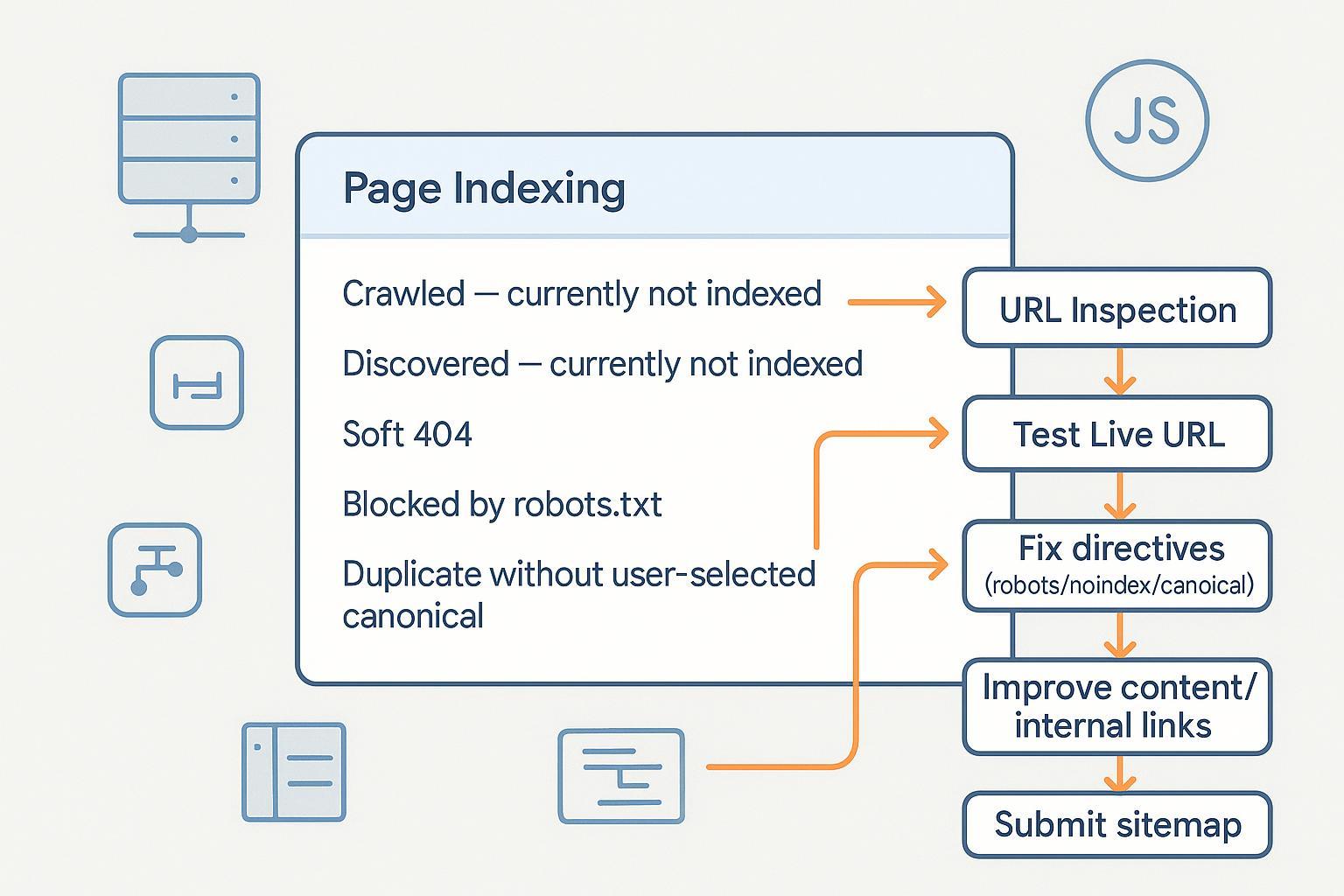
If Google is showing “Crawled – currently not indexed,” “Discovered – currently not indexed,” or other exclusion statuses in Search Console, you’re not alone. This guide walks you through practical, step‑by‑step diagnostics and fixes—focused on Google’s official guidance—so you can resolve issues and verify progress inside Search Console.
- Difficulty: Moderate (mix of content and technical fixes)
- What you’ll need: Google Search Console access, CMS/server access (or a developer), and time to validate changes
- Important: Indexing is not guaranteed. Google indexes pages it considers useful and canonical; requests are treated as hints.
Quick triage workflow (do this first)
- Open Search Console → Indexing → Pages. Identify the status for your URL.
- Click an example URL in that status.
- Use URL Inspection:
- Enter the full URL in the inspection bar.
- Review whether “URL is on Google” or “URL is not on Google,” and coverage details.
- Click Test Live URL to fetch the current response.
- Open Tested Page → see rendered HTML and screenshot. Confirm that your actual content is visible (especially if the site is JavaScript‑heavy).
- If you’ve fixed issues, click Request Indexing. It’s a hint; there’s no guarantee, per Google’s URL Inspection Tool help (Google, updated 2023–2025).
Checkpoint: After any fix, re‑run Test Live URL and note changes in “Indexing” and “Coverage” details. If rendering differs from what users see, review JavaScript/CSS blocking and consider server‑side rendering.
Fixes by status (with verification steps)
1) Crawled – currently not indexed
Meaning: Google crawled the URL but didn’t index it—often due to low perceived value, duplication, or technical/rendering issues.
Do this:
- Improve uniqueness and usefulness. Consolidate near‑duplicate content and avoid thin pages. Google’s canonicalization guidance explains how it chooses a preferred URL from duplicates; align your signals using Consolidate duplicate URLs (Google Developers, updated 2024–2025).
- Strengthen internal linking to signal importance and help discovery. Add contextual links from relevant, indexed pages.
- Ensure indexability: Do not block the page via robots.txt; remove meta robots noindex if you want it indexed. See Robots meta tags (Google Developers, updated 2024–2025).
- Check rendering. If critical content loads via JS, verify Google can fetch JS/CSS and fully render. Refer to JavaScript SEO basics (Google Developers, updated 2024–2025).
Verify:
- URL Inspection → Test Live URL. Confirm “Page fetch” succeeds, content appears in the rendered HTML/screenshot, and no conflicting directives.
- Optionally Request Indexing. Monitor the Page Indexing report over the next 1–2 weeks. No fixed timeline is guaranteed by Google.
Pro tip: If you maintain multiple variants (UTM‑decorated or faceted URLs), pick one canonical and de‑emphasize alternates in internal links and sitemaps.
2) Discovered – currently not indexed
Meaning: Google knows your URL but hasn’t crawled it yet. Causes include low priority, crawl limits, or server performance.
Do this:
- Review Crawl Stats and performance. For large/frequently updated sites, improve server capacity and reduce low‑value URLs to increase crawl capacity, per managing crawl budget (Google Developers, updated 2024–2025).
- Clean up sitemaps: Include only canonical, indexable 200‑OK URLs; keep lastmod accurate; split large files. See Sitemaps overview (Google Developers, updated 2024–2025).
- Strengthen internal links to raise priority for important pages.
- Avoid generating infinite parameter/faceted URLs; canonicalize or limit them.
Verify:
- In GSC, check Crawl Stats for fetch volume and host status.
- In Sitemaps, confirm submitted files are processed and show expected counts.
- URL Inspection → Test Live URL. If fetch now works and content is visible, Request Indexing.
Warning: Don’t rely on changefreq/priority—you can include them, but Google may ignore those hints (documented in the sitemaps overview).
3) Duplicate without user‑selected canonical
Meaning: Google detected duplicates and you didn’t declare a canonical; Google will pick one.
Do this:
- Declare rel=canonical on duplicate pages pointing to the preferred URL, and ensure the preferred URL is self‑canonical.
- Align signals: Internal links, sitemaps, redirects, and hreflang should consistently reference the same canonical. See Consolidate duplicate URLs (Google Developers, updated 2024–2025).
- Don’t block canonical pages via robots.txt; Google must crawl them to see canonicals. See robots.txt intro (Google Developers, updated 2024–2025).
Verify:
- URL Inspection on both the canonical and duplicate. Confirm Selected Canonical matches your intent.
- Re‑crawl over time; Google may take multiple crawls to consolidate signals.
4) Alternate page with proper canonical
Meaning: This URL is an alternate (parameters, sorted views) that correctly references a canonical.
Do this:
- If intended, no fix needed. Ensure alternates aren’t aggressively interlinked from navigation if you prefer the canonical to dominate.
- Make sure the canonical URL is crawlable and indexable.
Verify:
- URL Inspection → Selected Canonical should be the canonical page.
- Confirm the canonical appears indexed and ranking as expected.
5) Soft 404
Meaning: The URL returns 200 OK but the content indicates “missing” or extremely low value; Google treats it like a not‑found page. See HTTP status codes and soft 404s (Google Developers, updated 2024–2025).
Do this:
- For truly missing content, return 404 or 410 and provide a helpful custom 404 page.
- If the page should exist, add substantial unique content and correct any misleading redirects.
- Avoid redirecting missing pages to the homepage—it’s a common pattern that can be treated as a soft 404.
Verify:
- URL Inspection → Test Live URL. Check the response code and content.
- After fixes, monitor the Page Indexing report for status changes.
6) Blocked by robots.txt
Meaning: Crawling is disallowed; Google can’t see page directives and typically won’t index the content. Per Google’s robots docs, robots.txt controls crawling, not indexing.
Do this:
- Allow crawling for any page you want indexed. Don’t use robots.txt to keep a page out of search—use noindex.
- For preventing indexing, use meta robots noindex (or X‑Robots‑Tag for non‑HTML resources). Pages must be crawlable for Google to see noindex. See Robots meta tags (Google Developers, updated 2024–2025).
Verify:
- Fetch robots.txt directly and confirm rules are correct.
- URL Inspection → Test Live URL should show that Googlebot can fetch the page and that noindex is honored if present.
7) Excluded by noindex
Meaning: A meta robots or X‑Robots‑Tag tells Google not to index the page.
Do this:
- Remove the noindex directive for pages you want indexed. Ensure the page returns 200 OK and isn’t blocked by robots.txt.
- For PDFs or other binaries, adjust the X‑Robots‑Tag header accordingly. See Robots meta tags (Google Developers, updated 2024–2025).
Verify:
- URL Inspection → Test Live URL. Confirm the directive is gone and “Indexing allowed” appears.
- Request Indexing and monitor Page Indexing for inclusion over time.
8) Crawl anomaly / HTTP errors (4xx/5xx)
Meaning: Googlebot encountered errors fetching the URL; persistent issues reduce crawl rate and can remove pages from the index.
Do this:
- Fix server errors (5xx/429). For maintenance windows, return 503 with a Retry‑After header. See HTTP/network errors guidance (Google Developers, updated 2024–2025).
- Resolve client errors appropriately: Serve 200 for valid content, 301 for moved pages, 404/410 for removed pages.
- Check CDN configurations and caching; misconfigurations can surface as crawl anomalies. Google’s Search Central discussed CDN crawling best practices in late 2024: see CDNs & crawling best practices (Google Search Central blog, Dec 2024).
Verify:
- Monitor Crawl Stats for spikes in errors.
- URL Inspection → Test Live URL. Confirm stable fetch and the expected HTTP status code.
JavaScript‑heavy sites: rendering and crawlability
- Don’t block JS/CSS in robots.txt; Google needs them to render pages. See JavaScript SEO basics (Google Developers, updated 2024–2025).
- If critical content relies on client‑side rendering and indexing lags, consider server‑side rendering or pre‑rendering. Google also documents dynamic rendering as a workaround for complex apps: Dynamic rendering overview (Google Developers, updated 2024–2025).
- Use URL Inspection → Tested Page → rendered HTML & screenshot to confirm Google sees the same content users do.
Verify: After changes, rerun Test Live URL and compare rendered HTML. If links are JS‑bound only, add standard anchor links for crawlability.
Sitemaps: hygiene and prioritization
- Include only canonical, indexable 200‑OK URLs; exclude redirects, disallowed, and noindexed pages. See Sitemaps overview (Google Developers, updated 2024–2025).
- Respect size limits: 50,000 URLs per file or 50 MB uncompressed; use a sitemap index for large sites, per large sitemaps best practices (Google Developers, updated 2024–2025).
- Reference your sitemap in robots.txt and submit it in Search Console.
- Keep lastmod accurate to help Google understand meaningful updates.
Verify: In GSC → Sitemaps, ensure files are processed and URL counts align with canonical pages. Cross‑check with the Page Indexing report.
Practical example: upgrading content and internal links
Disclosure: QuickCreator is our product.
When a page is “Crawled – currently not indexed,” upgrading content quality and improving internal links often help the page earn inclusion. A practical workflow is to audit the page against your target intent, add unique, useful sections, and point contextual links from related articles. A content workflow tool like QuickCreator can be used to draft improvements, identify thin sections, and spot internal‑link opportunities without changing your tech stack. Keep changes focused on user value; indexing follows from clear signals and quality.
For step‑by‑step internal linking considerations, see our guide on internal linking and content structuring. If you’re assessing content quality upgrades, our Help Center explains the Content Quality Score. For foundational SEO concepts, here’s a concise SEO overview.
Monitor progress and iterate
- Watch Page Indexing statuses weekly. Status changes can take time; avoid frequent, unnecessary Request Indexing.
- Check Crawl Stats for server stability and fetch trends.
- Review the Search Console Overview page; Google began surfacing Recommendations in August 2024 to help prioritize site‑wide improvements—see Search Console Recommendations announcement (Google Search Central blog, Aug 2024).
- Keep up with documentation changes via the Google Search documentation updates log.
Common pitfalls to avoid
- Blocking canonical URLs in robots.txt while expecting them to be indexed.
- Combining rel=canonical with meta noindex on the same page (conflicting signals).
- Submitting non‑canonical or erroring URLs in sitemaps.
- Redirect chains and mixed status codes (e.g., 200 on thin placeholders) causing soft 404s.
- Relying solely on parameter/faceted pages without clear canonicals; prefer one canonical per content set.
If the status persists
- Recheck rendering and directives with a fresh Test Live URL.
- Confirm there’s clear, unique value vs. other indexed pages on your site.
- Reduce low‑value URLs (filters, sessions) that dilute crawl capacity.
- For large sites, align canonical signals across internal links, sitemaps, redirects, and hreflang. Be patient—Google may need multiple crawls to consolidate signals.
From experience: Troubleshooting indexing is iterative. Focus on technical cleanliness, canonical consistency, and genuine user value. Use Search Console for verification at each step, and expect some statuses to take time to resolve—especially on large or JS‑heavy sites.
