Best Practices for Welcome Email Sequences in Ecommerce Fintech

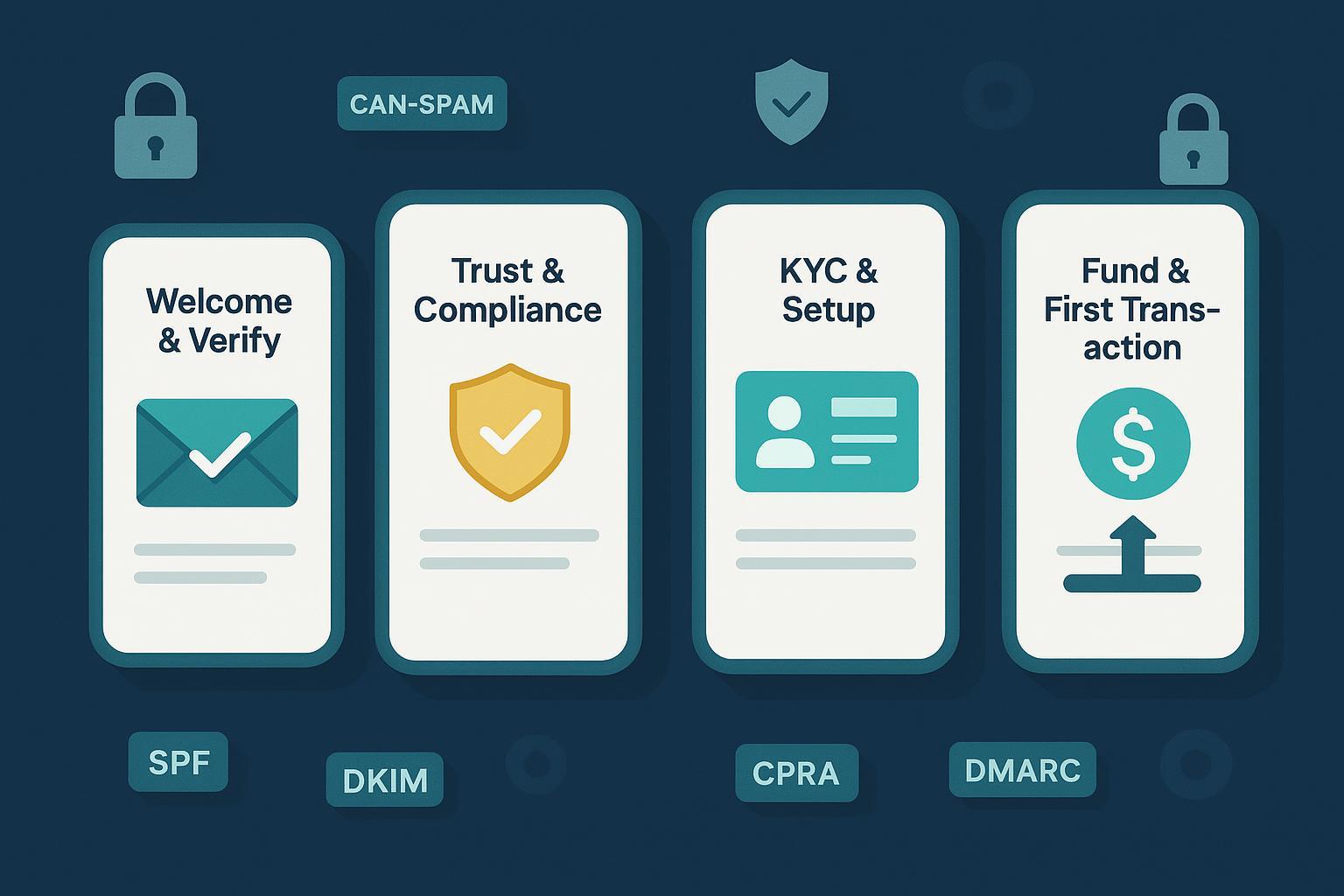
Designing a welcome series in ecommerce fintech is not just about conversion—it’s about establishing trust under regulatory constraints while moving new users to first value quickly. Below is a practice-first playbook I’ve used to build 4‑email sequences that balance activation, compliance, and fraud risk without sacrificing deliverability or user experience.
1) Set the foundation before you hit “send”
If you skip these prerequisites, even great content will underperform or stall in spam.
-
Authentication and inbox placement
- Configure and align SPF, DKIM, and DMARC on your sending domain. Google/Yahoo bulk sender policies from 2024 require this, and Microsoft began enforcement for Outlook.com/Hotmail/Live on May 5, 2025, as announced in the Microsoft TechCommunity post titled Outlook’s new requirements for high‑volume senders (Apr 2025). For Gmail/Yahoo specifics, see the 2024 summary by Postmark on Gmail/Yahoo bulk sender requirements (published 2024).
- Include one‑click unsubscribe headers and process opt‑outs fast; monitor complaint rates and keep them well below ~0.3%.
-
Legal and privacy guardrails
- Ensure CAN‑SPAM compliance in every marketing message: accurate headers, non‑deceptive subject lines, physical address, and a functioning opt‑out, per the FTC’s CAN‑SPAM guide (updated guidance page).
- If you coordinate with SMS during onboarding, capture and store consent as required under the FCC’s TCPA overview (United States).
- If you operate in California or process CA residents, align disclosures/rights to CPRA; see the California regulator portals for CCPA/CPRA resources.
-
Security and data standards context
- If cardholder data enters onboarding flows, map obligations to PCI DSS v4.0.x and future‑dated 2025 requirements; the standards body details changes in the PCI SSC v4.0.1 update (2024–2025). This isn’t about putting PCI text in emails—it’s about ensuring claims and links in Email 2 (trust/compliance) match your controls.
Practical tip: Build a single “foundation” checklist your team must pass before any welcome series deploys. In audits, this one sheet saves hours.
2) A 4‑email sequence engineered for activation, trust, and speed
These timings and goals assume a typical ecommerce-enabled fintech: account creation → verification → KYC → funding → first transaction. Adjust based on your actual onboarding flow and risk controls.
Email 1 — Welcome & Verify
- Timing: Immediately after sign‑up (within minutes).
- Goal: Confirm the account, set security expectations, and drive the first activation step (email verification or login).
- Must‑have blocks:
- Clear headline and single primary CTA: “Verify your email to activate your account.”
- Security reassurance: “We use encryption and device checks to keep your account safe.”
- Secondary links: support, status page, and preference center.
- Compliance footer: physical address, one‑click unsubscribe link, legal text.
- Copy cue you can adapt:
- Subject: “Welcome to [Brand]: Secure your account in 30 seconds”
- Preheader: “Verify your email so we can keep your account safe.”
- Triggers/variants:
- If double opt‑in is enabled, this email becomes the confirmation message; send a post‑confirmation “You’re in” follow‑up only after click.
- If the user already verified in‑app, swap the CTA to “Finish setup” and deep‑link to the next step.
Trade‑off note: Double opt‑in improves list quality and deliverability but can reduce absolute list size. For high‑risk categories, the quality win typically outweighs the loss.
Email 2 — Trust & Compliance Primer
- Timing: +24 hours from Email 1.
- Goal: Build trust, explain why verification/KYC protects the user, and set expectations for documents and timelines.
- Must‑have blocks:
- Plain-English explanation of KYC/AML and why it prevents fraud and protects accounts.
- Short privacy summary with link to full policy; remind users they can manage communication preferences.
- “What you’ll need” checklist (e.g., government ID, selfie, proof of address) and average review time windows.
- Security center link or help article that matches your actual controls (avoid over‑promising).
- Copy cue:
- Subject: “Your security matters: what to expect with verification”
- Body snippet: “We verify identity to keep your account and funds safe. It usually takes 2–5 minutes to submit and under 24 hours to review.”
Why early trust pays off: Fraud harms users and brands; Juniper Research projected ecommerce fraud rising from $44.3B in 2024 to $107B by 2029, reinforcing the value of clear antifraud steps communicated early, per the Juniper Research ecommerce fraud projection (2024 press release).
Email 3 — Guided KYC & Account Setup
- Timing: +48–72 hours after Email 2, or sooner if behavioral triggers show the user stalled at KYC for >24 hours.
- Goal: Remove friction with a step‑by‑step guide and direct deep links to each incomplete step.
- Must‑have blocks:
- Progress indicator (“You’re 60% done”) and checklist-style section (“Upload ID”, “Add address”, “Enable 2FA”).
- Contextual help: live chat link, troubleshooting for common errors (blurry ID, address mismatch).
- Accessibility note: assure mobile capture best practices (good lighting, steady surface, glare reduction).
- Copy cue:
- Subject: “Finish in minutes: your checklist to get verified”
- CTA: “Resume verification” deep‑linking to the exact step.
Operational detail: Trigger this email only if the KYC step is incomplete; otherwise pivot to the funding email.
Email 4 — Fund & First Transaction Incentive
- Timing: +4–7 days from sign‑up, or within 24–48 hours after KYC completion.
- Goal: Motivate funding and the first transaction—your moment of first value.
- Must‑have blocks:
- Simple, low‑friction funding methods with clear limits and settlement times.
- Social proof or safety reminders (e.g., “Instant notifications on every transaction”).
- Conditional incentive with fraud‑aware terms (e.g., “$10 credit after your first purchase within 7 days; one per verified customer”).
- Copy cue:
- Subject: “Make your first purchase—get a $10 credit”
- CTA: “Add funds and shop” or “Checkout with [Brand] now.”
Fraud trade‑off: Incentives attract bonus hunters. Limit by account age, device velocity, and verification status. Communicate terms transparently in‑email to deter abuse.
3) Personalization and segmentation that actually moves metrics
Personalization only works if it’s anchored to signal quality and intent. Start with these lightweight rules:
-
Signals to leverage on day 0–7
- Acquisition source: personalize CTAs and examples to the offer or landing page the user came from.
- Geography and compliance: adjust document instructions and acceptable ID types by state if applicable; link to the right policy version for California CPRA disclosures when relevant.
- Device and channel: if the sign‑up happened on mobile, default to mobile capture guidance; if on desktop, offer “Continue on your phone” with a QR code.
- Risk flags: if fraud risk is high, require stronger verification before revealing offers; avoid sending incentive language until KYC is complete.
-
- Swap modules based on completion status (show “Resume verification” vs. “Add funds now”).
- Use progressive profiling: do not ask for all details in Email 1; escalate requirements only when necessary.
-
Trust cues that test well
- Security badges and concise explanations of protections (encryption, 2FA, device checks), consistent with what you actually implement.
- A brief “How we handle your data” paragraph with a plain‑language link to policy.
4) Orchestrate email + SMS + in‑app without breaking consent
In practice, omnichannel nudges lift completion—if you respect consent boundaries and avoid over‑messaging.
-
Roles by channel
- Email: deep explanations, checklists, policy links, and stateful progress updates.
- SMS: short, time‑sensitive reminders (“Your verification is almost done—complete the last step”). Reserve for users who have explicitly consented to marketing texts and always include opt‑out language to align with the TCPA expectations referenced earlier.
- In‑app: real‑time tips, banners, and error‑specific help. Use these to prevent email reliance for micro-frictions.
-
Escalation logic I’ve found effective
- If a user stalls at doc upload: in‑app tooltip after 2 minutes of inactivity → after 2 hours, SMS “Need help finishing?” → after 24 hours, Email 3 with checklist and live support options.
- If a user completes KYC but doesn’t fund within 48 hours: in‑app banner + Email 4; skip SMS unless the user has opted-in to promotional texts.
-
Preference center and audit trail
- Centralize consent and channel preferences. Use granular toggles (e.g., transactional email vs. marketing email; OTP SMS vs. marketing SMS) and store timestamps and source for audits.
5) Mobile-first design and accessibility that reduce drop-offs
Technical design choices directly affect completion, especially on mobile.
-
Layout and readability
- Single‑column responsive layout; avoid image‑only emails. Body text 14–16px; headings 18–22px; line height around 1.5.
- Tap targets at least 44×44px; generous spacing and thumb‑friendly placement.
- Dark mode: use transparent PNG/SVG where possible; avoid hard‑coded background colors that invert poorly.
-
Accessibility
- Meet WCAG 2.1 AA contrast ratios (4.5:1 for normal text, 3:1 for large text). Provide descriptive alt text and meaningful link labels.
- Keep copy in plain English and avoid jargon, especially in trust/compliance messages.
If you want a deeper checklist to sanity‑check your builds, the Litmus team’s guide to accessible email design is a solid reference point; see the Litmus ultimate guide to accessible emails (evergreen resource).
6) Measurement, experimentation, and governance in regulated contexts
Don’t chase vanity metrics. Tie the sequence to activation outcomes.
-
- Activation rate (email verified/logged in within 24–48h)
- KYC completion within 7 days
- Funding within 7 days of KYC
- First transaction within 14 days
-
Testing discipline
- Test one major variable at a time (subject line, incentive framing, checklist visuals). Power your tests properly and keep variants pre‑approved by compliance.
- Maintain a holdout (no‑send) control group to measure true incremental lift.
- Run multi‑channel experiments where consented (e.g., Email 3 alone vs. Email 3 + SMS prompt).
-
Governance workflow
- Pre‑send: compliance/legal review, CAN‑SPAM/TCPA checks, link to the current privacy policy, and deliverability validation (SPF/DKIM/DMARC alignment, List‑Unsubscribe header present). Gmail/Yahoo policies and Microsoft’s 2025 Outlook.com enforcement are a good barometer; revisit the Postmark Gmail/Yahoo summary and Microsoft’s TechCommunity announcement when auditing.
- Post‑send: weekly performance review; track complaints, bounce classifications, and spam-trap signals; retire tired variants quickly.
7) Pitfalls and trade‑offs I see repeatedly
- Compliance vs. friction: Front‑loading heavy explanations can depress clicks; keep Email 2 tight and link to policy detail.
- Incentives vs. fraud: Generous bonuses can spike abuse. Gate with verification status, cap by device/account velocity, and spell out terms.
- Over‑automation: Rigid journeys ignore user state. Use event triggers (e.g., “KYC step incomplete for 24h”) to branch messaging.
- Deliverability neglect: Missing authentication or List‑Unsubscribe tanks placement. Bulk sender requirements from Gmail/Yahoo (2024) and Outlook.com (2025) are table stakes—verify in postmaster tools.
8) Implementation checklist you can run this week
-
- SPF, DKIM, DMARC aligned on the sending domain; List‑Unsubscribe header present; test against seed lists and major ISPs.
- Complaint rate target <0.1%; quickly address any spike.
-
Legal & privacy
- CAN‑SPAM footer present; unsubscribe functions instantly and is honored quickly.
- SMS campaigns tied to explicit TCPA consent records; opt‑out language included.
- CPRA disclosures linked for CA residents; privacy policy current.
-
Content & journey
- Email 1: verify/activate with security reassurance.
- Email 2: trust/compliance primer + “what you’ll need” and average timelines.
- Email 3: personalized checklist and live help; trigger only for stalled users.
- Email 4: funding + first transaction incentive with anti‑abuse terms.
-
Design & accessibility
- Single‑column responsive; WCAG AA contrast; alt text; dark mode sanity check.
-
- KPIs set; holdout group defined; compliance pre‑approved; weekly review cadence scheduled.
9) Where to learn more (handpicked)
- Welcome email inspiration: curated examples from Omnisend’s welcome email roundup (updated periodically).
- Financial services email considerations: CleverTap’s financial services email guide (evergreen fundamentals for FS).
Credibility notes and citations used in this guide:
- Outlook.com bulk sender enforcement (May 5, 2025): Microsoft’s TechCommunity announcement.
- Gmail/Yahoo bulk sender requirements (2024): Postmark summary.
- CAN‑SPAM legal obligations: FTC guide.
- TCPA text/call consent expectations: FCC overview.
- PCI DSS evolution relevant to fintech claims: PCI SSC v4.0.1 blog.
- Ecommerce fraud trajectory context: Juniper Research projection.
