How to Use AI to Optimize Checkout Pages


AI has revolutionized the way people shop online. When stores use AI, it simplifies the checkout process, reducing the chances of customers leaving without completing their purchase. In fact, smart AI can lower cart abandonment rates by 18%, which is a significant boost for online retailers! Additionally, AI-powered tools like chatbots resolve issues in just 5 seconds, ensuring a quick and hassle-free checkout experience. By using AI, shopping becomes faster, safer, and more personalized, almost like having a silent assistant working behind the scenes to keep everything running smoothly.
Key Takeaways
AI can lower cart abandonment by 18%, keeping more buyers.
Customizing checkout with AI makes shoppers feel special and buy more.
AI chatbots give quick help, making checkout easier and less annoying.
AI improves payment safety, keeping data safe and building trust.
Testing and updating AI tools often makes checkout better for customers.
Benefits of Using AI in Checkout Optimization

Predictive Analytics to Lower Cart Abandonment
Cart abandonment is a big problem for online stores. You might have added items to your cart but left without buying. AI uses predictive analytics to study customer actions and find reasons for abandonment. For instance, AI notices when someone pauses during checkout. It can then offer a discount or send a reminder to help them finish their purchase.
Here’s what AI can do with predictive analytics:
Cut cart abandonment by 17%
Boost conversion rates by 25%
Reduce shipping-related questions by 32%
Raise customer satisfaction by 41%
Increase repeat purchases by 28%
These stats show how AI helps solve customer problems quickly. By making checkout easier and smarter, stores can keep shoppers interested and sell more.
Personalizing Checkout for Each Shopper
Think about walking into a store where everything fits your needs. AI does this for online shopping. It learns what you like, such as your favorite payment or shipping choices. Then, it adjusts the checkout process to match your preferences. This makes customers feel special and understood.
Personalization changes how people shop:
Metric | Value |
|---|---|
Adding more items to the cart | |
Spending more than planned | 40% more likely |
Paying extra for premium products | Up to 16% |
Using AI for personalization improves the shopping experience. It also encourages customers to buy more and return later. Both stores and shoppers benefit from this approach.
Speeding Up Checkout with Auto-Filled Forms
Filling out forms can be annoying, especially when you're in a rush. AI fixes this by automatically entering details like names, addresses, and payment info. This saves time and avoids mistakes that could slow down purchases.
A faster checkout makes customers happier. AI simplifies form filling, especially on mobile devices where typing is harder. By making transactions quicker, stores create a smooth shopping experience that keeps customers coming back.
Improving Payment Security with AI-Driven Fraud Detection
Shopping online means you care about keeping your payments safe. AI helps protect your payment details from fraud. It checks transactions instantly to spot anything unusual. For example, if your card is used in another country, AI can stop it right away.
Here’s how AI keeps payments secure:
It checks thousands of transactions every second.
It finds suspicious actions faster than people can.
It learns what’s normal for you to avoid false alerts.
AI doesn’t just protect your money. It also makes checkout easier. You won’t face extra security checks because AI knows when payments are safe. This mix of safety and ease makes customers trust online stores more.
Tip: Choose online stores that use AI for fraud detection. It shows they care about keeping you secure.
Boosting Conversion Rates Through Data Insights
AI isn’t only about safety. It also helps stores sell more by using data. AI studies things like what you browse, buy, or how long you look at items. This helps stores improve your shopping experience.
Here’s what AI does with data insights:
It watches data live and makes quick changes for better results.
It learns what you like and suggests items you’ll enjoy.
It handles boring tasks, so marketers can focus on ideas.
It shows ads and deals to the right people, boosting sales.
AI makes shopping personal and fast. You get better suggestions, and stores sell more. Businesses using AI for real-time data and smart ads see big sales growth. It proves knowing customers well leads to success for everyone.
Note: If a product suggestion feels perfect, thank AI for improving your shopping!
Key Strategies to Use AI for Checkout Pages
Using AI Chatbots for Instant Help
Have you ever needed help during checkout but couldn’t find it? AI-powered chatbots fix this by giving quick answers. They can solve problems, explain steps, and answer questions right away. It’s like having a store helper available all the time.
For example, if you’re confused about shipping or payment options, a chatbot can explain them in seconds. This makes checkout easier and less frustrating. Over time, chatbots learn from past chats to understand your needs better.
Here’s why chatbots are helpful:
They make checkout faster by solving problems quickly.
They keep you focused, lowering cart abandonment.
They improve shopping on phones by making it smoother.
With AI-powered chatbots, stores make sure you don’t feel stuck during checkout. This makes shopping faster and more enjoyable.
Customizing Checkout Based on Shopper Habits
Imagine a checkout process made just for you. AI can do this by studying your habits, like what you browse, how you pay, or how often you shop. It adjusts checkout steps to match your preferences, making everything easier.
For example, if you often pick express shipping, AI will highlight that option for you. If you’ve left items in your cart before, it might offer a discount to encourage you to buy. This saves time and makes you feel appreciated.
Here’s how personalized checkout works:
Description | |
|---|---|
Spot and Fix Problem Areas | Finds where users struggle, like confusing forms or unclear buttons. |
Improve Conversion Funnels | Tracks where users drop off during checkout and fixes those spots. |
Tailor the Experience | Uses data to create checkout steps that match user preferences. |
When stores use AI to personalize checkout, it feels smoother and more engaging. This makes shoppers happier and increases completed purchases.
Using AI to Suggest Extra Items
Have you ever added something to your cart and seen a suggestion for a matching item? That’s AI helping stores offer upsell opportunities. It looks at what you’ve bought or browsed and suggests things you might like.
For example:
Some apps show related items or discounts during checkout.
Salesforce’s Einstein Analytics finds upsell chances using smart predictions.
Shopify’s Upsell AI app suggests products that go well with what you’re buying.
These suggestions feel helpful, not pushy. They help you find great products while boosting store sales. It’s a win-win for both shoppers and businesses!
Tip: Pay attention to these smart suggestions. They’re made to improve your shopping experience and save you time.
Optimizing Mobile Checkout Experiences with AI
Have you ever tried shopping on your phone but quit because it was hard? Many people face this problem. Mobile shopping is growing, but some checkout pages aren’t great for phones. AI helps fix this issue.
AI studies how you use mobile checkout pages. It finds what slows you down, like tiny buttons or confusing designs. Stores use this data to make checkout easier for phone users.
Here’s how AI improves mobile checkout:
Smart Layout Adjustments: It changes the page layout to fit your screen. No more zooming!
Voice-Activated Checkouts: Instead of typing, you can speak your details to finish buying.
Predictive Typing: It remembers past entries and guesses what you’ll type next.
Tip: If you shop on your phone often, choose stores that use AI for better mobile checkout. It saves time and effort.
AI also helps stores test different checkout designs to find the best one. This testing, called A/B testing, makes sure you get a fast and easy experience. By improving mobile shopping, AI keeps you coming back.
Leveraging AI for Payment Method Recommendations
Do you ever feel unsure about which payment option to pick? AI makes this choice easier. It looks at your past purchases and suggests the best payment method for you. This makes checkout faster and simpler.
For example, if you often use PayPal, AI will show it first. If you’re buying from another country, it might suggest a method with fewer fees. These smart tips save time and reduce stress.
Here’s why AI payment suggestions work:
Stores using AI see conversion rates grow by 20%.
Amazon’s AI recommendations drive 35% of its yearly sales.
Nord Security saw a 10% boost in conversions by using AI for payments.
AI doesn’t guess randomly. It uses smart algorithms to study your habits in real time. This makes the suggestions feel natural and helpful. By making checkout smoother, AI helps you finish buying without hesitation.
Note: Personalized payment options don’t just help you—they also lower cart abandonment for stores. Everyone wins!
AI also makes payments safer. It spots unusual transactions or payment methods that don’t match your habits. This keeps your info secure. So, when a payment option feels perfect, thank AI for making checkout smarter and safer.
Steps to Use AI for Better Checkout Pages
Finding Problems in the Checkout Process
To fix your checkout page, find out what’s wrong first. Problems, or pain points, are where customers struggle. These could be slow pages, unclear forms, or tricky payment steps. Fixing these makes checkout much better.
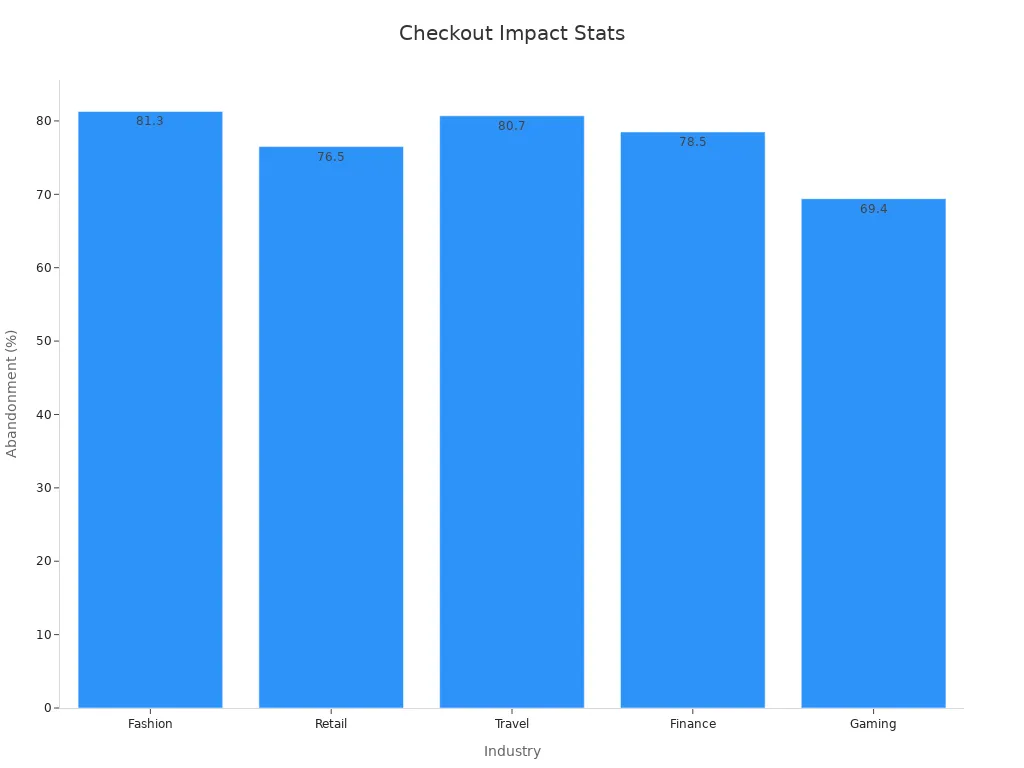
For example, industries like fashion and travel lose many sales. Check this table to see how different sectors are affected:
Industry | Abandonment Rate (%) | Revenue Loss Risk |
|---|---|---|
Fashion | High | |
Retail | 76.5% | High |
Travel | 80.7% | High |
Finance | 78.5% | High |
Gaming | 69.4% | Medium |
By studying these problems, you can focus on fixing the worst ones. This step helps create a smoother checkout process.
Picking the Best AI Tools
After finding issues, choose tools to solve them. Not all AI tools are the same, so pick wisely. Use this checklist to help:
Know your goals. Do you want fewer abandoned carts or better personalization?
Pick tools with good data. For example, GWI Spark uses millions of user insights.
Choose easy-to-use tools. A simple design helps your team work faster.
Make sure tools fit your systems. They should work well together.
Think about growth. Pick tools that grow with your business.
Check costs and benefits. Make sure the price is worth it.
These steps help you pick AI tools that solve problems now and in the future.
Connecting AI to Your E-Commerce Systems
Once you pick tools, connect them to your systems. This makes sure AI works smoothly with your setup. Keep these tips in mind:
Match AI tools to your business goals for better results.
Use clean data. Bad data causes mistakes and poor decisions.
Check AI tools often to keep them working well and secure.
Companies using AI well see a 35% boost in efficiency.
Connecting AI might seem hard, but it’s worth it. When done right, it makes checkout faster and easier for everyone.
Testing and Improving AI Tools for Better Results
Adding AI to your checkout isn’t the final step. You need to test and improve it regularly. Think of it like tuning a bike—you want it to work perfectly.
Start by trying A/B tests. These tests compare two checkout versions to find the better one. For example, check if an AI payment suggestion boosts sales more than a regular option. Use the results to decide what works best.
Here’s a simple testing guide:
Set clear goals: Do you want fewer abandoned carts or faster checkouts?
Track performance: Watch conversion rates, checkout time, and errors.
Ask for feedback: See if customers like the changes you made.
Tip: Keep testing often. AI learns over time, so updates help it stay useful.
Improving is just as important. Use test results to adjust your AI tools. Small changes, like better recommendations or smarter analytics, can make a big difference. By testing and improving, you’ll create a checkout process that customers love.
Training Teams to Use and Improve AI Tools
Even smart AI needs people to manage it. Your team is key to making AI work well. Without training, you won’t get the most out of it.
Teach your team how AI tools work. They don’t need to be tech experts but should know the basics. For example, explain how AI finds cart problems or how chatbots answer questions. Use hands-on lessons to make learning easier.
Here’s how to train your team:
Assign tasks: Pick who will check AI performance and handle updates.
Share resources: Give guides, videos, or access to AI experts.
Work together: Let team members share ideas and solutions.
Note: A trained team can spot problems early and suggest fixes.
Encourage your team to try new features and study data trends. When they feel confident, they’ll use AI better. This teamwork between people and AI creates a smooth checkout process for shoppers.
Overcoming Challenges When Using AI
Keeping Data Private and Secure
When you shop online, your data must stay safe. Businesses need to protect it carefully. But how does AI help keep your information secure? Here are some simple ways:
Privacy-by-Design Principles: Build privacy into AI systems from the start. Use tools like hiding personal details and limiting access to sensitive data.
Transparency and Explainability: Use clear AI models that are easy to understand. Explain how your data is used to build trust.
Encryption: Protect your data by locking it during transfer or storage.
Data Minimization: Only collect what’s needed and delete it when it’s no longer useful.
These steps protect your data and make online shopping feel safer.
Controlling Costs with Smart AI Use
AI might seem costly, but it saves money over time. It automates tasks and improves efficiency, helping businesses spend less. Here’s how AI helps manage costs:
Strategy | How It Helps |
|---|---|
Automation | Reduces the need for big support teams, saving money. |
Loss Prevention | Spots fraud early, cutting down theft-related losses. |
Sustainability | Saves energy and reduces waste, lowering operational costs. |
Data-Driven Decision Making | Helps businesses set better prices and manage inventory wisely. |
Labor Cost Reduction | Handles repetitive tasks, freeing employees for important work. |
Supply Chain Optimization | Tracks buying trends to avoid extra stock and storage costs. |
Using AI wisely balances spending and benefits, giving you better service without raising prices.
Making AI Work with Older Systems
Some businesses use old systems, making AI hard to add. This can make websites feel outdated. Here’s how companies fix this problem:
Check Current Systems: Look at old setups to find problems or limits.
Pick Flexible AI Tools: Choose tools that fit with older systems and grow with the business.
Train Employees: Teach workers to handle both old and new systems smoothly.
By solving these issues, businesses create a better shopping experience, even with older technology.
Overcoming Resistance to Change Within Teams
Adding AI to checkout can feel like a big change. Some workers may worry about learning new tools or losing their jobs. It’s normal for people to resist change, but you can make it easier with the right steps.
First, involve your team early. Explain why AI is helpful and how it benefits everyone. For example, show how AI reduces boring tasks, giving them more time for creative work. When they see AI as helpful, not harmful, they’ll accept it more easily.
Training is also important. Offer simple lessons to teach how AI works. Show examples, like how chatbots answer questions or how AI improves checkout. When workers feel confident, they’ll adjust faster.
Tip: Celebrate small wins. If AI lowers cart abandonment or speeds up checkout, share the success. This builds trust and excitement.
Lastly, encourage open talks. Let employees share worries or ask questions. Listening shows you value their thoughts, which helps them feel positive about AI.
By focusing on teamwork, training, and clear communication, you can turn resistance into support. Your team will see AI as a helpful tool, not a threat.
Best Practices for Continuous Improvement with AI
Checking Checkout Performance Metrics Often
To keep your checkout smooth, check its performance often. Look at key numbers to see what works and what doesn’t. Here are some important ones:
Metric | What It Shows |
|---|---|
Conversion Rate | How many visitors buy something. |
Average Order Value | How much people spend on average per order. |
Cart Abandonment Rate | How many leave items in their cart without buying. |
Checkout Completion Time | How long it takes to finish checkout. |
These numbers show how well your checkout is doing. For example, a high cart abandonment rate might mean checkout is too hard. Watching these numbers helps you make smart changes to improve shopping.
Tip: Use AI tools to track and study these numbers. It saves time and finds trends fast.
Learning About New AI Trends
AI keeps changing, so stay updated to stay ahead. Here’s how AI is shaping checkout pages:
AI makes shopping personal by suggesting products and deals.
Better fraud tools make online shopping safer for everyone.
Smart AI learns customer habits to meet their needs faster.
Waiting to use AI could leave you behind your competitors.
By learning about new AI tools, you can keep improving your checkout. Stay curious and explore ways to grow your business with AI.
Listening to Customers for Improvements
Your customers know what works and what doesn’t. Their feedback shows problems you might not notice. Ask them questions like:
"Did anything go wrong while shopping?"
"Was it easy to move around our website?"
This feedback can show where to improve, like fixing forms or making mobile checkout better. Solving these issues makes shopping easier and keeps customers happy.
Note: AI can quickly study feedback to find common problems. This helps you focus on the most important fixes.
Collaborating with AI Experts and Consultants
You don’t need to handle AI alone. Working with AI experts and consultants can help a lot. These professionals know how to avoid mistakes and make AI tools work better.
Experts can assist with picking tools, setting them up, and improving their use. For example, if you’re stuck with predictive analytics or chatbots, they can offer solutions that fit your needs. Consultants also stay updated on new AI trends, so they can suggest smart strategies to keep your business ahead.
Here’s why teaming up with AI experts is helpful:
Save Time: Experts know what works, so you skip trial and error.
Boost Efficiency: They make checkout pages faster and smarter.
Reduce Costs: Avoiding mistakes saves money over time.
Tip: Choose consultants who know your industry. They’ll give advice that fits your challenges.
Working with experts isn’t just about fixing issues. It’s also a chance to learn. Your team can gain skills and knowledge by collaborating with them. This teamwork helps your AI tools improve and stay effective.
Scaling AI Solutions as Business Needs Evolve
As your business grows, your AI tools should grow too. Scaling AI means adjusting tools to match new goals and challenges. This takes careful planning and smart strategies.
One way to scale is using a hybrid by design model. This combines different AI systems for flexibility. Enhanced automation also helps by cutting costs and improving security as AI expands.
Key Insights | Description |
|---|---|
Combines AI systems to meet changing business needs. | |
Enhanced Automation | Saves money and boosts security across platforms. |
Intentional Architecture | Uses hybrid cloud and AI to improve business results. |
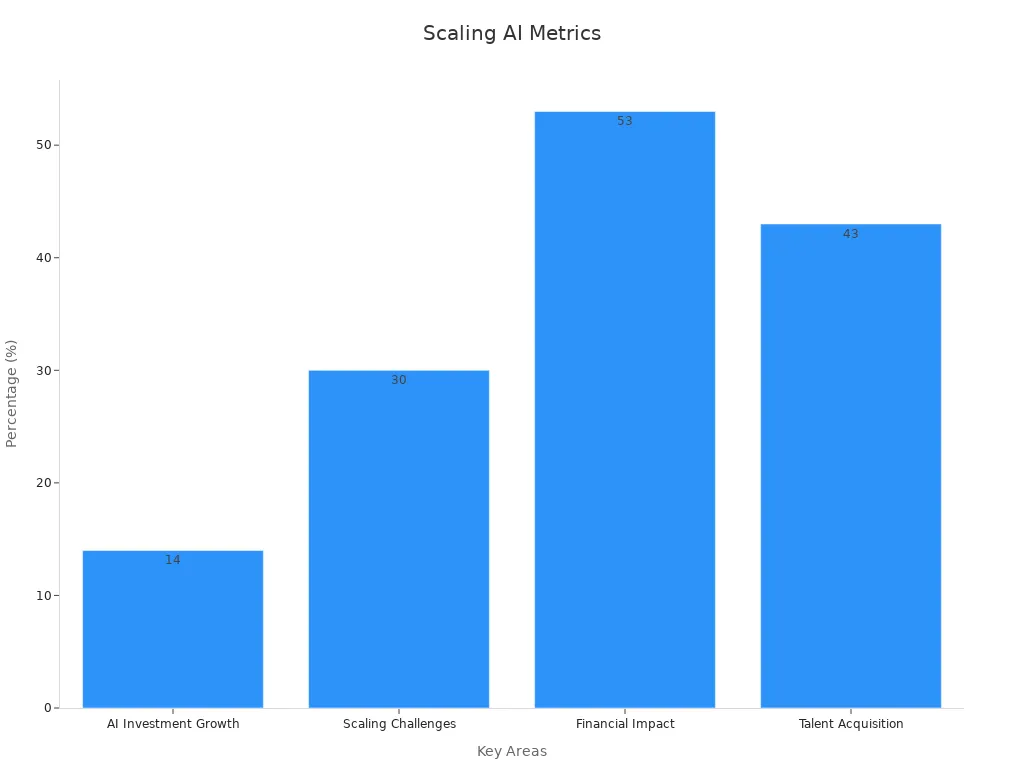
Scaling AI can be tricky. Only 30% of advanced companies succeed in using AI widely. To do it right, you need tools like MLOps, which speed up machine learning processes.
Here’s how to scale AI effectively:
Automate repetitive tasks to save time.
Train your team to use advanced AI tools.
Create rules to make sure AI supports your business goals.
Scaling AI isn’t just about technology—it’s about planning. With the right strategies, your AI tools can grow as your business grows.
AI is making checkout pages easier and faster to use. It changes forms instantly, skipping extra steps for repeat shoppers. This speeds up buying and lowers the chance of leaving carts behind. AI tools also scan products automatically, saving time and making shopping smoother. These tools don’t just save time—they help stores handle more shoppers, even when it’s busy. Using AI well means creating a checkout that’s safe, personal, and successful. To stay ahead, stores must use these tools and keep improving them.
FAQ
What is AI checkout optimization, and why is it important?
AI checkout optimization uses smart tools to make buying easier. It speeds up checkout, makes it safer, and reduces problems. This helps customers feel happy and businesses sell more. Think of it as a helper that makes shopping simple.
How does AI stop people from leaving their carts?
AI knows when shoppers might leave without buying. It sends reminders, gives discounts, or makes checkout easier. By fixing problems quickly, AI helps you finish shopping without trouble.
Is AI safe for online payments?
Yes! AI keeps payments safe by spotting strange activity fast. It stops fraud and protects your data better than people can. It also skips extra checks when everything looks normal, making payments smooth.
Can AI improve mobile checkout?
Of course! AI makes mobile shopping easier by fixing layouts, filling forms, and using voice commands. It saves time and avoids problems like tiny buttons or slow pages.
Can small businesses use AI checkout tools?
Yes! AI tools are affordable and grow with small businesses. They help by making checkout faster, personalizing shopping, and giving better support. It’s like having big-business tools without spending too much.
Tip: Start with simple AI tools that fit your budget. Add more as your business grows.
See Also
Achieving SEO Excellence Using Perplexity AI: An In-Depth Manual
Writesonic AI And QuickCreator: A Battle For Content Supremacy
Blog Creation With AI: Hosting, Writing, And SEO Essentials
