UGC Rights Registry: What It Is, Why It Matters, and How to Build One

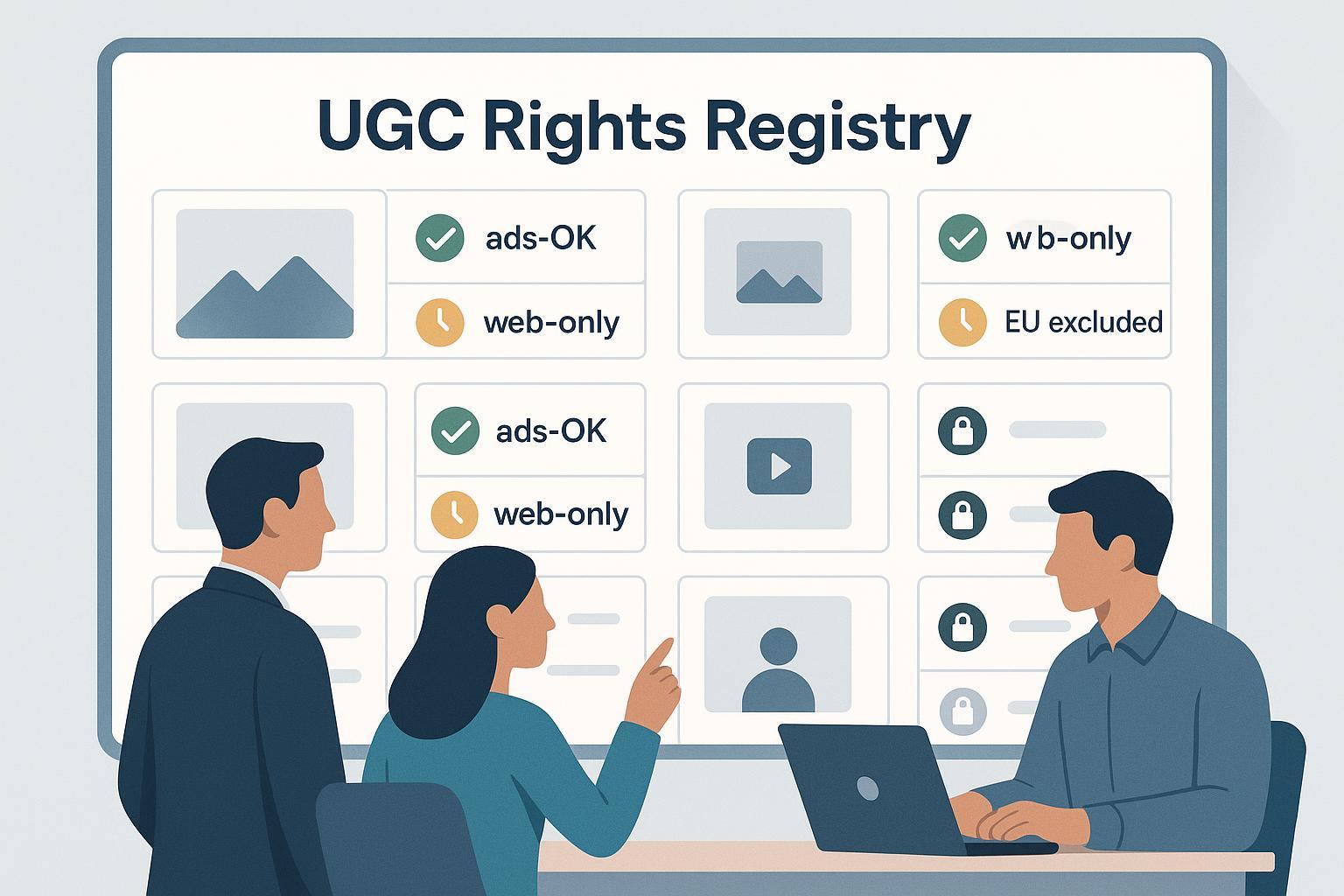
A UGC Rights Registry is a workflow plus database that centralizes proof of permission to reuse user-generated content (UGC)—photos, videos, reviews—across your marketing. Think of it as a digital lease ledger that records who said “yes,” to what uses, where, and for how long, complete with evidence.
What it isn’t: a government copyright registry or a universal industry database. It’s usually brand- or vendor-specific and often connects to your asset library and publishing tools.
Key takeaways
- Public doesn’t mean permissible: platform terms grant licenses to the platform, not to outside brands; explicit creator permission is safest.
- Your registry should store consent artifacts, license scope (channels/territories/dates), creator metadata, provenance, and revocation history.
- Build guardrails into activation: only publish assets that the registry marks as “cleared” for the intended channel and market.
- Maintain a clear takedown/revocation process and keep auditable logs for endorsements and privacy compliance.
Why a UGC Rights Registry matters
Creators generally own the copyright in their posts; copyright in the U.S. “ordinarily vests in the author,” and transfers require a signed writing, while licenses grant permission without transferring ownership. See the U.S. Copyright Office’s plain-language overview on what copyright is and who owns it.
When UGC operates as an endorsement (think testimonials in ads or on product pages), marketers must ensure claims are truthful and that any material connections are clearly disclosed. The Federal Trade Commission’s 2023 update to its Guides and FAQ clarifies duties for brands and endorsers; review the FTC Endorsement Guides: What People Are Asking (2023).
Also, don’t confuse platform visibility with permission: Instagram, TikTok, and X state that users retain ownership; platform licenses do not automatically grant brands off-platform reuse rights. Instagram’s help pages explain this directly; see Instagram’s ownership and license basics and copyright FAQs urging permission before reposting. Similar principles appear in TikTok’s creator content terms and TikTok’s IP policy, as well as the X Developer Agreement & Policy.
Practically speaking: a registry reduces legal risk, speeds approvals, and keeps teams aligned on where UGC may (and may not) be used.
What a UGC Rights Registry tracks
At minimum, your registry should capture:
- Consent method and evidence: reply-to-comment, DM, hosted form, contract; store screenshots, timestamps, and links.
- Usage grant (license scope): allowed channels (website, email, paid social, display, OOH), territories, start/end dates, exclusivity, and any restrictions (e.g., no edits or no endorsements).
- Creator and rights-holder metadata: social handle, legal name/entity, preferred contact, and age/guardian details if minors are involved.
- Asset provenance and versions: source URL, upload hashes, edit history, and audit trail of who approved what and when.
- Compliance artifacts: links to terms presented to the creator, privacy acknowledgments, and revocation/takedown logs.
For example, apply structured tags like “ads-OK,” “web-only,” “24-month term,” or “EU excluded” to prevent accidental misplacement and to automate eligibility checks.
How a UGC Rights Registry works (step-by-step)
- Discovery and intake: pull candidate UGC via hashtags, mentions, API feeds, or direct submissions; run moderation.
- Rights request: send a templated DM/comment or route creators to a hosted form for explicit consent and terms. A concrete pattern is captured in Nosto’s “Rights via Registration,” which shows configurable fields you can collect alongside permission; see how to collect data with Rights via Registration.
- Recordkeeping: link consent artifacts to the specific asset and license scope; maintain an audit trail of approvals and changes.
- Activation: only approved, in-scope assets should be eligible for export and placement; enforce checks in your CMS, DAM, or ad tools.
- Ongoing compliance: handle expirations, revocations, and re-verification for time-bounded rights; log and honor takedowns promptly.
Legal and policy touchpoints (orientation, not legal advice)
- Copyright and licenses: creators retain ownership; brands need permission to reuse. Review the U.S. Copyright Office’s explanation of what copyright is and ownership basics.
- Endorsements and disclosures: disclosures must be clear and conspicuous when there’s a material connection or when UGC functions as an endorsement; see the FTC’s 2023 Endorsement Guides FAQ.
- Privacy and consent in the EU/UK: consent should be freely given, specific, informed, and unambiguous, with easy withdrawal and records. See the EDPB consent guidelines (05/2020) and the UK ICO’s guidance on obtaining, recording, and managing consent.
Platform ToS realities (as of September 2025)
- Instagram: users own content; brand reuse off-platform generally requires permission. See Instagram’s ownership/license help.
- TikTok: creator ownership with campaign-limited rights unless otherwise licensed; review TikTok One Terms of Service.
- X (Twitter): license scopes and consent-driven restrictions; see X’s Developer Agreement & Policy.
Bottom line: public availability ≠ commercial license. Acquire explicit permission.
Governance: make compliance part of the workflow
- Audit trail: keep screenshots, message logs, timestamps, and approver identities tied to each asset.
- Expiry and renewal: track end dates; set alerts 30–60 days before expiry; block placements after expiration.
- Revocation and takedowns: provide a clear request path; remove content promptly and log actions.
- Role-based checks: train designers and media buyers to confirm registry status before exporting or trafficking creative.
- Minors: add extra review and guardian consent workflows; local laws may impose additional conditions.
How to stand up a basic registry in 30–60 days
Weeks 1–2: Data model and policy
- Define fields: consent method/evidence, channels, territories, dates, restrictions, creator metadata, provenance, revocation.
- Draft templates: DM/comment request scripts and a hosted consent form with clear terms and disclosures. For inspiration on fields, review Nosto’s example of configurable data capture in rights registration.
Weeks 3–4: Tooling and integration
- Choose where the registry lives: spreadsheet (short-term), DAM/CRM custom objects, or a UGC platform.
- Integrate with your asset library and CMS/ad tools to enforce “cleared-for-use” checks.
- Set up alerts for expirations and revocations.
Weeks 5–8: Pilot and scale
- Run a limited pilot with one product line or market.
- Train creative, social, and media teams; add a pre-flight rights check to QA.
- Review the first month’s audit logs; refine tags and approval rules.
Quick checklist
- Do we have explicit permission and proof tied to each asset?
- Are channel, territory, and time limits tagged and enforced?
- Are disclosures present where content functions as an endorsement? Consult the FTC’s 2023 FAQ.
- Is there an easy revocation path, and are takedowns logged?
Tooling landscape and trade-offs (examples, not endorsements)
- UGC suites for discovery + rights + activation: Nosto (Stackla) and Emplifi/Pixlee offer rights-request workflows and permission capture; see the Nosto Rights via Registration overview and the Emplifi UGC platform page. Strengths: end-to-end workflow, social discovery, templated requests. Considerations: vendor lock-in, variable depth of public documentation, and per-seat or volume-based pricing.
- Rights management for broader marketing assets: FADEL BrandVision (Rights Cloud) centralizes contractual terms, expirations, and asset availability with DAM integrations; see the FADEL BrandVision overview. Strengths: robust governance and alerts across channels. Considerations: implementation effort and enterprise-centric pricing.
Tip: If you operate at small scale, a disciplined spreadsheet or DAM custom fields can work temporarily—but add automation (alerts, publish blocks) as usage grows.
Adjacent concepts: provenance and authenticity
Content provenance standards like C2PA and Adobe’s Content Authenticity Initiative add cryptographically signed “Content Credentials” to media, capturing origin and edit history. They complement a rights registry by answering “who created/changed this and when,” while the registry answers “who allowed what use and for how long.” Explore the C2PA project and the CAI’s overview of how Content Credentials work.
Common pitfalls (and fixes)
- Assuming platform ToS grant blanket commercial rights. Fix: obtain explicit permission; see Instagram’s guidance on ownership and permission.
- Losing proof of consent (deleted comments/DMs). Fix: screenshot and archive artifacts; store them with the asset.
- Using UGC as testimonials without disclosures. Fix: follow the FTC’s 2023 endorsement guidance and ensure clear, conspicuous disclosures.
- Ignoring geography or time limits. Fix: tag restrictions and block placements outside scope; set renewal alerts.
FAQ
- Is a hashtag reply like “#yesBrand” enough? It can document consent if paired with clear, accessible terms—but explicit, documented permission via a hosted form or DM is safer. See practical advice such as Sprout Social’s copyright basics for social media.
- How do we handle minors in content? Add an extra review layer and obtain verifiable parental/guardian consent; requirements vary by jurisdiction.
- How long should we retain consent records? Regulations don’t prescribe a universal duration; adopt a risk-based retention policy with counsel and ensure revocations are honored and logged.
- Do platform disclosure tools suffice? Not always. Disclosures must be clear and conspicuous in context; see the FTC’s 2023 FAQ.
The bottom line
A UGC Rights Registry turns good intentions into operational certainty. By capturing explicit permissions, tagging scope and limits, and enforcing checks at publish time, you reduce legal risk and speed creative activation—without losing the authenticity that makes UGC so powerful.
