How to Use AI for Search Intent Optimization

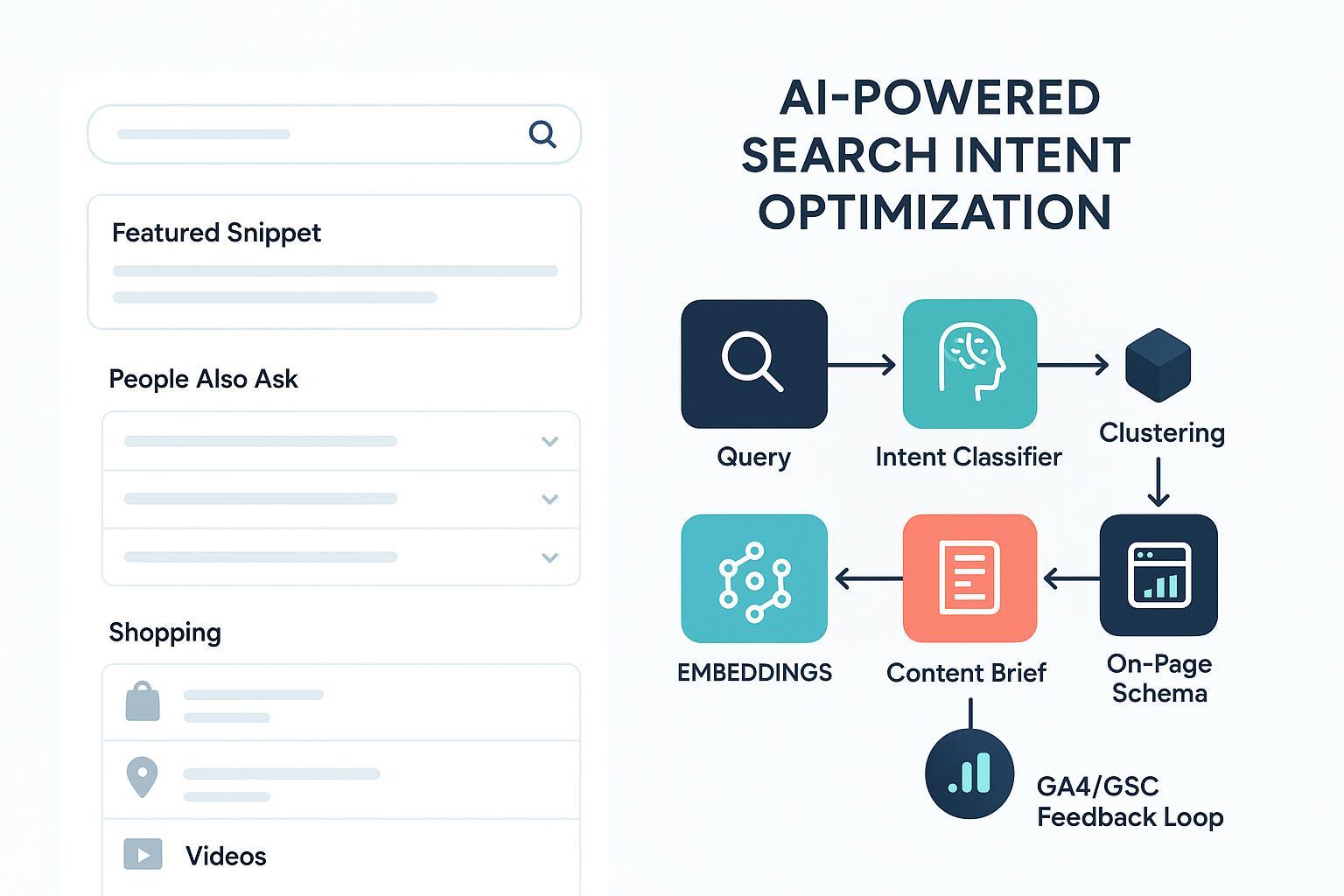
If you can reliably match what a searcher hopes to achieve, you win more clicks, engagement, and conversions—especially as AI reshapes SERPs. This guide shows a practical, 2025-ready workflow to classify intent with LLMs, group keywords with embeddings, translate SERP signals into programmatic briefs, and validate outcomes in GA4 and GSC.
What “search intent” really means (and why it’s your north star)
Search intent is the purpose behind a query—the job the user wants done. Industry practice aligns around four core types: informational, navigational, transactional, and commercial investigation. Hybrid or compound intent is increasingly common (e.g., “best laptops for designers” mixes commercial investigation with informational specifics). For a concise overview of how intent aligns to content strategy, see the Search Engine Land guide to search intent, which frames intent as the user’s underlying goal and the publisher’s task as matching it with the right content type and depth (Search Engine Land — search intent guide).
A 5-minute SERP diagnosis (Three Cs + features)
Before you fire up any model, read the SERP. In five minutes, you can infer dominant vs. secondary intent by scanning the top results’ content type (blog posts, category pages, product pages, tools, or videos), format (listicles, how-tos, comparisons, landing pages, case studies), and angle (beginner vs. expert, brand-neutral vs. vendor, price-sensitive vs. feature-led). Then note the SERP features: Featured Snippet and People Also Ask tend to signal informational expectations; Shopping, product rich results, or Local Pack lean commercial/transactional; video carousels hint at tutorial/demo expectations. Semrush’s regularly updated overview explains how features map to user expectations (Semrush — SERP features guide). Finally, decide what must be satisfied to compete on page one and what can be addressed as supportive sections or internal links.
Think of this as a preflight check. If the top 10 results are all how-to articles with a Featured Snippet, trying to rank a product page is an uphill climb.
Step 1: Classify intent with an LLM (prompt + QA loop)
LLMs can classify intent accurately at scale when you give them clear labels and strong examples. Rasa’s documentation outlines patterns like few-shot prompting and retrieval-augmented examples to stabilize performance across domains (Rasa — LLM intent classification).
Prompt skeleton (adapt as needed):
System: You are an SEO analyst. Classify the search intent for the user’s query.

User:
Task: Classify the primary and secondary search intent for the query.
Labels:
- informational: learning, problem-solving, definitions.
- navigational: finding a specific site/app/brand.
- commercial: researching products/services to buy soon (comparisons, pricing, features).
- transactional: ready to buy/act (add-to-cart, sign up, download, book).
Output JSON:
{
  "label": "informational|navigational|commercial|transactional",
  "secondary_labels": ["…"],
  "confidence": 0–1,
  "rationale": "short explanation"
}
Examples:
Q: "how to clean suede shoes" -> {"label":"informational","secondary_labels":[],"confidence":0.92,"rationale":"seeks steps"}
Q: "asana pricing" -> {"label":"commercial","secondary_labels":["navigational"],"confidence":0.89,"rationale":"evaluation signaling purchase research"}

Query: "{{your_query}}"
Quality loop (fast): build a labeled seed set (100–500 examples per label) from your GSC queries and keyword list; run the classifier, then manually review a stratified sample across labels and edge cases; track disagreements and refine label descriptions and examples; re-test until agreement stabilizes. For long-tail queries, retrieval-augmented prompting that injects similar, pre-labeled examples can boost consistency. Asking for a confidence score and short rationale supports faster spot checks.
Step 2: Group keywords with embeddings + clustering
Once single-query labels are stable, scale up with semantic clustering so you can map topics to pages. A practical approach is to embed your keywords with a high-quality model (e.g., a modern sentence embedding), normalize vectors, and compare with cosine similarity. For an SEO practitioner’s perspective on embeddings in content workflows, see iPullRank’s technical overview on vector embeddings and semantic use cases (iPullRank — embeddings primer). Choose a clustering method that fits your set: K-means for large, evenly distributed data; HDBSCAN for variable density and noisy long-tail groups. Validate clusters in two ways—first, check semantic cohesion (tight intra-cluster distances vs. inter-cluster), and second, run a SERP validation by sampling keywords from each cluster and confirming top results share content type, format, and angle. Label clusters by intent (majority vote from your classifier) and by “content model” (e.g., “best + {category} comparison,” “how-to guide,” “pricing page”). If a cluster mixes intents (tutorials and product pages ranking together), split it or plan separate pages to avoid cannibalization.
Step 3: Turn SERP data into a programmatic content brief
Automating SERP parsing saves hours and standardizes quality. Use a SERP API to extract the top results, People Also Ask, featured snippet structure, and schema sightings. The Apify Google Search Scraper shows the sort of structured outputs you can expect (query params for language, locale, pagination) and is a good reference for field coverage (Apify — Google Search Scraper input schema).
Next, convert findings into a brief your writers (or generator) can follow. Start by stating the target intent (primary and secondary) and the content model—type, format, and angle—that matches the SERP’s dominant pattern. Outline the required H2/H3 sections that will satisfy must-have subtopics and list the questions to answer, drawing from PAA and competitor headings. Specify the evidence and citations you expect (for example, pricing pages or official documentation), and note any media requirements such as a comparison table, screenshots, or a short video if the SERP shows a carousel. Recommend schema types that genuinely reflect the page’s purpose (e.g., Article, HowTo, FAQPage), and define internal links that move readers to the appropriate next step based on their stage.
Here’s a compact JSON-like spec you can adapt for generation:
{
  "keyword": "best budget email marketing tools",
  "intent": {"primary": "commercial", "secondary": ["informational"]},
  "model": {"type": "article", "format": "list + comparison table", "angle": "budget under $X"},
  "outline": ["Intro: who this is for", "Methodology", "Top picks (H2->H3 per tool)", "Comparison table", "FAQs"],
  "evidence": ["Pricing pages", "Independent benchmarks"],
  "schema": ["Article", "FAQPage"],
  "media": ["comparison table", "product screenshots"],
  "internal_links": ["/pricing/", "/compare/tool-a-vs-tool-b/"]
}
On-page alignment and schema that reinforce intent
Your page should echo the SERP’s expectations from title to CTA. H1, title tag, and meta description must promise the thing the searcher wants; use intent modifiers (e.g., “best,” “vs,” “how to,” “near me”) when they reflect the dominant pattern. Lead with an “intro promise” that states what the page will deliver and for whom. Navigation and internal links should move readers to the next logical step—for example, from an informational guide to a comparison or product page. CTAs should match the stage: soft newsletter or template download for informational; demos, pricing, or “compare plans” for commercial; add-to-cart or “start now” for transactional. Finally, implement structured data that matches the page’s visible content. Google recommends JSON-LD and provides a Search Gallery to verify types and requirements like Article/BlogPosting, FAQPage, HowTo, Product, and LocalBusiness. Always ensure your markup reflects on-page content and test in Rich Results tools (Google Search Central — structured data and Search Gallery).
Pro move: When the SERP shows a video carousel for a how-to, embed a short, scannable video and add HowTo schema if the page is genuinely step-by-step.
Measure and iterate with GA4 + GSC
Intent alignment isn’t “set and forget.” Use both GA4 and Google Search Console to validate that users behave the way your intent model predicts. Google’s 2025 Search Console Insights update clarifies how to connect content performance with search behavior and on-site engagement (Google Developers — Search Console Insights update, 2025).
A simple validation framework: for informational queries, expect solid engagement time and scroll depth and watch for proxy conversions such as downloads and subscriptions; if impressions are high but CTR is low, your title/meta may not reflect the dominant SERP angle. For commercial queries, track micro-conversions like “view pricing,” “compare plans,” or “request demo”—thin or buried comparison sections often signal a mismatch. For transactional queries, monitor add-to-cart, checkout starts, and purchases/leads; high CTR but poor conversion could indicate you’re ranking for the wrong variant of the query.
To diagnose issues, use GSC to map queries to landing pages and flag transactional queries that land on informational pages (and vice versa). In GA4, build segments by intent clusters and compare engagement and conversion patterns; large gaps suggest content-model misalignment. Track CTR and position by cluster over time. If CTR drops while position holds, the SERP’s dominant model may have shifted—time to refresh the brief.
Troubleshoot hybrids and decide split vs. consolidate
Some topics straddle intents. Split when the SERP shows separate content types ranking distinctly (e.g., tutorials and product/category pages); each intent deserves its own page. Consolidate when top results consistently cover multiple sub-intents within one comprehensive page and there’s no cannibalization risk. Scope secondary intents into sections (FAQs, mini buyer’s guide) and add internal links to the next-step page. Watch for cannibalization: if two of your URLs volley for the same query cluster, differentiate them by intent and angle or merge the weaker into the stronger.
Practical example (Disclosure): Using QuickCreator to accelerate the brief
Disclosure: QuickCreator is our product.
Here’s how you can translate your SERP diagnosis into a ready-to-write brief using QuickCreator without overhauling your stack. Start a new brief and set the target keyword plus the primary/secondary intent. Paste notes from your SERP scan (content type/format/angle, PAA questions, required media). QuickCreator can help structure these into H2/H3 sections and add suggested FAQs based on SERP-style prompts. Add an “evidence list.” If you want AI-assisted draft sections that include citations, see how we approach cited outputs in our explainer on an AI writer with references in practice (AI Writer with Citations — explainer). Finally, enable on-page checks so titles, meta descriptions, and internal link suggestions align to the chosen intent model. For a broader overview of aligning pages to intent with automated checks, review our blog SEO capabilities (Blog SEO overview).
Neutral note: You can run this process with other stacks, but a single workspace that combines SERP cues, outline generation, and on-page checks reduces errors and handoffs.
Minimal viable stacks and next steps
Pick the simplest stack that gets you consistent results. The no/low-code route combines an SEO suite for SERP snapshots, a spreadsheet for briefs, and GA4/GSC for validation. A mid-tech setup layers in an LLM for intent classification, embeddings with a vector database for clustering, a SERP API (e.g., Apify) for inputs, and a small scripts/notebook pipeline to generate briefs. Prefer a platform-centric path? Choose a content platform that supports AI briefs, on-page checks, and publishing.
Next steps: codify your prompt templates and brief schema so anyone on your team can run the process; create GA4 audiences and GSC filters by intent clusters for monthly reviews; and if you’re consolidating your workflow, our Help Center has setup and integration guides you can browse when you’re ready (QuickCreator Help Center).
References and further reading
- A strategic primer on intent and content expectations: Search Engine Land — search intent guide
- Mapping features to user expectations: Semrush — SERP features guide
- LLM classification patterns: Rasa — LLM intent classification
- Embeddings in SEO practice: iPullRank — embeddings primer
- SERP parsing reference: Apify — Google Search Scraper input schema
- Structured data implementation: Google Search Central — structured data and Search Gallery
- Measurement alignment: Google Developers — Search Console Insights update, 2025
