Why Google Maps Scraper is a Game-Changer for Local SEO Success

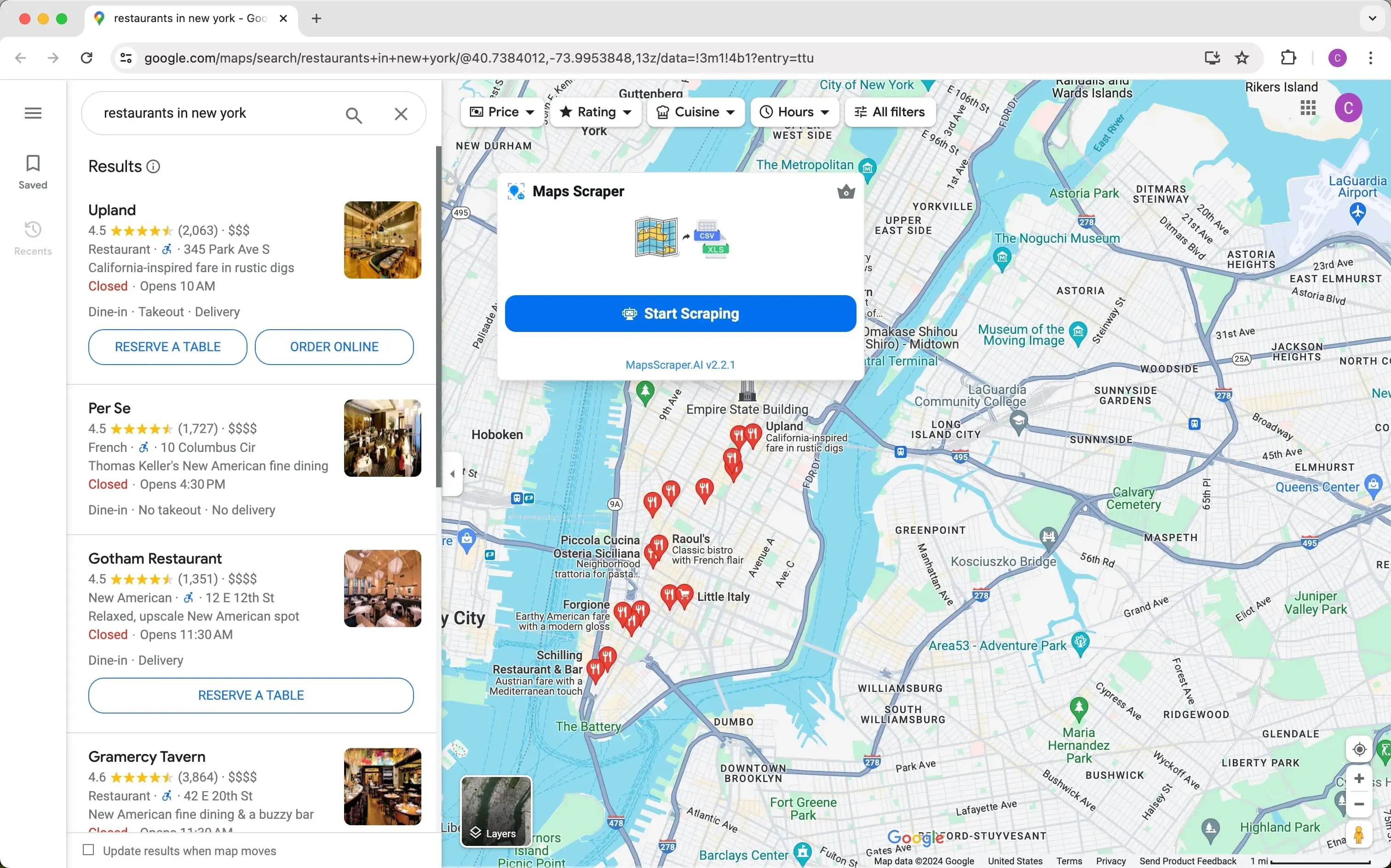
Imagine a tool that boosts your local SEO efforts. A Google Maps scraper does just that. It helps you collect important data, like business info and reviews, from Google Maps. This data becomes your key to improving local SEO. You can use it to get noticed, gain more local customers, and beat competitors. With this tool, you’re not just improving your plan—you’re turning it into a strong growth machine.
Key Takeaways
A Google Maps scraper gathers important business details to boost local SEO and get more customers.
Using this data helps businesses improve their Google My Business pages, making them easier to find in local searches.
Looking at competitor reviews and ratings shows trends and customer likes, helping create better marketing plans.
It’s important to scrape data ethically; always follow Google’s rules to stay out of trouble and keep trust.
Automating scraping saves time and keeps data correct, helping with better local SEO strategies.
Understanding Google Maps Scraper and Its Role in Local SEO
What is a Google Maps Scraper?
A Google Maps scraper is a tool that gathers useful details from Google Maps. It collects things like business names, addresses, phone numbers, and reviews. This tool works automatically, saving you time and effort. It helps you gather lots of data for finding leads, studying the market, and improving local SEO plans. Instead of doing it by hand, scraping gives you fast and easy access to information that can change how you run your business.
Did you know? Many companies use Google Maps scraping to study competitors, improve their Google My Business (GMB) profiles, and spot local trends. This helps them stay ahead in their market.
How Google Maps Scraping Works
Data Extraction Techniques
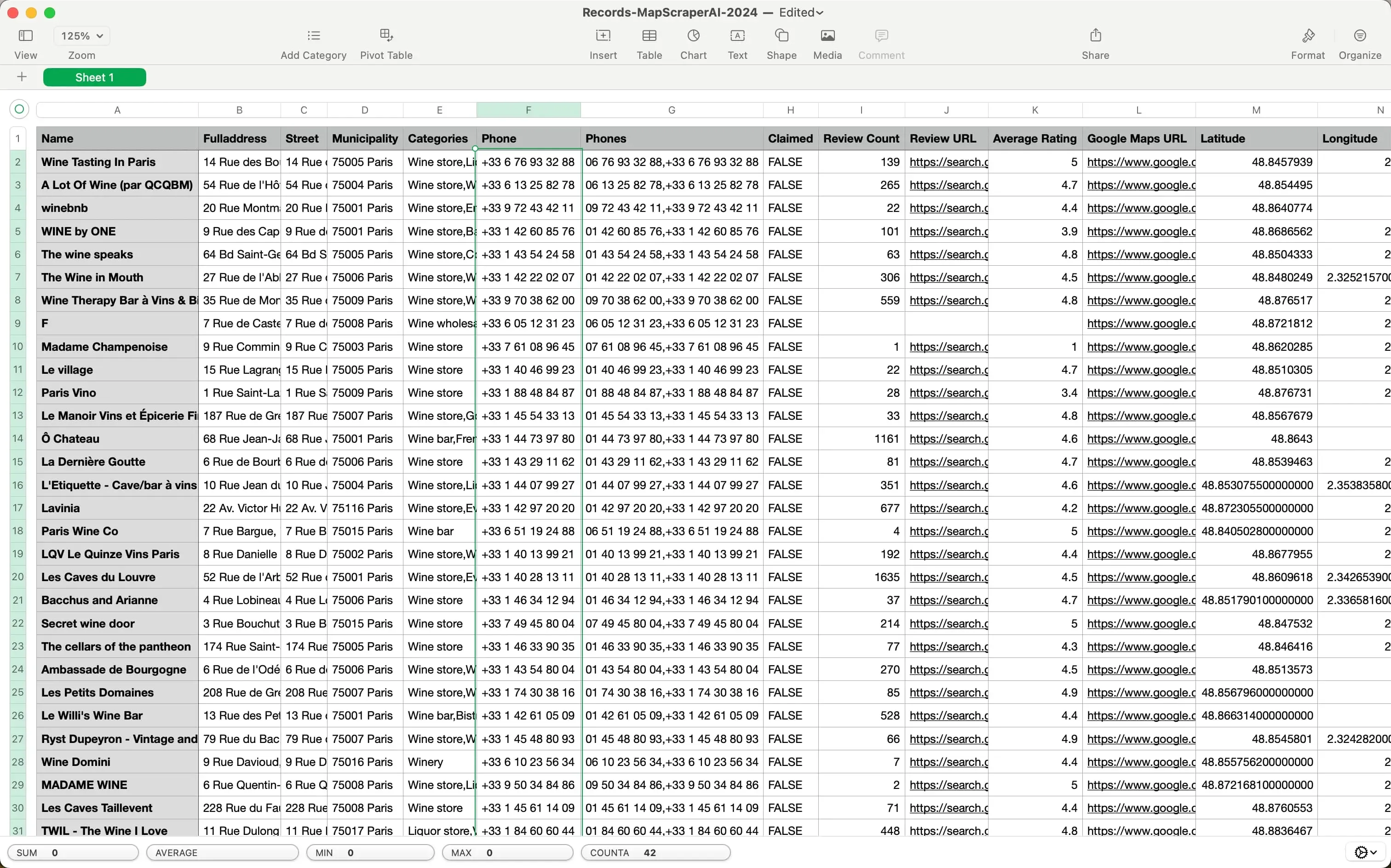
Scraping Google Maps uses smart methods to collect data quickly. While Google has an official API, many people like scraping because it’s cheaper and more flexible. Here’s how it works:
Pull business names, addresses, and phone numbers from Google Maps.
Organize the data into a neat format, like a list.
Change the data into a spreadsheet for easy review.
Use the information to improve your local SEO plan.
For example, Python can help automate this process. Here’s a simple code example:
import requests

api_key = "your-api-key"
url = "https://api.scrapingdog.com/google_maps/reviews"

params = {
    "api_key": api_key,
    "data_id": "0x89c2585144ec67ad:0xbfef005e94c9d209"
}

response = requests.get(url, params=params)

if response.status_code == 200:
    data = response.json()
    print(data)
else:
    print(f"Request failed with status code: {response.status_code}")
Types of Data Collected
Scraping Google Maps lets you gather many kinds of data, like:
Business names and locations
Phone numbers and emails
Customer reviews and ratings
Social media links
Business hours and types
This data helps you learn about your market, improve your listings, and reach new customers.
Why It Matters for Local SEO
Connecting Businesses with Local Customers
Scraping Google Maps helps connect your business with local people. By looking at reviews and ratings, you can see what customers like most. This helps you adjust your services and ads to match their needs. For instance, if reviews often mention friendly staff, you can highlight this in your marketing.
Enhancing Local SEO Visibility
Scraping Google Maps also helps boost your local SEO. By studying top competitors, you can find good keywords and descriptions to improve your GMB profile. This makes it easier for people to find your business in local searches, bringing in more visitors.
Benefit/Use Case | Description |
|---|---|
Competitor Analysis | Study competitor profiles and keywords to improve your SEO. |
Customer Insights | Use reviews to learn what customers like or dislike. |
Keyword Research | Find local keywords to make your SEO better. |
Location-Based Trends | Spot local demand for products/services to guide your marketing. |
Google My Business Optimization | Improve your GMB profile using data from top competitors. |
By using this information, you can stay ahead of others and attract more local customers.
Key Benefits of Google Maps Scraping for Improving Local SEO
Improving Local Search Results
Making Business Listings Better
Google Maps scraping gives you detailed business details. These include names, addresses, and contact numbers. This data helps you fix and improve your Google Maps listing. A complete and correct listing makes your business easier to find. For example, studying competitors can show you good keywords to use. Adding these keywords to your listing can boost your SEO. This brings more visitors and builds trust with your customers.
Creating Correct Citations
Citations are important for local SEO success. Scraping Google Maps helps you collect accurate data for making citations. These citations appear on different websites and platforms. Correct citations make your business look real to search engines. This improves your local search ranking. It also gives you an advantage over competitors with bad or missing citations.
Learning About Customers
Checking Reviews and Feedback
Customer reviews are full of helpful information. Scraping Google Maps lets you gather and study reviews. This shows what customers like or dislike. For example, a study of 5,427 restaurant reviews found trends that helped businesses improve. By spotting common feedback, you can fix problems and promote your strengths. This makes customers happier and keeps them coming back.
Understanding What Customers Want
Scraping Google Maps also shows how customers behave. By looking at ratings and review patterns, you learn what they value most. For example, Starbucks uses location data to pick new store spots. They also use it to improve their products. This kind of data helps you create better marketing plans that fit your audience.
Evidence Type | Description |
|---|---|
Numbers and Data | A study of 5,427 reviews used Google Maps scraping to find trends. |
Real-Life Example | Starbucks uses location data to choose store spots and improve products. |
Business Knowledge | Google Maps data shows risks and helps plan for future growth. |
Studying Competitors
Learning Competitor Strategies
Scraping Google Maps shows how competitors are doing. You can see their ratings and reviews. This helps you learn what they do well and what they don’t. For example, you can find their popular products or services. Use this information to make your business better. This research helps you stay ahead in your field.
Finding New Market Chances
Scraping Google Maps also shows areas with high demand but few competitors. This helps you find new places to grow your business. Customer complaints about competitors can also show where they fail. You can use this to offer better services. This makes your business stand out and become a top choice.
Google Maps scraping shows competitor ratings and reviews to understand the market.
It reveals where competitors are located and how crowded the market is.
Scraped data shows customer likes and dislikes, helping you improve your services.
Practical Uses of Google Maps Scraping in Local SEO Plans
Finding Leads
Discovering Good Leads
Using Google Maps scraping helps find great leads for your business. It collects key details like names, addresses, phone numbers, and ratings. This helps you make a focused contact list. For example, a medical software company could check hospital reviews in one area. Hospitals with bad ratings could need better solutions. This way, you save time by focusing on leads likely to work with you.
Building Focused Campaigns
Data from Google Maps scraping helps create focused marketing plans. For example, finding areas with many businesses like yours can guide your outreach. You could host events, send custom emails, or run local ads. This makes sure your message reaches the right people, increasing interest and sales.
Studying Competitors
Checking Local Competitors
Scraping Google Maps shows what your competitors are doing. You can look at their profiles, keywords, and services to see what works. For instance, if a competitor offers something unique, you can improve your services to match or beat it. This helps you adjust your local SEO plan and stay ahead.
Spotting Market Needs
Google Maps data shows areas with unmet needs. By looking at competitor locations and reviews, you can find places needing better services. For example, if reviews mention bad service at a competitor’s store, you can offer better options. This helps you fill gaps and stand out in the market.
Custom Marketing Plans
Adjusting Offers with Local Info
Scraping Google Maps shows what customers want and local trends. By reading reviews, you can find common words and ideas customers use. Adding these to your ads makes them more relatable. For example, if reviews ask for eco-friendly products, you can offer those. This makes your marketing connect better with local buyers.
Boosting Customer Interest
Local data helps you make offers that attract nearby customers. For instance, you could give discounts to people close to your store. This brings more visitors and builds loyalty. Using Google Maps scraping, you can make your marketing more exciting and useful.
Tip: Use insights from Google Maps scraping to improve your website and Google My Business profile. This will help boost your local SEO results.
Ethical Considerations and Challenges in Google Maps Scraping
Legal Aspects of Google Maps Scraping
Understanding Terms of Service
When scraping Google Maps, you must follow Google’s rules. These rules say no automated scraping without permission. Breaking them can cause big problems for your business. For example, in 2017, LinkedIn sued hiQ Labs for scraping without consent. This case showed it broke terms of service and the Computer Fraud and Abuse Act. To avoid trouble, always read the rules before scraping.
Note: Scraping public data is often okay, but Google bans automated scraping. Following the rules helps you avoid legal problems.
Avoiding Legal Risks
Legal issues can hurt your business if you’re not careful. Scraping without permission can lead to fines or lawsuits. Laws like GDPR and the US Privacy Act control how data is used. To stay safe, act responsibly. Don’t use data for spam or unwanted ads. Use it to help your business grow ethically. This keeps your reputation strong and avoids legal trouble.
Addressing Data Privacy Concerns
Protecting Customer Information
You must respect privacy when collecting data. Customers trust you to handle their information safely. Misusing it can harm your reputation. For example, scraping emails and sending spam can lead to complaints. Instead, use data to improve your services and help customers.
Respect people’s and businesses’ privacy.
Don’t collect sensitive or private information.
Follow ethical rules when scraping data.
Ensuring Compliance with Regulations
Following data laws is very important. Rules like GDPR say you must be clear about how you use data. Tell users what you’ll do with their information. This builds trust and keeps you out of legal trouble. Using data ethically also makes your brand stronger and more trustworthy.
Overcoming Technical Barriers
Managing Large-Scale Data Extraction
Scraping lots of data can be hard. You need good tools and methods to do it well. Tools like BeautifulSoup or Scrapy make scraping easier. To save time, use caching and scrape data in smaller parts. These steps help you get accurate results faster.
Strategy | Description |
|---|---|
Dealing with CAPTCHAs and IP Blocks | Use CAPTCHA-solving tools and rotating proxies to avoid blocks. |
Optimizing Performance | Use caching and monitor performance to handle large data scraping. |
Best Practices | Follow robots.txt, add delays, and update tools to avoid detection. |
Avoiding IP Blocking Issues
Google might block your IP if it sees strange activity. To stop this, use rotating proxies and scrape less often. These tricks make your actions look normal, like a person. By solving these problems, you can scrape data smoothly without interruptions.
Tip: Watch your scraping tools for problems. Update them often to keep up with Google Maps changes.
Tools and Methods for Effective Google Maps Scraping
Top Tools for Google Maps Scraping
Features to Consider
When picking tools for Google Maps scraping, focus on your needs. Choose tools that are simple to use, like ones with drag-and-drop features. These save time and don’t need coding knowledge. Look for tools that let you export data in formats like CSV or JSON. This makes it easy to study and use the data in your SEO plans. Tools with features like rotating proxies are also helpful. They stop IP blocks and keep the process running smoothly.
Comparison of Leading Tools
Here’s a table comparing popular tools for Google Maps scraping:
Tool Name | Type | Features | Pros | Cons | Pricing |
|---|---|---|---|---|---|
Octoparse | Desktop Scraper | Drag-and-drop tool, pre-made templates for scraping | Easy to use, no coding needed | No free plan, not very user-friendly | $0.2 per 1000 results |
MapLeads | Add-On Scraper | Collects local business data, large contact database | Finds emails, removes limits in paid version | Limited search area, risk of IP blocks | $9.9 per month for 100,000 records |
Web Scraper | Add-on Scraper | Point-and-click interface, extracts many records | Works on complex pages, no coding needed | Slow data export | $50 per month |
MapsScraper | Add-on Scraper | Scrapes Google Maps data, finds emails | Affordable option | Hard to set up, performance varies | $15/month for unlimited listings |
Pick a tool that matches your skills, budget, and goals. For example, if you’re new to scraping, Octoparse is a good beginner-friendly choice.
Best Practices for Google Maps Scraping
Automating the Process
Automation makes Google Maps scraping faster and easier. Use tools that let you schedule tasks and pick specific data, like business names or ratings. This saves time and keeps your data updated. For instance, you can set a tool to scrape weekly, so your contact list stays fresh. Anti-detection tools and rotating proxies help avoid getting blocked and keep things running smoothly.
Ensuring Data Accuracy
Getting accurate data is very important for SEO. Plan what kind of data you need and how often to scrape it. Check the process often to catch mistakes early. Use tools with features that check data for errors. For example, compare scraped data with your current records to find and fix any mismatches. This keeps your information correct and reliable.
Tip: Always follow Google’s rules and legal guidelines to avoid problems.
Leveraging Scraped Data for SEO Success
Integrating Data into Local SEO Strategies
Scraped data can improve your local SEO. Use it to update your Google My Business profile, make better website content, and create targeted ads. For example, studying competitor reviews can show useful keywords and trends. Adding these to your listings can make your business easier to find and attract more local customers.
Tracking and Measuring Results
To get the most from Google Maps scraping, track your progress. Use tools to measure how your SEO changes are working. Watch metrics like website visits, search rankings, and customer interest. This shows what’s working and what needs fixing. By improving your strategy over time, you can stay ahead of competitors and succeed long-term.
Note: Scraping Google Maps data helps businesses learn from competitors and improve their local SEO strategies.
Using Google Maps scraping has changed local SEO in big ways. It gives useful information to help you reach local customers and beat competitors. You can improve your business listings, study customer habits, and find new chances in the market.
Tip: Use this method carefully. Following ethical rules keeps your business safe and earns customer trust.
Try out tools and methods now. Begin improving your local SEO and aim for lasting success!
FAQ
Why use a Google Maps scraper?
A Google Maps scraper collects useful business info like names and reviews. This data helps improve your local SEO, connect with customers, and get noticed in local searches.
Is it legal to scrape Google Maps?
Scraping public info is usually okay, but follow Google’s rules. Don’t use automated scraping without permission to avoid legal trouble.
How does Google Maps scraping help local SEO?
Scraped data improves your Google My Business profile and citations. It also helps you study competitors, boosting your rankings and bringing more local customers.
What are the best tools for Google Maps scraping?
Tools like Octoparse, MapLeads, and Web Scraper are easy to use. Pick one based on your budget and needs. Look for tools with automation and anti-blocking features.
How can I scrape data ethically?
Respect privacy and follow rules like GDPR. Use data to improve services, not for spam. Ethical scraping builds trust and keeps your reputation safe.
Tip: Always check Google’s rules before starting any scraping project.
