Creating Storyboard Scripts for TikTok Using AI

AI storyboard generators revolutionize how you create TikTok videos by turning your ideas into storyboard scripts in just minutes. Recent data shows that AI speeds up video creation by 27%, allowing you to complete your planning much faster. These tools combine scriptwriting, visual planning, and voiceover features, giving you more time to focus on storytelling and creativity.
Benefit | Impact Example |
|---|---|
Efficiency | |
Creativity | AI boosts originality and helps with consistent tone |
Engagement | Hyper-personalized content increases audience reach |
Whether you're a beginner or experienced, using AI storyboard scripts makes crafting TikTok stories easier and more enjoyable.
Key Takeaways
AI storyboard generators help you make TikTok videos faster. They turn your ideas into visual scripts in just a few minutes. These tools help you be more creative. You can try new ideas without needing to draw or know a lot about tech. Using AI storyboards makes your videos more interesting. This can get you more views, longer watch time, and more followers. Always follow a clear plan. Know who your audience is. Write a strong script with a good hook. Plan your visuals with AI and check your work. Pick AI tools that let you switch between writing and editing visuals easily. Always add your own style for the best results.
Why Use AI Storyboard Generators
Speed and Efficiency
Making TikTok videos can be quick with ai storyboard generators. These tools turn your script into a storyboard in just a few minutes. You do not have to draw or spend a long time planning. When you upload your script, the ai splits it into scenes and shots. It also adds things like camera angles, lighting, and where characters stand. You can change and share your storyboard with your team right away. This saves you both time and energy.
ai storyboard generators change text scripts into visual storyboards, making the creative process easier.
They help you make full storyboards fast, so you save time.
The storyboard keeps the same look from start to finish.
You and your team can work together easily with digital storyboards.
These tools help lower costs and make projects move faster.
Companies such as Synthesia use ai to make videos up to 90% faster and cut costs by up to 70%. The ai video production market is growing, showing that creators trust these tools for quick and simple video making.
Creativity in Storytelling
ai storyboard generators help you be more creative when telling stories. You can try new ideas without needing to know how to draw. TikTok Symphony and other ai tools let you turn pictures into videos or write scripts that become animated scenes. These tools help you come up with ideas, write scripts, and even add music. Most creators use ai to get ideas and edit their work. You can focus on your story instead of worrying about the technical parts.
96% of creators use ai to help with ideas and make better content.
83% think ai will soon be very important in creative jobs.
ai lets anyone be creative, so small creators can compete with big studios.
With ai, you can make faceless ai videos, animated clips, or videos made fully by ai. This lets you tell stories in new ways and reach more people. ai helps you be more creative and grow your ideas quickly.
Visual Storytelling for TikTok
Telling stories with pictures is very important on TikTok. ai storyboard generators help you plan every shot easily. You can make faceless ai videos or animated scenes that fit your brand. These tools let you turn your storyboard scripts into videos, ready to post.
Evidence Type | Details |
|---|---|
Watch Time Increase | TikTok-ready videos get 67% more watch time per view than others. |
View Count Growth | These videos get three times more views. |
Follower Growth | TikTok-ready videos can help you get over 40 times more followers. |
User Appreciation | 79% of TikTok users like brands that know TikTok’s style. |
Engagement Boost | Videos with background music get 98% more views on average. |
AI Tools Used | ChatGPT (scriptwriting), MidJourney (visuals), Grok (trend tracking), God of Prompt (prompts). |
Content Relevance | AI tools help make content that fits US audiences, so more people enjoy it. |
Hashtag Strategy | Using 2-3 good hashtags helps people find your videos without spamming. |
With automated storyboard tools, you can make faceless ai videos that are different from others. You get more watch time, more views, and more followers. ai storyboard generators help you make stories with pictures that your audience likes and wants to see again.
Step-by-Step Storyboard Scripts Guide
Creating TikTok videos with AI can feel easy when you follow a clear plan. Let’s break down the process so you can make your own storyboard scripts that grab attention and boost your storytelling skills.
Define Audience and Message
Start by thinking about who will watch your video. Ask yourself, “What does my audience like?” and “What message do I want to share?” When you know your viewers, you can shape your storyboard to fit their interests. For example, if your followers love funny moments, you can add humor to your script generation. If they enjoy learning, you can focus on tips or facts.
A study with elementary students showed that using a step-by-step AI system helped them create stories with more creativity and richer details. The AI guided them to pick characters, set up scenes, and plan emotions. This approach works for TikTok too. When you plan your audience and message first, your storyboard scripts become more focused and engaging.
Tip: Write down three things your audience cares about before you start your storyboard. This will help you stay on track.
Script Structure for Engagement
Now, let’s build your script. TikTok videos move fast, so you need a strong start. Begin with a hook—something that makes people stop scrolling. Next, add the main part of your story. End with a clear finish or a call to action, like “Follow for more!” or “Try this at home!”
Here’s a simple structure you can use:
Hook: Grab attention in the first 2 seconds.
Story: Show the main idea or action.
Ending: Wrap up with a message or question.
AI tools can help you with script generation by suggesting hooks, dialogue, and even jokes. They can also help you keep your narrative clear and easy to follow. While traditional storyboards sometimes do better with structure, AI makes your stories more creative and rich.
Visual Planning with AI
Once your script is ready, it’s time to plan the visuals. AI can turn your words into images, scenes, or even animated characters. You don’t need to draw or hire an artist. Just type your ideas, and the AI will create a storyboard for you.
Fortune 1000 companies see a 460% return on ad spend when they use AR and AI visuals on TikTok.
AR campaigns get 70% higher brand recall and 3 times more brand lift than regular ads.
These campaigns also cut costs by 59% and keep viewers engaged 4 times longer.
By 2025, 75% of people worldwide will use AR, showing how important AI visuals are for TikTok.
With AI, you can make faceless videos, animated scenes, or even use AR effects. This makes your storyboard scripts stand out and keeps your storytelling fresh. Try different styles to see what your audience likes best.
Review and Refine
Don’t stop after your first draft. Review your storyboard and ask, “Does this match my brand?” and “Will my viewers care about this story?” AI lets you make changes fast. You can swap out scenes, change dialogue, or adjust the visuals in minutes.
Here’s how the review process helps:
Human review keeps your storyboard scripts on-brand and high quality.
Feedback from others helps you improve your narrative and emotional impact.
You can use AI to test different versions and pick the best one.
Measured Outcome | Improvement Metric |
|---|---|
Speed of creative iterations | |
Collaboration flow | 3x faster |
Vision accuracy | Up to 90% |
This table shows how AI speeds up your creative process. You can work with your team faster and make sure your storyboard matches your vision. The more you review and refine, the better your TikTok videos will be.
Note: Always watch your video before posting. Small changes can make a big difference in how your story feels.
By following these steps, you can use AI to quickly draft, revise, and perfect your storyboard scripts. This step-by-step method helps you tell better stories, connect with your audience, and make videos that stand out on TikTok.
Top AI Storyboard Generators
Key Features Overview
When you look for ai storyboard generators, you want tools that make your video creation process simple and fun. Some of the most popular options include Katalist.ai, StoryboardHero, and StoryDiffusion. These tools let you write a script, turn it into visuals, and even add voiceover—all in one place.
StoryDiffusion uses advanced models to turn your ideas into both text and images. You can start with a short idea or a full story, and the system builds a complete storyboard for you. You can change each frame using simple prompts, which makes customization easy.
ID.8 gives you a full workflow. You can write your script with ChatGPT, create visuals with Stable Diffusion, and add music or sound effects. The tool organizes your scenes and lets you edit everything on a visual canvas. You can even branch your story in different directions.
Many ai storyboard generators now support real-time editing, so you can see changes as you make them. This helps you keep your video on track and match your vision.
Tip: Look for tools that let you switch between scriptwriting and visual editing. This makes your storyboard creation smoother and more flexible.
Pros and Cons
You will notice some big advantages when you use ai for your storyboard. First, you can explore creative ideas much faster. What used to take days now takes hours. You also save money because you do not need to make lots of drafts. Teams work better together since everyone can see and talk about the same visuals. You can try bold new ideas and see them right away.
Fast creative exploration—scene ideas come together quickly.
Cost-efficient—less time spent on drafts and edits.
Better teamwork—visuals help everyone share ideas.
More innovation—try out new styles and concepts easily.
So far, users have not reported any major drawbacks in studies. You still need to check your facts and make sure your story fits your brand, but the benefits stand out.
Choosing the Right Tool
Picking the best ai storyboard generator for TikTok depends on your needs. Think about your script style. Short, punchy lines work best—keep dialog under 20 words and use a fun, casual tone. Make sure your characters and settings fit your story. Try to include only the most important points, so your video stays clear.
Experts suggest you look for these features:
Easy script-to-visual conversion
Strong customization options for scenes and characters
Tools for checking story flow and accuracy
Visual consistency and clear shot descriptions
You should always review your storyboard for accuracy and style. Human judgment helps you avoid mistakes that ai might make. The best results come from mixing ai speed with your own creativity and careful review.
Boost Audience Engagement
Storytelling Techniques
You want people to notice your TikTok videos right away. Studies say half of viewers leave in two seconds if you do not grab them. Only about 15% stay after ten seconds if your start is weak. Begin your storyboard with a bold line or a surprising picture. This helps people keep watching and boosts audience engagement.
Try these storytelling ideas:
Write clear scripts. Give the AI strong visual hints so your storyboard looks good.
Use bright images and smooth changes. This helps viewers feel connected.
Focus on one main message. Keep your story simple and finish with a call-to-action.
Make your content personal. Use templates and changing text to make each video special.
Try different versions. AI can help you make many storyboard scripts for A/B testing.
Tip: Always use a strong hook in the first three seconds. This helps stop your audience from scrolling away.
Visual Storytelling Tips
Visual storytelling helps your storyboard stand out. You can use AI tools like Copy.ai to write short, catchy scripts. Try InVideo or Pictory to edit your video, cut out extra words, and add cool changes. These tools help your video move better and keep viewers watching.
Here are some ways to make your visual storytelling better:
Start with a bold picture or big text.
Add popular music and hashtags to get noticed.
Keep your video short—15 to 60 seconds is best.
Use subtitles or voiceovers with tools like Descript or Zubtitle. This helps people who watch without sound.
Check your analytics with tools like Sprout Social. See what works and change your storyboard for better results.
Note: Work with other creators and look for new trends. This keeps your stories fresh and helps your audience grow.
Common Pitfalls
Many creators have the same problems when using AI for storyboarding. The biggest mistake is not planning your storyboard. Over 40% of people skip this step, which makes weak videos. Another problem is messy style. If your storyboard looks sloppy, viewers lose interest.
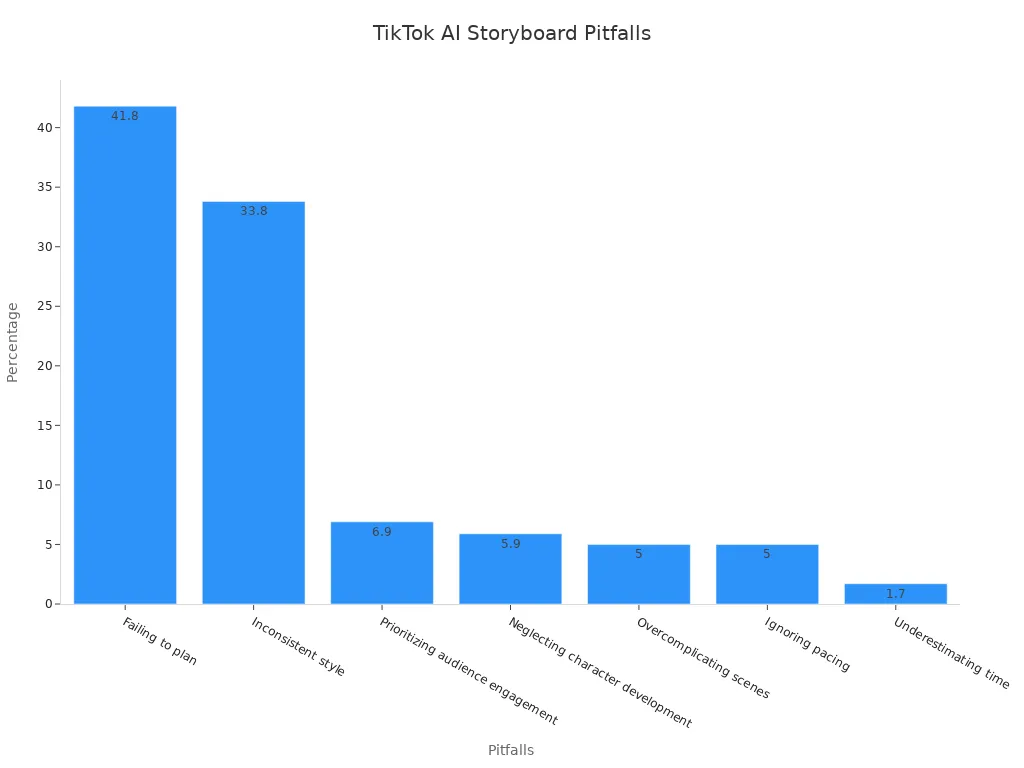
Common Pitfall | Percentage |
|---|---|
Failing to plan | 41.8% |
Inconsistent style | 33.8% |
Prioritizing engagement | 6.9% |
Neglecting character growth | 5.9% |
Overcomplicating scenes | 5% |
Ignoring pacing | 5% |
Underestimating time | 1.7% |
Sometimes, AI voices sound too robotic. This can hurt your story and make your video less fun. You might also see repeated pictures or scenes that do not fit your story. Always check your storyboard and make changes to keep your story strong and your audience interested.
Future of AI in TikTok Storyboarding
Trends to Watch
You will see big changes in how creators use ai for TikTok storyboarding. The global ai market is growing fast. Statista says it could reach $2 trillion by 2030. This growth comes from new tools that help you make videos, images, and even 3D models much faster. Many companies now use ai to create textures, concept art, and animations. These tools save time and help you tell better stories.
The ai image generation market may hit $1.3 billion by 2025, growing at over 35% each year.
More than 75% of studios now use ai-generated animations to speed up their work.
Motion Synthesis technology can cut animation costs by 30% and boost revenue by 20%.
Generative ai is now the top choice for making images and text, with over half of companies using it for content creation.
In the US, brands use ai to make TikTok scripts and turn long videos into short, catchy clips.
You can expect ai to keep making content creation easier. Soon, you might see tools that let you make full videos from just a few words or ideas. Brands will use ai to reach more people and keep up with trends.
Getting Started Tips
If you want to use ai for your TikTok storyboards, start with a plan. Here are some easy steps to help you begin:
Grab attention right away. Use strong visuals, sounds, or a fun question.
Pick a topic that fits your brand and speaks to your audience.
Focus on one clear message. Plan your shots with a simple storyboard or script.
Make sure your videos look good on phones. Use the 9:16 vertical format.
Track your video’s performance. Watch views, likes, comments, and shares.
Ask your viewers what they think. Use polls or questions to get feedback.
Change your content based on what works. Try new ideas and see what your audience likes.
Set goals for engagement or views. Check your progress and keep improving.
Tip: Look at popular TikTok accounts for inspiration. Notice what trends, images, and styles get the most attention. Break down these elements and use them in your own ai-powered storyboards.
With ai, you can create videos faster and test new ideas without much risk. Keep learning and trying new tools. You will find what works best for your style and audience.
You can boost your TikTok videos by using storyboard scripts. These tools help you save time, get creative, and make your stories stand out. Many creators see better results when they try new workflows and update their storyboard with feedback.
You get help with editing, animation, and sound, so you can focus on your ideas.
Videos made with these tools often get more views and shares.
Stay curious and keep learning new tricks. Start your next storyboard today and see what you can create!
FAQ
How do I start using AI storyboard generators for TikTok?
You just pick a tool, sign up, and follow the prompts. Most platforms guide you step by step. You can write your script, choose visuals, and preview your storyboard in minutes. No special skills needed!
Can AI help me make videos if I can’t draw?
Absolutely! AI creates images and scenes for you. You only need to describe what you want. The tool handles the rest. You get professional-looking storyboards without picking up a pencil.
What if my AI storyboard looks too robotic?
Try editing the script or visuals. Add your own style or tweak the scenes. Most tools let you change colors, characters, and camera angles. You can always mix AI ideas with your personal touch.
Are AI storyboard tools expensive?
Many tools offer free versions or trials. Some have paid plans with extra features. You can start for free and upgrade if you need more options. Always check what fits your budget.
Can I use AI storyboards for other social media?
Yes! You can use AI storyboards for YouTube Shorts, Instagram Reels, or Facebook videos. Just adjust the format and style to match each platform. AI makes it easy to repurpose your content.
See Also
How To Boost Audience Interaction Using TikTok Analytics
Writesonic AI And QuickCreator Battle For Content Creation Supremacy
Transforming Blogging With AI Tools That Redefine Content Creation
Step-By-Step Guide To Quick Creator’s New Content Features
Essential Blogging Storytelling Trends Every Beginner Should Understand
