Content Repurposing Workflow for Creators

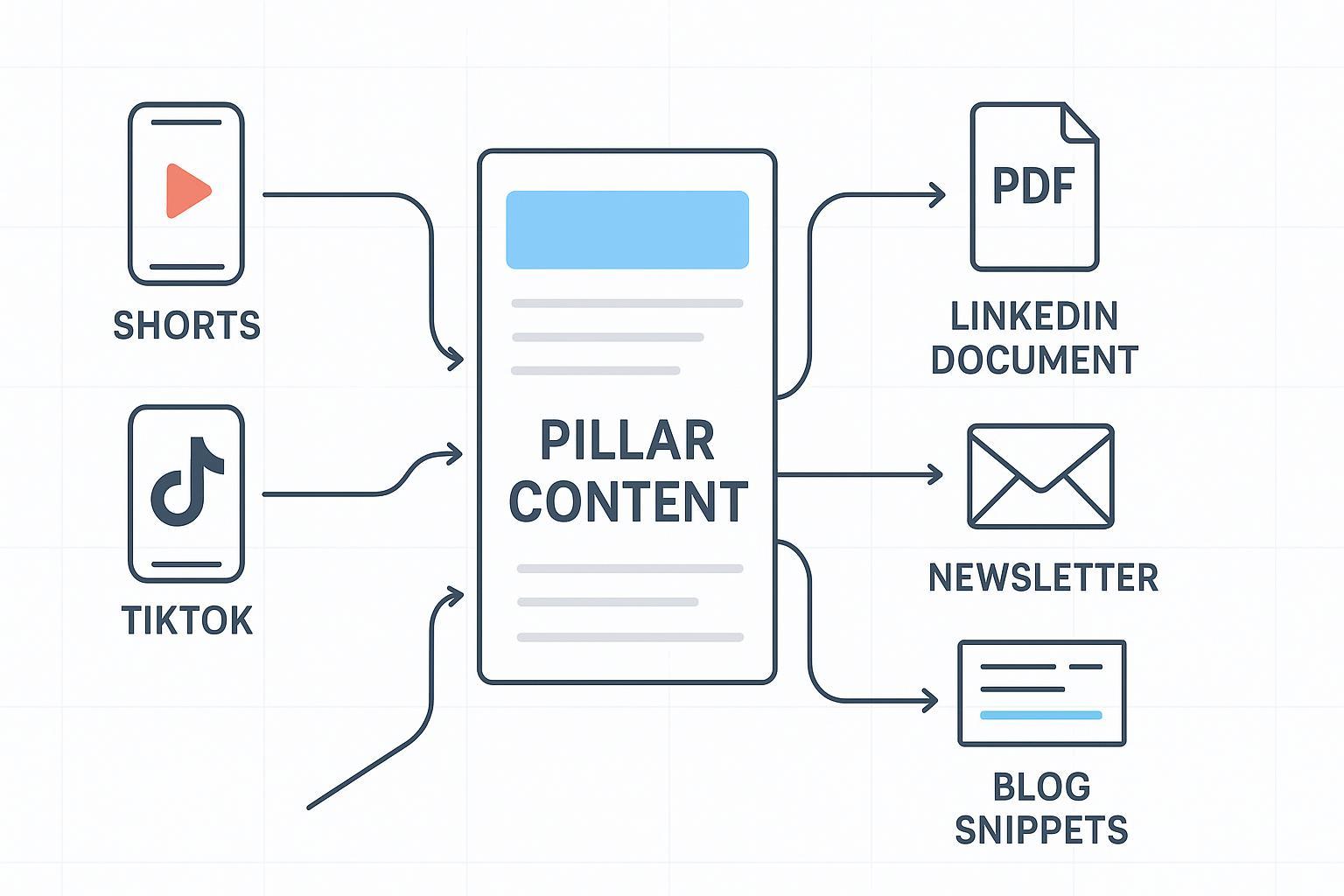
If you can turn one great piece of content into a week of platform‑native posts—without burning out—you’ll publish more consistently and grow faster. This guide gives you a repeatable workflow you can run every week: start with one “pillar” asset, map smart derivatives, tailor them to each platform, and ship with confidence.
Repurposing is not the same as cross‑posting. Repurposing transforms the idea for the context. Cross‑posting just pastes the same file everywhere and hopes for the best. A goal‑first, structured process is what separates the pros; it’s a pattern echoed in the TryLeap 5‑step workflow and social strategy playbooks like Sprout Social’s repurposing guidance.
1) Set outcomes before you touch the edit
Start with intent. What job should this content do in the next 7–10 days?
- Define a single primary goal per cycle: awareness (reach), engagement (comments/saves), list growth (email signups), or sales enablement (bookings). Tie each to one or two metrics you’ll actually check.
- Pick your pillar cadence. Most solo creators can sustain one pillar per week; small teams might run two. Pillar options: a 30–60 minute video/podcast or a 1,500–2,000 word blog.
- Ensure the pillar is repurpose‑ready: clean audio, chapters/clear sections, quotable insights, and a few visual beats for clipping.
- Plan your link paths and CTAs up front. Where should short‑form viewers land—long‑form on YouTube, a lead magnet, or a product page?
- Specs change. When you export or schedule, verify current platform requirements via official help (for example, YouTube’s Shorts basics) instead of relying on memory.
2) Analyze and select your source content
Don’t pick at random. Let performance and substance guide you.
- Use analytics to shortlist candidates. Look for high retention segments in videos, posts with above‑baseline saves/shares, or evergreen pieces that still earn search traffic. This analytics‑led selection is widely recommended, including by Socialinsider’s repurposing overview (2025).
- Run a quick scorecard: hook strength (can you articulate the first 5 seconds?), clarity of takeaway, novelty, visual moments, and CTA alignment.
- Check rights and consent. If guests appear or third‑party assets are included, confirm you have permission to clip, re‑edit, and redistribute derivatives.
- Flag facts that may be stale. Plan to refresh stats or remove time‑sensitive claims before reusing them.
3) Map the derivatives (content atomization)
Think of the pillar like a tree trunk; your derivatives are the branches. Break the source into atomic ideas: 3–5 short clips, 1–2 visuals (carousel or document), 2–3 text posts/threads, one email summary, and a few story posts.
Here’s a simple mapping example you can adapt each week.
| Pillar Idea (chapter/segment) | Derivative Format | Channel | Hook/Angle | CTA |
|---|---|---|---|---|
| “3 common pricing mistakes” | 30–45s vertical clip | Shorts, TikTok, Reels | “Are you making this pricing mistake?” | “Full breakdown in the long‑form” |
| Case study result | 8–10 slide carousel | Problem → process → outcome | “Save this; link in bio for details” | |
| Framework explainer | Document (8–12 pages) | “One‑page template inside” | “Comment ‘template’ to get the link” | |
| Debunk a myth | Text post/thread | LinkedIn/X | “Hot take: X isn’t your bottleneck” | “Reply with your scenario” |
| Key insights | Weekly email | Newsletter | “What changed and what to do next” | “Watch full episode / grab checklist” |
Two pro tips: keep each derivative focused on a single idea, and plan a narrative cadence (from quick wins early in the week to deeper dives later).
4) Tailor for each platform
Your ideas carry the value. Packaging earns the attention.
Short‑form vertical video (YouTube Shorts, TikTok, Instagram Reels)
- Hook fast. State the value or spark curiosity in the first seconds to earn watch time.
- Frame for 9:16 and mind safe areas for on‑screen text. Keep fonts large and high‑contrast for mobile viewers.
- Add accurate captions. Auto is a start; edit for clarity. Captions aid accessibility and retention (see WCAG in section 5).
- Mind audio rights. Prefer platform music libraries or your licensed tracks.
- Use platform‑native CTAs: follow/subscribe, “link in bio,” or “watch the full breakdown.” Avoid posting clips with another platform’s watermark; export clean masters.
Instagram carousels
- Lead with a cover slide that feels like a headline. One idea per slide, consistent typography, and a clear payoff.
- Design for saves: step‑by‑step sequences, checklists, or frameworks. End with a summary slide and a caption CTA.
- Add alt text for each image and ensure legibility on small screens.
LinkedIn documents/articles
- Document posts (PDF carousels) work when each page delivers one clean takeaway. Aim for short, high‑contrast pages with scannable subheads.
- Keep the first lines strong; they appear before the click. Use charts or simple diagrams where they clarify.
- Add alt text to images. For a deep dive, expand into a LinkedIn article and cross‑reference the document.
Email summary
- Subject line = outcome + curiosity (“The 3 pricing fixes that added 18% ARPU”).
- Lead with the single biggest takeaway, then a short “how to apply it this week.” Link to the long‑form and any downloads.
- Keep the email readable on mobile: short paragraphs, clear buttons, and a single, focused CTA.
Note: Platform upload limits and features evolve. Double‑check the current guidelines before export or scheduling; official help centers remain the authoritative sources.
5) Produce and QA (accessibility, rights, editorial)
Great workflows fail without guardrails. Use this pre‑publish checklist every time.
- Editorial: Hooks are crisp; facts current; quotes accurate; captions reviewed for typos.
- Technical: Correct aspect ratio and safe‑area framing; audio levels normalized; covers/thumbnails readable.
- Accessibility: Captions/subtitles included; alt text written; color contrast and font sizes meet minimums. WCAG 2.1 outlines the baseline; see WCAG’s success criteria for contrast and captioning.
- Rights: Music/license verified; third‑party assets cleared; guest consent stored.
- Disclosures: If sponsored or affiliate‑supported, add clear disclosures as required by the FTC Endorsement Guides FAQ.
- Platform‑native: CTA tailored; hashtags/keywords sensible; no cross‑platform watermarks.
- Scheduling: Stagger timing; test links and UTMs; confirm time zones.
6) Schedule and distribute without fatiguing your audience
Cluster related derivatives into a narrative arc. Early in the week: quick hits to earn reach. Mid‑week: deeper context. End of week: recap and invitation back to the pillar or offer.
Example cadence from one pillar (adapt to your audience tolerance):
- Day 1: 1–2 vertical clips + 1 LinkedIn text post (hot take)
- Day 2: Instagram carousel + stories
- Day 3: Vertical clip + LinkedIn document
- Day 4: Email summary (links to pillar) + light social reminders
- Day 5: Final clip or “tight cut” variant; community prompt
Isn’t it nicer when the week feels intentional instead of chaotic? This cadence keeps the message consistent without spamming the same asset everywhere at once.
7) Measure, learn, and iterate
Measurement makes the workflow compound. Add light instrumentation and a weekly review.
- Use UTMs consistently: utm_source (platform), utm_medium (format), utm_campaign (series), and utm_content (variant). Keep a simple sheet so names don’t drift.
- Validate tracking before launch (click your links from a test post) and confirm events appear in GA4 real‑time.
- Compare derivative performance to pillar goals. Which hooks earned the most watch time, saves, or CTR? Which formats underperformed?
- Double down on winners next week and sunset weak variants quickly.
For additional perspective on goal‑first planning and transformation over cross‑posting, see respected guides such as those from TryLeap and Sprout Social. Use them as reference points while adapting the specifics to your audience.
8) Troubleshooting guide
Things go sideways. Here’s how to get back on track fast.
- Copyright flags or muted audio: Swap to a licensed/platform track; appeal only if you have clear rights documentation.
- Cropped captions or covered UI: Re‑export for vertical 9:16, check safe areas, and preview in‑app before posting.
- Caption timing is off: Edit auto‑captions or upload an SRT; re‑render if burned‑in text drifts.
- Weak day‑one performance: Refresh the first frame/cover, tighten the first 3–5 seconds, or test a sharper caption.
- Broken links or UTMs: Click test every link; verify tracking appears in GA4; fix and republish if needed.
- Watermarked re‑posts underperform: Export clean clips and reframe for the platform; avoid recycling downloads from other apps.
AI assists (with human judgment)
Use AI to move faster—never to abdicate editorial judgment. Transcribe the pillar, surface candidate clips, and draft caption/title variants. Then edit for tone, accuracy, and compliance.
Your next step
Pick one pillar you already published. Run this workflow for the next five days. Keep the table structure, the QA checklist, and the cadence. At the end of the week, review performance and tweak your map. Ready to ship more with less thrash? Let’s dig in.
