Crafting Abandoned Cart Emails with AI Insights

Cart abandonment causes eCommerce stores to lose about $18 billion each year. Seven out of ten shoppers leave their carts behind. If you send Abandoned Cart Emails that seem the same for everyone, shoppers usually ignore them. Personalized emails are better. They use things like the shopper’s name and the exact items left in the cart. These emails get opened more often and clicked more. They can lead to up to six times more sales than regular emails. AI helps you send the best message at the best time. This brings shoppers back and helps you sell more.
Key Takeaways
Use shoppers' names and the items they left to make emails personal. This helps more people open emails and buy things. - Let AI pick the best time to send emails. AI can also help write messages that fit each shopper's likes and actions. - Make subject lines and calls to action easy to understand. They should catch the shopper's eye and help them finish buying. - Try out different parts of the email like subject lines, when you send them, and what deals you offer. Do this often to get better results. - Use email, SMS, and phone calls together with AI automation. This helps you reach more shoppers and get back more carts.
Abandoned Cart Emails Challenges
Common Pitfalls
Many shoppers leave their carts for different reasons. Problems can happen during checkout. Here are some common reasons why:
Extra costs like shipping or taxes show up at the end.
The checkout steps are hard or confusing.
Shipping is too expensive or there are not many choices.
You might worry if your payment is safe.
The store makes you sign up before buying.
Return rules are hard to find or not helpful.
Sometimes, you want to check prices or find a better deal.
You stop to look for a coupon code.
It is hard to get help when you have questions.
The website is slow or does not work right.
Abandoned Cart Emails may not work well if you ignore these problems. Let’s see how these emails usually do:
These numbers show Abandoned Cart Emails can help bring back sales. But there is still a lot that can be better.
Need for Personalization
You get lots of emails every day. If an email feels boring, you might not read it. Your customers feel the same way. If emails do not fit what they like, they lose interest.
Personalized product ideas based on what shoppers looked at or bought help a lot. These emails help people find what they want and feel special. Brands like Ryderwear and Booktopia made more money and got more loyal customers after using personalized emails. Ryderwear grew its email sales from 4-5% to almost 20% by sending behavior-based emails.
Personalization is more than just using a name. You need to match your message to what each shopper does and where they are in shopping. This can lower cart abandonment by up to 30%. If you do not personalize, your emails may get ignored and you could lose sales.
AI-Powered Solutions

Personalization with AI
You want emails to feel special and just for you. AI helps with this. It checks what you look at and what you buy. It also sees how long you stay on pages. AI puts shoppers into groups by what they like and how often they shop. This helps send the right message to each person.
AI adds details that matter to your emails. It can put your name in the subject. It can show you the shoes you left behind. If you like deals, AI can add a special offer. It can make you hurry with messages like “Only 2 left!” or “Sale ends soon!” These things make you want to open the email and buy.
Did you know? Using your name and showing products you like makes you open emails more. Brands like Adidas and Casper use AI to send simple emails at the right time. These emails have clear actions and show proof from other shoppers. This makes you feel noticed and important.
Here is how AI makes your shopping better:
It remembers your name and what you like to buy.
It shows pictures and info about what you left in your cart.
It gives you deals or gifts based on what you like.
It sends reminders when you are most likely to see them.
It uses data to guess when you might leave your cart and acts fast.
Aspect of AI Analysis | What It Does for You |
|---|---|
Uses your name, location, and shopping history to tailor messages | |
Segmentation | Groups you by what you like and how you shop |
Dynamic Content | Shows you the exact products you left behind |
Personalization | Adds special offers or messages just for you |
Predictive Analytics | Spots when you might leave and sends reminders |
Optimization | Keeps testing what works best for you |
Send Time Optimization
When you get an email matters a lot. If you get it right after leaving your cart, you may come back. AI learns when you open emails and when you shop. It sends messages when you are most likely to see them.
AI tools like Seventh Sense show that sending emails at the best time helps. Open rates can go up by 50%. Some brands see 30–40% more people answer just by letting AI pick the time. Sending the first reminder within one hour works best.
Metric Description | Improvement Percentage |
|---|---|
AI-powered campaigns vs traditional methods | |
Companies using AI-driven scheduling | Up to 25% improvement in open rates |
Response rate increase reported | 30–40% increase |
Tip: The first day after you leave your cart is very important. AI helps you reach shoppers fast, so you do not miss your chance.
Automation Triggers
AI does not stop after one email. It makes smart plans that use email, SMS, or phone calls. These triggers change based on what you do.
Old triggers use simple rules, like sending an email after 24 hours. AI triggers watch what you do and change the timing and message. If you open the first email but do not buy, AI may send a text or show you an ad. If you shop on your phone, you might get a text instead of an email.
Feature | ||
|---|---|---|
Triggers | Static (email opens, clicks) | Real-time, behavior-based, and contextual |
Workflow | Fixed | Adaptive and dynamic |
Optimization | Manual | Self-learning and autonomous |
Personalization | Basic | Deep, real-time, individual-level |
Control | Manual setup and updates | Smart autonomy, minimal intervention |
Setup Complexity | High | Low after initial setup |
Adaptability | Static | |
Time Savings | Medium | High |
AI can use different paths. If you shop on a laptop, you get an email. If you use your phone, you get a text. It can send special deals to VIPs or remind members about points. This makes every message feel right.
AI can send reminders by email, SMS, or phone, depending on what you use.
AI phone agents can talk to you, answer questions, and send you a checkout link by text.
These tools work with your store and CRM, so everything stays connected.
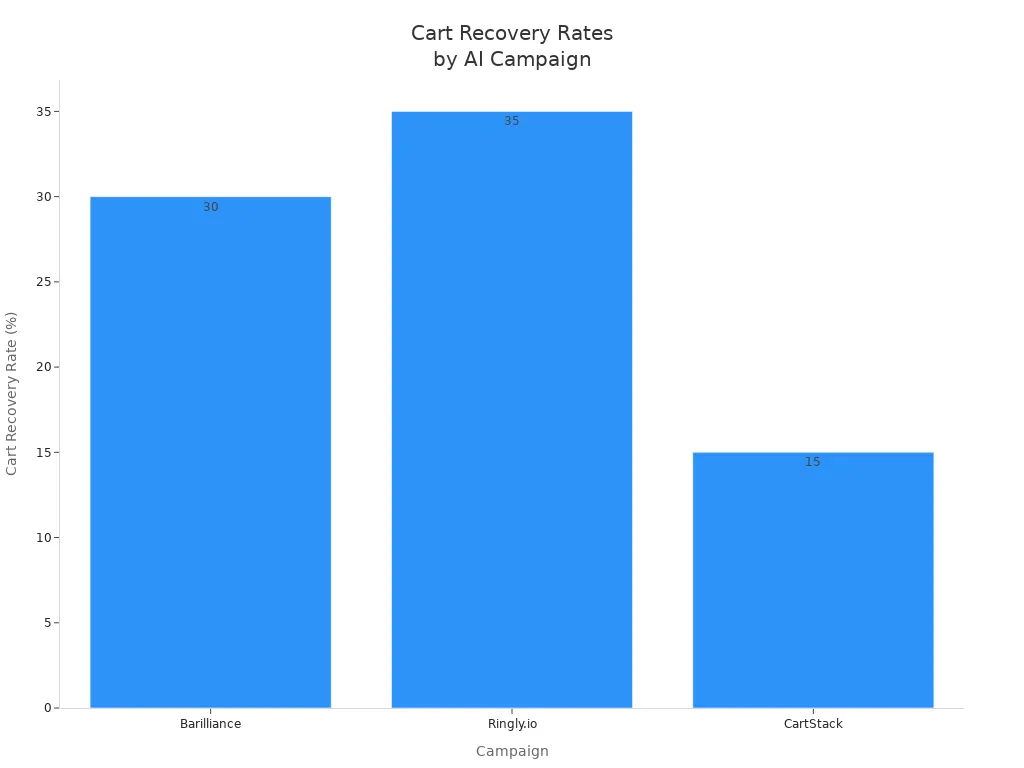
Note: Using email, SMS, and phone calls together can bring back up to 45% of carts. AI helps you reach shoppers where they are and when it matters most.
Abandoned Cart Emails with AI help you get more sales, save time, and give shoppers a better experience. You can try different messages, ways to send them, and times. AI keeps learning and gets better, so your results improve over time.
Crafting Effective Abandoned Cart Emails
Subject Lines
You want your email to stand out in a crowded inbox. The subject line is your first chance to grab attention. Keep it simple and clear. Use your brand’s voice. Add a touch of curiosity or a helpful tone. Personalize it with the shopper’s name or the product they left behind. Avoid using all caps or too many exclamation marks, which can make your email look like spam.
Show urgency or scarcity, but always be honest. For example, “Only 2 left in stock!” works if it’s true.
Ask a question or offer help, like “Oops, did something go wrong?” This feels friendly and gets high open rates.
Offer an incentive, such as “Free shipping if you complete your order today.”
Test different subject lines with A/B testing to see what works best for your audience.
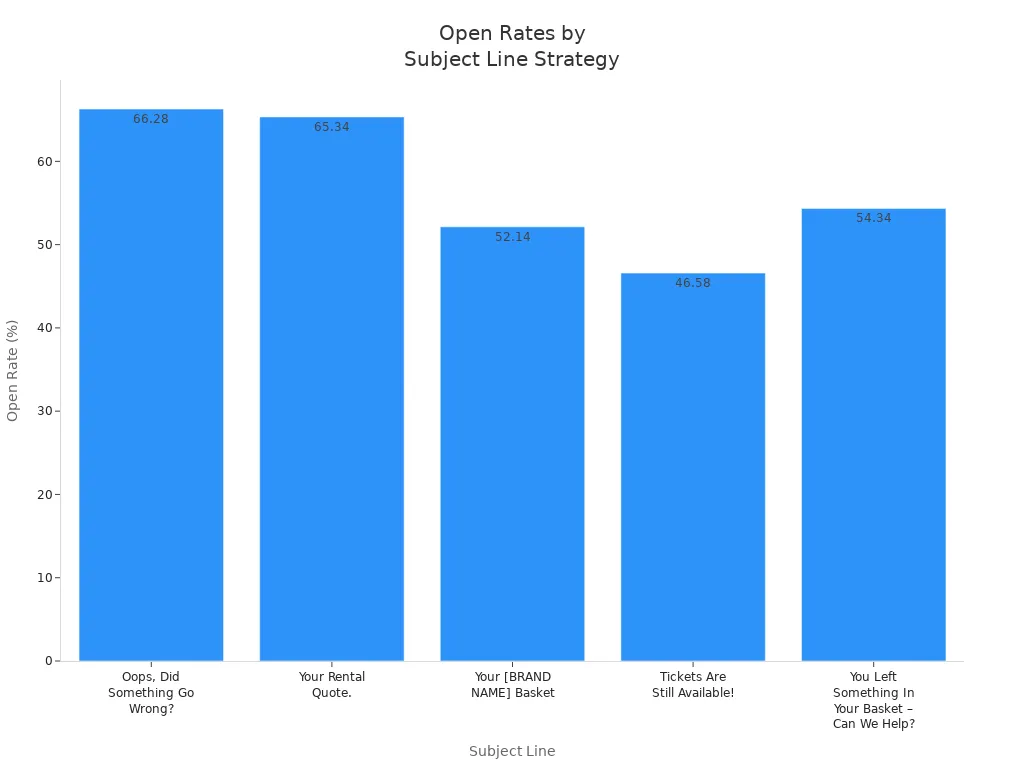
Here’s a look at how different subject lines perform:
Subject Line | Open Rate | Conversion Rate | Timing Post Abandonment | Strategy Highlighted |
|---|---|---|---|---|
Oops, Did Something Go Wrong? | 66.28% | 13.26% | 20 minutes | Curiosity, customer service tone |
Your Rental Quote. | 65.34% | 12.76% | 30 minutes | Simplicity, clarity, helpfulness |
Your [BRAND NAME] Basket | 52.14% | 32.73% | 1 day | Brand personalization, clear communication |
Tickets Are Still Available! | 46.58% | 13.95% | 30 minutes | Urgency and scarcity |
You Left Something In Your Basket – Can We Help? | 54.34% | 15.95% | 1 hour | Customer service approach |
Tip: Use AI to quickly generate and test subject lines. AI can suggest new ideas and help you find the best one for your shoppers.
Call to Action
Your call to action (CTA) tells shoppers what to do next. Make it clear and easy to find. Use action words like “Complete Your Purchase” or “View Cart.” Keep it short—no more than five words. Place your CTA near the top of the email and again at the end if needed. Use a button that stands out, especially on mobile.
Use only one main CTA per email to avoid confusion.
Softer CTAs like “View Cart” often work better than “Buy Now,” which can feel pushy.
Personalize your CTA if possible, such as “Finish Checking Out, Sarah.”
Test different CTA words, colors, and placements to see what gets the most clicks.
A clear, friendly CTA helps shoppers feel comfortable and ready to finish their order.
Copy Personalization
Personalized copy makes your email feel special. Remind shoppers what they left behind by showing product images, names, and prices. Offer a discount or free shipping if it fits your brand. Use short, friendly sentences. Address common worries, like shipping or returns, right in the email.
Show the exact items left in the cart with pictures and details.
Add a time-limited offer or highlight low stock to create urgency.
Include real customer reviews or star ratings for social proof.
Reassure shoppers about payment safety and easy returns.
Ask for feedback if they still don’t buy—this shows you care.
AI can help you write personalized messages fast. Try prompts like:
“Write a friendly reminder for a shopper who left a blue hoodie in their cart. Offer 10% off and mention free returns.”
When you use Abandoned Cart Emails with urgency, social proof, and a smooth checkout, you make it easy for shoppers to come back and buy. AI helps you test and improve every part of your email, so you keep getting better results.
Testing and Optimization
Experimentation
You want your Abandoned Cart Emails to get better each time. The best way to do this is by trying new things. Start with holdout testing. This means you send emails to one group but not to another. Then, you see which group buys more. Holdout tests show if your emails really help or if people would buy anyway. Try to do these tests every few months.
Next, use A/B testing. Change one thing at a time, like the subject line or the call to action. For example, you can test “View My Cart” against “Complete My Order.” You can also try different email styles. Sometimes, a simple email works better than a fancy one. Test product pictures, offers, and when you send the email. Try sending it within 60 minutes after someone leaves their cart and see if that helps.
Tip: Every email is a chance to learn. Try new ideas, check what happens, and keep what works best.
Here are some things you can try:
Subject lines and preheaders
Email style (plain-text or HTML)
CTA words and where you put them
Product pictures and suggestions
Offers, discounts, and ways to make people hurry
When and how often you send emails
Groups based on customer type or cart value
Performance Tracking
You need to know what is working. Watch your results using clear numbers. Here is a table to help you focus on what matters:
Metric | Description | Tips to Improve |
|---|---|---|
Open Rates | How many people open the email | Use fun subject lines and send emails soon |
Click-Through Rates | How many click links back to their cart | Use clear CTAs and make the email feel personal |
Recovery Rates | How many carts turn into purchases | Send emails within 1 hour, add deals, and show product pictures |
Revenue Per Recipient | How much money you make for each person who gets an email | Give suggestions, use other channels, and keep making your emails better |
Watch other numbers too:
Conversion rates and money made
How long people read your emails
Unsubscribe and bounce rates
How much a customer spends over time
AI tools help you find patterns and give tips to get better. Most stores see about 50.5% of these emails opened. The best stores get over 65%. Click rates are around 6.25%, and about 3.33% of people buy. If you keep testing and checking, you can beat these numbers and get more sales back.
Remember: Testing and tracking often help you do better. Small changes can lead to big wins over time.
You can boost your sales and keep shoppers coming back by using AI for your email recovery strategy. Start by personalizing messages with names and product details, then test subject lines and timing to see what works best. Try tools like Mailchimp or Klaviyo for easy setup. Join marketing groups or use free AI tools to learn more. When you use smart automation and keep improving, you’ll see more carts recovered and happier customers.
FAQ
How does AI know when to send my abandoned cart email?
AI looks at when you usually open emails and shop online. It learns your habits. Then, it sends your reminder at the best time for you. This helps you see the email when you are most likely to act.
Can AI personalize my abandoned cart email if I am a new shopper?
Yes! AI uses what you did on the site, like what you viewed or added to your cart. Even if you are new, it can show you the exact items you left and suggest similar products.
Will using AI make my emails sound like a robot?
No, not if you set it up right. AI tools let you pick your brand’s voice and style. You can review and edit messages. Your emails will sound friendly and personal, not robotic.
What if I want to use SMS or phone calls too?
You can! Many AI tools work with email, SMS, and phone calls. You choose how to reach your shoppers. AI helps you send the right message on the right channel.
Do I need to know coding to use AI for abandoned cart emails?
No coding needed! Most AI email tools have easy drag-and-drop editors. You pick what you want, and the tool does the rest. You can set up smart emails without any tech skills.
See Also
Comparing Writesonic AI And QuickCreator For Content Creation
Complete Guide To Achieving SEO Success Using Perplexity AI
Customizing Blog Posts To Suit Startup Audience Preferences
