Smooth Sailing: The Importance of Navigation in eCommerce UX
Introduction
In the world of eCommerce, user experience (UX) is everything. It's what sets a successful online store apart from one that struggles to gain traction. And when it comes to UX design, navigation plays a crucial role. Navigation refers to how users move through an eCommerce website - finding products, adding them to their cart and ultimately completing a purchase. In other words, it's the backbone of any eCommerce site and can make or break the overall UX for customers. A well-designed navigation system makes shopping easy and intuitive which leads to higher conversion rates while poor navigation will leave customers feeling confused, frustrated and likely abandon their carts altogether. Therefore in this blog post, we'll explore why navigation is so important for eCommerce sites and some best practices on improving it for better user experience. How Navigation Affects User Experience
Navigation is an essential part of any eCommerce website's user experience. It guides users through the site and helps them find what they are looking for quickly and easily. There are several types of navigation that can be used, including menus, search bars, and breadcrumbs. Menus
Menus come in different forms such as drop-downs, mega-menus or hamburger menus. Drop-down menus are a common form of navigation where subcategories appear when users hover over a main category. Mega-menus allow for more detail to be included within the menu structure by displaying images or even video content alongside the text links. Hamburger menus have become popular on mobile devices due to their compact design which opens up into full-screen navigation when clicked. The type of menu used can greatly impact user experience depending on its style and ease-of-use. A well-designed menu should be easy to navigate with clear categories that make sense to users while also being visually appealing.
Search Bars
Search bars provide another way for users to find what they're looking for on an eCommerce website. Autocomplete suggestions help guide users towards relevant products while filters allow them to narrow down results based on various criteria like price range or color options.
Suggestion features within search bars can help predict what a user may be searching for based on their previous searches or purchase history, providing personalized recommendations that improve overall UX.
Breadcrumbs
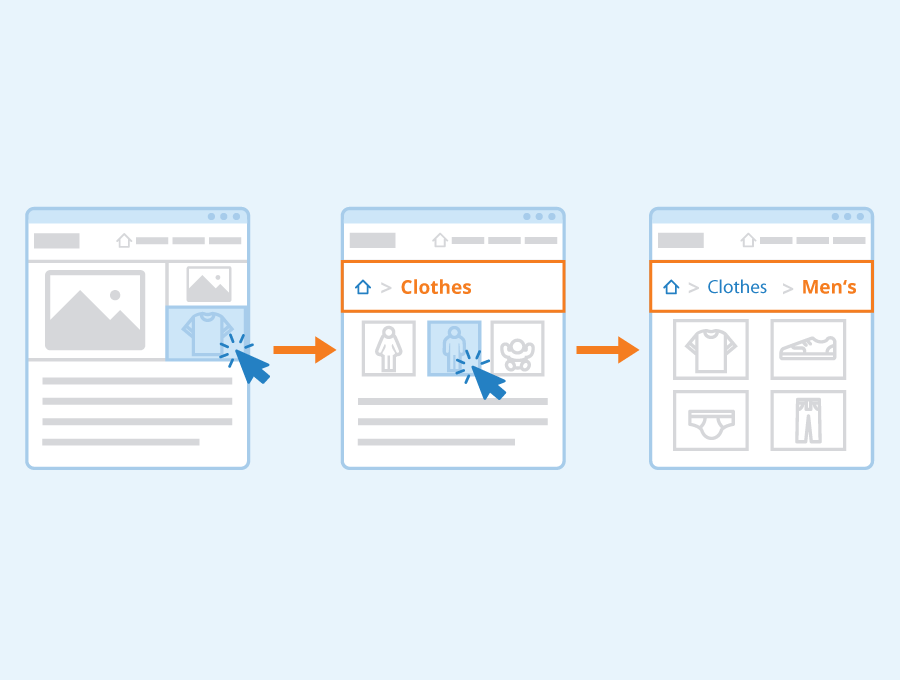
Breadcrumbs act as a secondary navigation aid by showing users exactly where they are within the site's hierarchy at any given time during their browsing session. They typically display as clickable links above the page title indicating which section(s) were navigated through previously leading up to this page view.
There are two types of breadcrumb trails: location-based (showing current position), path-based (showing entire path taken). Best practices suggest using both styles together whenever possible so visitors always know how far away from home base they might wander off course before needing assistance finding their way back again.
Tips and Techniques for Improving Navigation
Navigation is the backbone of eCommerce websites. It helps users to find what they are looking for and guides them through the buying process. Therefore, it is crucial to optimize navigation elements in an eCommerce website to provide a seamless user experience. In this section, we will discuss actionable tips on how to improve navigation. Simplify Menus
Menus can be overwhelming if there are too many options or subcategories listed in one place. This may confuse users and lead them to abandon your website altogether. One way to simplify menus is by using a drop-down menu with clear category labels that show only relevant information related to the current page. Another method is using a mega-menu that displays all categories at once but still maintains clarity by dividing content into groups and subgroups with visually distinguishable sections.
Use Clear Labels
Clear labeling plays a significant role in improving navigation as it informs users about where they are on your site, what they can expect from each link, and which path leads them where they want to go next.
Moreover, generic labels such as "Products" or "Services" should be avoided because users might not know what's included under those categories until they click on them. Instead, use specific labels like "Men's Clothing," "Women's Shoes," or "Electronics Accessories."
Optimize Search Functionality
The search box allows customers who have something specific in mind quickly find products without having to navigate through multiple pages manually. However, poorly optimized search functionality could result in irrelevant results or no results at all - frustrating potential buyers further.
To optimize searches:
Provide auto-suggestions while typing keywords.
Implement filters based on price range, brand name(s), color(s), size(s), etc.
Display popular search terms that customers frequently use so that other visitors can easily locate desired products/services/businesses/etcetera.
Benefits of Better Navigation
Improved Sales
One of the most obvious benefits of having better navigation on an eCommerce website is increased sales. When customers can easily find what they are looking for, they are more likely to make a purchase and return in the future. Clear and intuitive navigation makes it easier for customers to browse products, add them to their cart, and checkout quickly without getting frustrated or giving up. Customer Loyalty
Another important benefit of better navigation is that it fosters customer loyalty. Customers who have a positive experience navigating an online store are more likely to return for future purchases. They feel confident that they will be able to find what they need quickly and efficiently, which leads to a sense of trust with the brand.
Improved SEO
Better website navigation also helps improve search engine optimization (SEO). An eCommerce site with well-organized categories, subcategories, and product pages gives Google crawlers a clear idea of how your content is organized. This allows your site's content to be indexed properly so that potential customers can easily find you when searching for relevant keywords. Overall, investing time in developing good website navigation pays off big time both in terms of user experience as well as business success. A smooth sailing experience results in happier shoppers who spend more money while delivering long term value through improved customer retention rates and higher search rankings from major search engines like Google or Bing!
Conclusion
In conclusion, navigation is one of the most important elements in eCommerce user experience. It plays a vital role in guiding users through your website and helping them find what they are looking for quickly and easily. A well-designed navigation system can increase engagement, reduce bounce rates and ultimately lead to more conversions. To improve your website's navigation, start by understanding your users' needs and preferences. Conduct usability tests or surveys to get feedback on how intuitive your current navigation is. Then use this information to optimize your site's structure, labeling, and hierarchy.
Remember that good navigation should be consistent across all pages of the website so visitors can move effortlessly from page to page without getting lost or confused.
By focusing on improving the navigation of their eCommerce sites, owners and managers will create a smoother sailing experience for their customers which leads to more sales in the long run.