The Impact of Navigation on eCommerce Bounce Rates: Best Practices and Tips
Introduction
In the world of eCommerce, one of the biggest challenges that online business owners and marketers face is high bounce rates. A high bounce rate occurs when a visitor lands on a website and leaves without interacting with any other pages. This can be detrimental to an eCommerce business because it means that potential customers are not engaging with their products or services. One of the key factors that contribute to high bounce rates is poor navigation. Navigation refers to the way users move around a website and find what they're looking for. It's essential in reducing bounce rates because if visitors can't easily navigate through your site, they'll quickly become frustrated and leave. In this blog post, we'll explore best practices and tips for optimizing navigation on your eCommerce website to reduce bounce rates, increase engagement, and ultimately boost sales. Best Practices for Optimizing Navigation
As an eCommerce business owner, optimizing your website's navigation is crucial to reduce the bounce rate and increase conversions. In this section, we will discuss some best practices for optimizing navigation that can help you provide a seamless user experience. Using Clear Labels
One of the essential elements of effective navigation is using clear labels. The labels should be simple, intuitive, and descriptive enough to help users find what they are looking for quickly. You should avoid using industry jargon or internal terminology that may confuse the user.
To create effective labels, start by analyzing your target audience and their search behavior. Use language that resonates with them and aligns with their expectations. Be specific about what each link leads to so that users don't have to guess or hover over links.
Another tip is to use action-oriented words such as 'Shop,' 'Buy,' or 'Discover' instead of generic terms like 'Products' or 'Services.' This helps users understand what action they can take after clicking on a link.
Minimizing Clutter
Cluttered navigation menus make it challenging for users to navigate through your site's content easily. They might feel overwhelmed by too many options presented at once and leave without engaging further on your website.
To minimize clutter in your navigation menu, start by prioritizing important pages based on user intent and frequency of visits. Put those pages upfront where visitors can see them immediately when they land on your website.
You should also group similar items under relevant categories/subcategories rather than listing all items together randomly. This makes it easier for users to scan through different sections quickly and find what they need faster than scrolling down long lists of options.
Lastly, ensure consistency in design between the main menu bar and drop-down menus (if any). Consistent design reduces cognitive load while navigating through different levels of information architecture within a site hierarchy. Using Drop-Down Menus
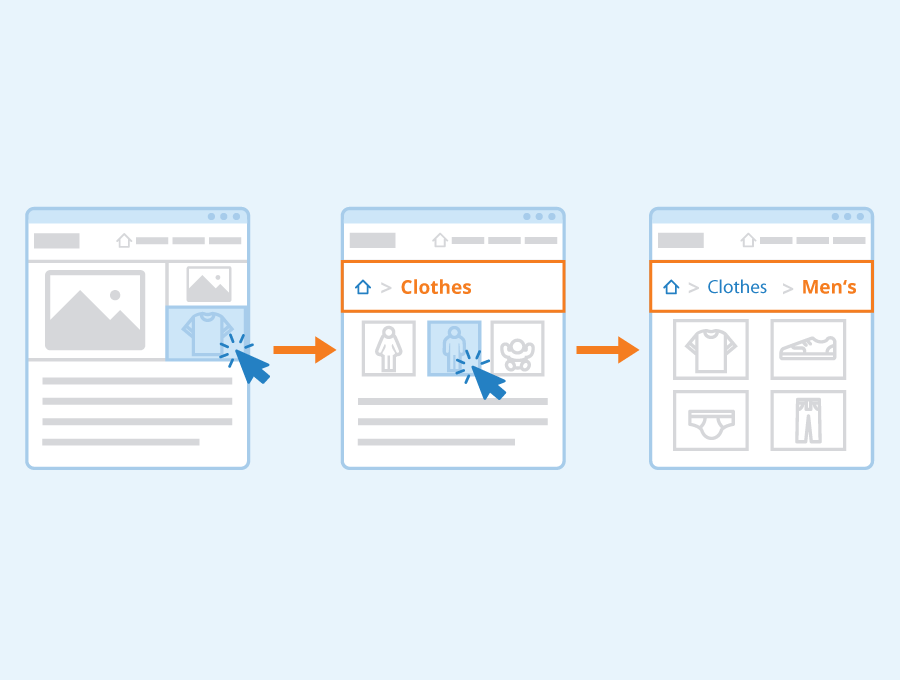
Drop-down menus are an efficient way of organizing your site's content hierarchy and reducing clutter in the main navigation menu. They allow you to categorize items according to subtopics or relevant pages, making it easier for users to find what they need.
When designing drop-down menus, keep them simple, intuitive, and easy to use. Use clear labels that describe the contents of each category/subcategory accurately. Avoid using too many levels of dropdowns as this can lead to confusion and increased cognitive load.
Also, ensure that hover events are triggered by a reasonable delay time (300-500ms) so that accidental hovering doesn't obscure other parts of content on the page.
Overall, optimizing your website's navigation is an ongoing process that requires continuous testing and refinement. By following these best practices for optimizing navigation, you'll be able to provide a seamless user experience that reduces bounce rates and increases conversions on your eCommerce website.
Measuring the Impact of Navigation on Bounce Rate
When it comes to measuring the impact of navigation on bounce rate, there are several metrics that can be used. One important metric is the time spent on a page. If users are spending very little time on a specific page before leaving, it may indicate that they were not able to find what they were looking for or that the content was not engaging enough. Another metric to look at is exit pages and where users are dropping off in their browsing session. The bounce rate itself can also provide valuable insight into how well a website's navigation is working. A high bounce rate may suggest that people are having difficulty finding what they need or that the site's layout is confusing or unappealing.
To improve navigation and reduce bounce rates, there are several tips to keep in mind. First and foremost, make sure your website's structure makes sense and is easy for visitors to understand. Use clear labels for categories and subcategories so users know exactly where they're going when they click on a link.
Another tip is to focus on mobile optimization since more than half of all internet traffic now comes from mobile devices. Ensure your website has responsive design so it looks great no matter which device someone uses to access it.
Additionally, consider implementing search functionality if you haven't already done so. This allows visitors who have specific needs or questions in mind to quickly find relevant content without wasting time clicking through menus and submenus.
Finally, don't forget about user testing as an effective way of identifying potential issues with your website's navigation. Ask friends, family members or colleagues who aren't familiar with your site to test out its usability—and pay close attention both during their experience and afterward when debriefing them—to identify areas where improvements could be made.
Overall
By taking these steps—measuring key metrics like time spent on-page while keeping an eye out for high bounce rates; focusing on mobile optimization; ensuring intuitive labeling structures; providing search functionality; and user testing—you can significantly improve a website's navigation, helping to reduce bounce rates and ultimately drive more traffic and conversions.
Conclusion
In conclusion, navigating through an eCommerce website can be a smooth and enjoyable experience or a frustrating one. The overall navigation of the website directly impacts the bounce rate and conversion rates. Therefore, it's crucial to implement best practices when designing your site's navigation menu. By having clear labeling, simple hierarchy, search functionality, and easy-to-use menus, you can enhance user engagement on your site which will eventually lead to increased sales and revenue. Online business owners must take into account all possible navigational scenarios that their target audience might face while browsing the website. In short, implementing optimized navigation should not be an afterthought but rather a top priority for any eCommerce store looking forward to decreasing its bounce rate and increasing conversions.