Boost eCommerce Conversions: Reduce Bounce Rate with Site Speed Optimization
Introduction
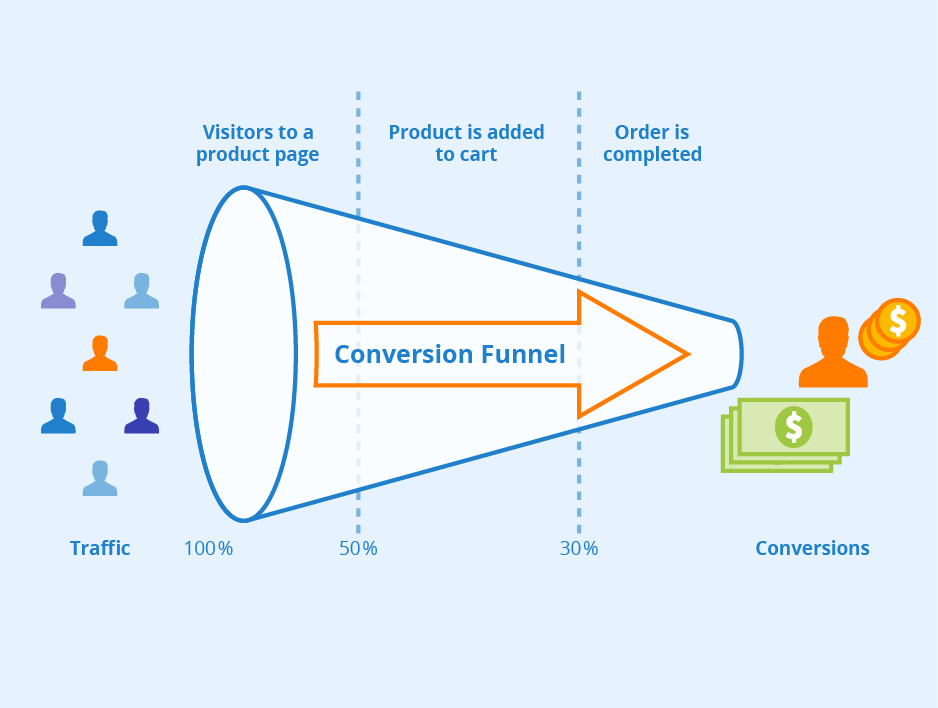
In the eCommerce industry, site speed has a significant impact on bounce rate. Bounce rate refers to the percentage of visitors who leave a website after viewing only one page. This metric is crucial for eCommerce websites because it directly affects their conversion rates. If a website takes too long to load or navigate, potential customers are more likely to abandon their shopping carts and seek out other options instead. In fact, studies have shown that even delays as short as one second can result in a 7% reduction in conversions. Therefore, optimizing site speed is essential for boosting eCommerce conversions and reducing bounce rates. Best Practices for Optimizing Site Speed
When it comes to eCommerce, website speed is critical. Slow-loading pages can be frustrating for online shoppers and ultimately lead to high bounce rates and lost sales. Therefore, optimizing site speed should be a top priority for eCommerce website owners and managers. In this section, we'll explore some best practices for improving site speed.
Minimizing File Size
One of the most effective ways to improve site speed is by minimizing file size. The larger the files on your website – including images, videos, and other content – the longer it takes for them to load. This can significantly slow down your website's performance.
To minimize file size, start by compressing images before uploading them onto your website. There are numerous free tools available online that allow you to compress JPEGs or PNGs without sacrificing quality. Additionally, consider using SVG (scalable vector graphics) instead of raster images whenever possible as they tend to have smaller file sizes.
You should also optimize any HTML or CSS files on your site by removing unnecessary code and formatting wherever possible while retaining functionality.
Leveraging Caching
Caching involves temporarily storing frequently accessed data so that it can be quickly retrieved when needed rather than requesting information from servers every time someone visits a page on your website.
Leveraging caching effectively can greatly improve site speeds since visitors will not need to wait for all elements of each page they visit if there are already cached versions stored in their browser memory or saved locally on their device's hard drive.The simplest way is through setting an expiration date; however,
It’s worth noting that leveraging caching may not work well with dynamically generated pages requiring real-time updates such as those featuring live chat widgets or social media feeds where a fresh copy must always be requested from the original server(s).
Optimizing Images
Images play an important role in eCommerce websites -they help showcase products visually but large image files can slow down loading times.Increasingly advanced photo editing software means that more and more images are created in high definition, which can be great for viewing but not so much for website performance.
To optimize your images, start by resizing them to the exact size they will appear on your site and compressing them using tools such as TinyPNG or Kraken.io. You should also consider converting large PNG files to JPEGs since these typically have smaller file sizes.
Another optimization technique is lazy loading where only visible images on a webpage load initially;when visitors scroll down the page slowly, other hidden images are loaded gradually.This ensures users don't need to wait for all products or pages' content before being able to interact with anything while still allowing everything else behind-the-scenes continue its work without interruption.
Using a Content Delivery Network (CDN)
A CDN is a network of servers distributed geographically around the world that stores copies of your website's static assets (such as CSS files and JavaScript libraries) closer to visitors than if they were served from just one server location usually located at headquarters or data center. This reduces latency time because requests reach their final destination faster due to less distance traveled and fewer internet hops required.If you have an international audience,this method can significantly improve user experience when accessing your site from different parts of the world.
Using a Performance Monitoring Tool
Finally, it’s important to use performance monitoring tools such as Google PageSpeed Insights ,Pingdom Tools or GTmetrix regularly so you can identify areas where improvements could be made.The tool analyzes various aspects like speed index,time until First Interactive,Fully Loaded Time etc.,to provide detailed suggestions about what needs fixing.For example,it may suggest optimizing image file sizes further by reducing resolution quality,or minifying HTML/CSS code snippets.
These suggested approaches form part of our next section "Advanced Tactics" -which aims at providing actionable insights based on these recommendations.
In summary,optimize site speed using best practices including minimizing file size, leveraging caching, optimizing images, using a content delivery network(CDN),and regularly monitoring performance. By implementing these strategies,you can improve your website's user experience,reduce bounce rates and increase conversions while making sure to follow Google E-A-T guidelines for expert and trustworthy advice.
Tips for Measuring Site Speed and Its Impact on Bounce Rate
Measuring site speed is crucial to the success of an eCommerce website. It has a direct impact on bounce rate, which measures the percentage of visitors who leave a website after viewing only one page. A high bounce rate can indicate that your site is slow and unresponsive, leading to frustrated users who abandon their shopping carts before making a purchase. Measuring Site Speed
To measure your site's speed, there are various tools available online that provide free or paid services. One popular tool is Google PageSpeed Insights—a free tool that analyzes and grades your website's performance based on several factors such as load time, server response time, and browser caching.
Another useful tool is GTmetrix—a web-based application that provides detailed reports on how fast your pages load and identifies areas for improvement. Pingdom Website Speed Test is another option; it allows you to test from multiple locations worldwide to get accurate results about how quickly your pages load.
Identifying Areas for Improvement
Once you have measured your site's speed using these tools, they will provide you with specific recommendations for improving its performance. These may include optimizing images by compressing them or reducing their size, minifying code by removing unnecessary spaces or comments in HTML/CSS/JS files, leveraging browser caching or Content Delivery Network (CDN), among others. By addressing these recommendations promptly and continuously monitoring the performance of your website over time through regular tests using these tools mentioned above will help ensure faster loading times with fewer delays encountered during customers' browsing experience.
Tracking Bounce Rate
Tracking bounce rate helps identify whether visitors are leaving the site without taking any action due to poor user experience caused by slow-loading websites. This metric can be tracked via Google Analytics—the most widely used analytics platform in eCommerce industry—by creating custom reports specifically designed around this issue. It would help if you also checked out other metrics like exit rates which shows where users left from within each page viewed or how long they stayed on the site before leaving, providing insights into which pages have a higher bounce rate and why.
A/B Testing for Site Speed Optimization
A/B testing is an effective way to optimize your website's speed by testing different versions of your webpages against each other. This process helps identify changes that impact page load time positively or negatively, such as reducing image sizes or using a more efficient code structure. When conducting A/B tests, it is crucial to establish clear hypotheses about what you expect to achieve from these tests. You can also consider experimenting with smaller elements such as button colors or font size in addition to larger ones like images and scripts.
Conclusion
In conclusion, reducing bounce rate through site speed optimization is essential for eCommerce website owners and managers to boost their conversion rates. In today's fast-paced digital world, users expect websites to load quickly and efficiently. If a website takes too long to load, potential customers will likely abandon the page before ever seeing its contents or products. This can lead to lost sales and revenue for businesses. The key takeaways from this article are that improving site speed has a direct impact on reducing bounce rate, which in turn increases the likelihood of converting visitors into paying customers. By optimizing your website's loading times, you not only provide a better user experience but also improve your chances of success in today's highly competitive eCommerce landscape. In addition to boosting conversion rates, there are other benefits associated with having a fast-loading website such as improved search engine rankings and decreased server costs. Therefore, investing time and resources into optimizing site speed should be viewed as an important aspect of running an online business.
Overall, it is clear that site speed optimization plays a crucial role in reducing bounce rate and increasing conversions for eCommerce websites. With more consumers shopping online than ever before, having a fast-loading website has become increasingly important for businesses looking to succeed in the digital marketplace. By prioritizing site speed optimization efforts and staying up-to-date with best practices in web development techniques such as image compression or minification of code files - eCommerce sites can ensure they remain competitive while providing exceptional customer experiences at every touchpoint along the way!